

Attendance management system for UAE teams: Attendance you
never have to chase.
Geofenced check-ins, geo-tagged selfies and biometric terminals all land in one record that feeds overtime, leave and payroll automatically.
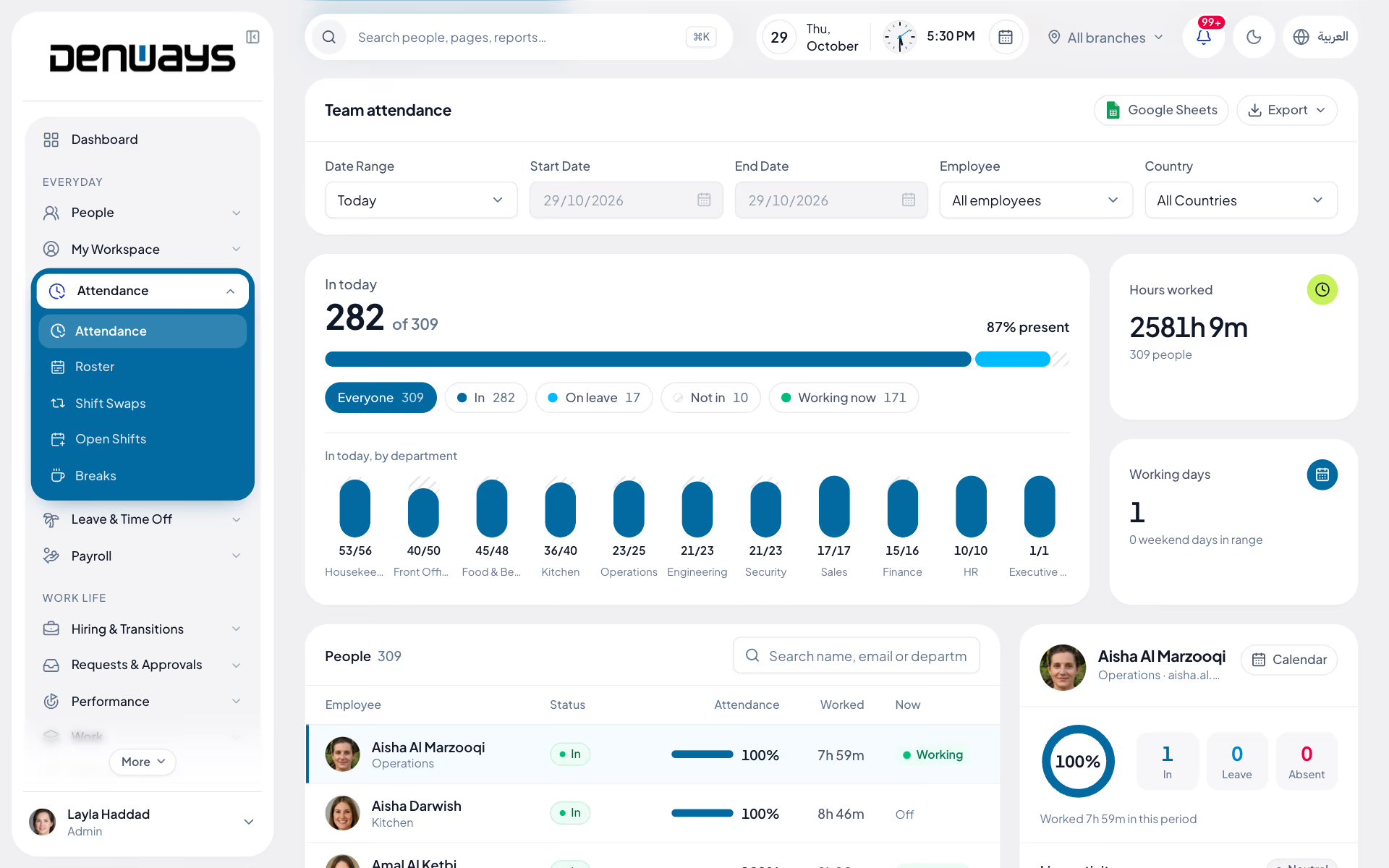
Everything the time office touches, in one module
- Geofencing
- Selfie Verification
- Biometric Terminals
- Shift Patterns
- Break Tracking
- Regularization
- Overtime Rules
- Holiday Calendar
- Live Today View
- Device Health
- Bulk CSV Import
- On-Prem Connector
Twenty seconds inside Attendance.
The Attendance screen is the one an HR admin opens in the morning, recorded from the product itself rather than drawn for the website.
Recorded in the product. Denways Hotels and its staff are demo data.
Check in from the site, not the office
Field crews, drivers and remote staff clock in where the work happens, and you can see where that was.
- Check-in and check-out from web, mobile or a biometric device
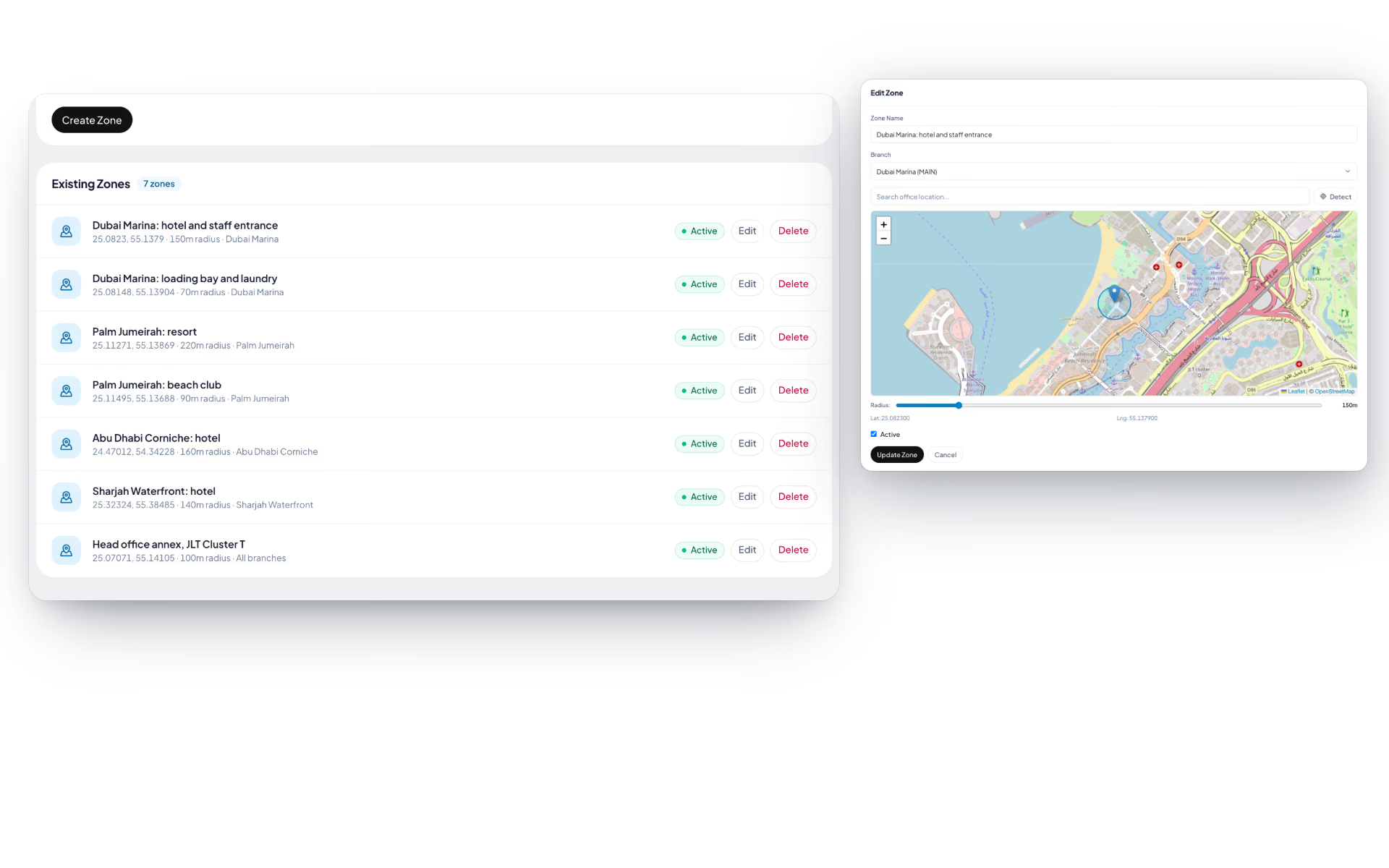
- Geo-zones defined per site, with attendance checked against location
- Geo-tagged selfie capture, with an admin map view of the whole team
- A live today view alongside the full historical calendar
Shifts, breaks and overtime that match your policy
Configure the patterns once and every punch is measured against the right shift, with overtime calculated the way your contracts define it.
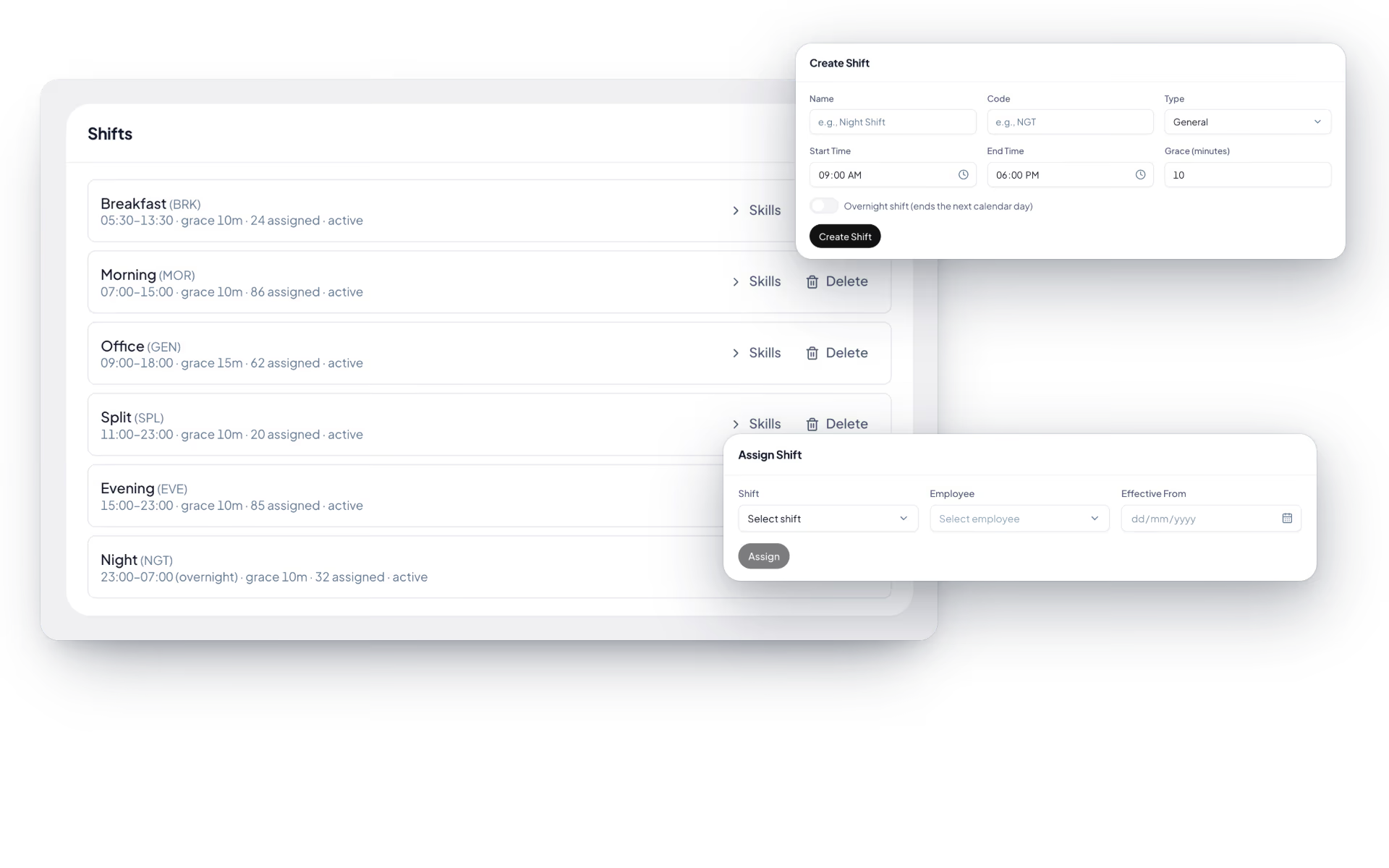
- Configurable shift patterns with per-employee assignment
- Shift allowance rules applied automatically
- Start and stop break tracking, with full history
- Overtime rules that feed straight into the payroll run
Corrections that follow the approval chain
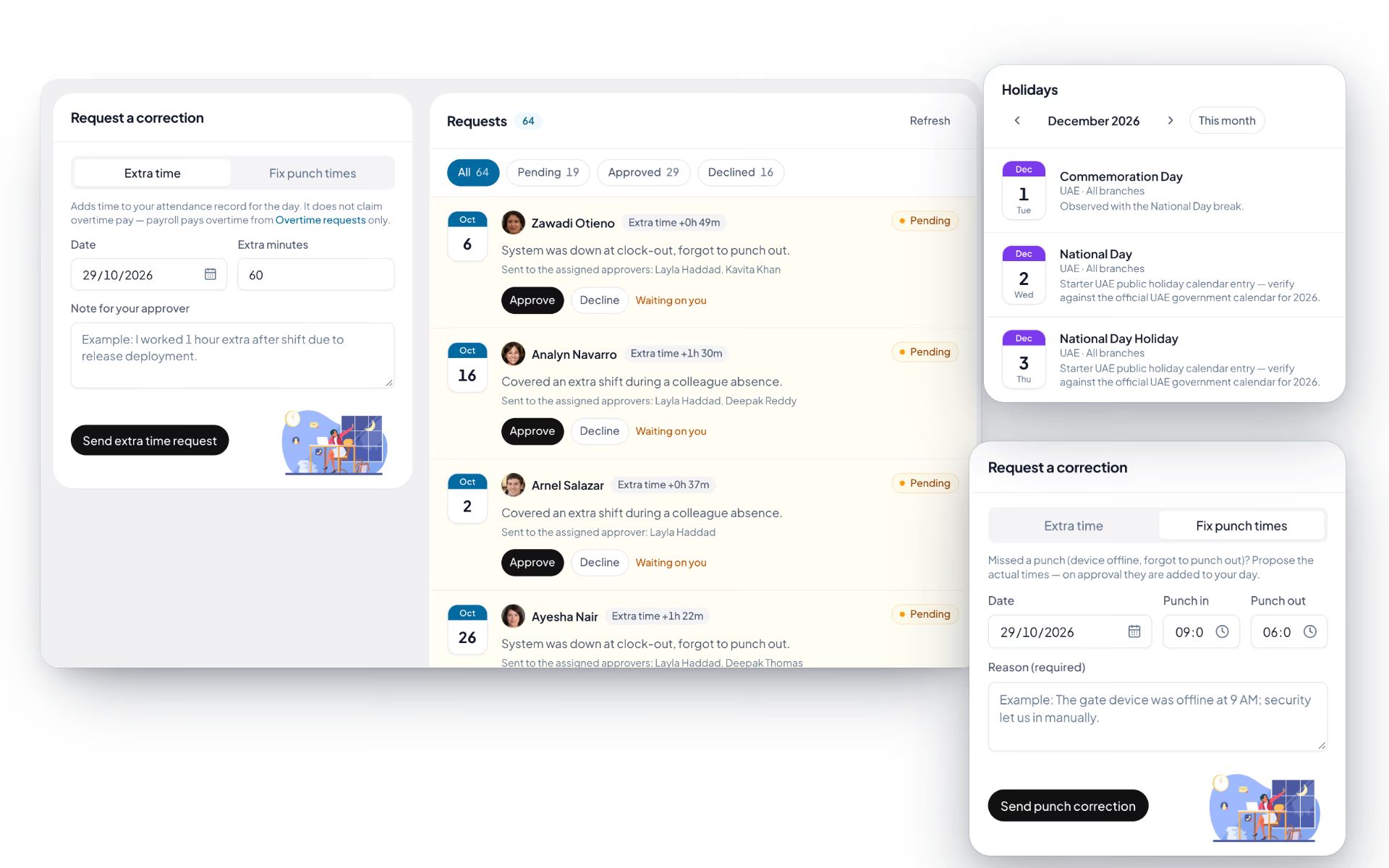
A missed punch is a normal event, not a crisis. Employees raise the correction and it moves through the same approval chain as everything else.
- Regularization requests raised by the employee
- Approve, reject or forward through the approval chain
- Organization-wide holiday calendar feeding attendance and payroll
- Every change recorded against the attendance record
Biometric hardware, connected properly
Fingerprint and face terminals talk to DenwaysHR directly, including devices sitting on a local network with no route to the internet.
- Direct fingerprint and face terminal integration
- Punches flow automatically into attendance and payroll
- Device health monitoring so a dead terminal is never a surprise
- CSV import for bulk history, plus an on-prem connector agent
Attendance, screen by screen.
The product itself, on a demo company's data. Nothing here is drawn for the website.
One day, fully accounted for.
A site engineer's Thursday, exactly as the system recorded it. Select any point on the timeline to see what was captured.
Omar Haddad
Site Engineer · Jebel Ali Yard
07:52
Checked in
PhoneInside the Jebel Ali Yard geo-zone, with a geo-tagged selfie captured and verified. Eight minutes ahead of the 08:00 shift start.
Scheduled shift
08:00 – 17:30
Worked
10h 22m
Break
22m
Overtime
1h 06m
The overtime figure above is already on its way to the next payroll run.
Three ways to clock in. One record.
An office team, a site crew and a driver can each check in the way that suits them, and it all lands in the same attendance record.
Mobile app
- GPS check-in with geo-tagged selfie
- Needs signal at the moment of the punch
- Until it ships, the web app does GPS check-in in a phone browser
Biometric terminal
- Fingerprint and face recognition
- Device health monitoring
- On-prem connector for local networks
Web app
- One-click check-in and breaks
- Live today view for managers
- Full historical attendance calendar
Whichever way the punch arrives, the same shift rules, overtime calculation and approval chain apply, and the result flows into the next payroll run.
The full list
What does the Attendance module include?
56 features across 9 parts of the product, each one built into the application. Where one depends on a plan, a setting or a release, the note under its module says so.
Daily attendance
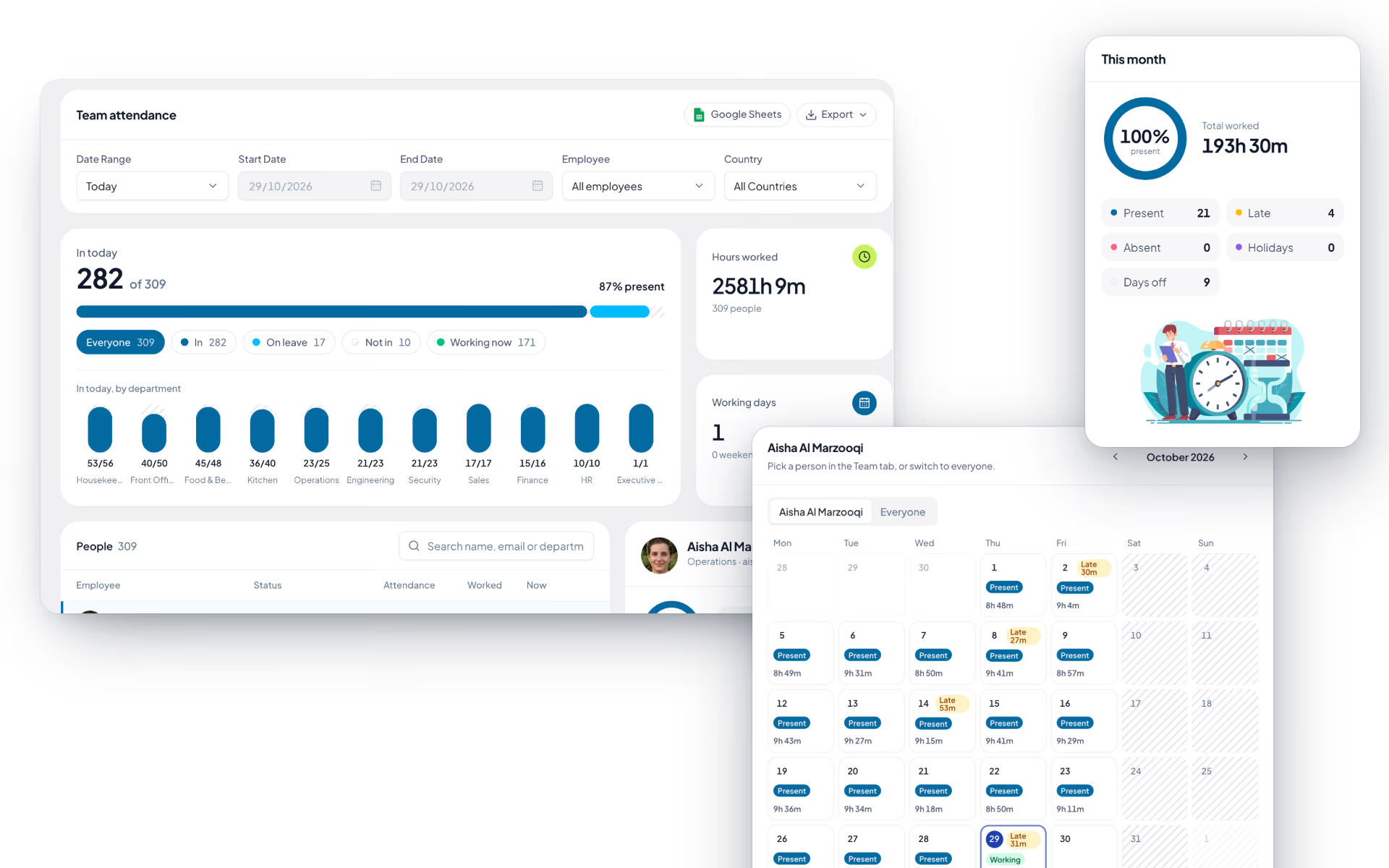
The page everyone opens in the morning: punch in, see how much of the shift is left, and for managers, see who is working right now.
- Punch in, out and in again
- One button. Step out at noon and come back and the day holds both pairs; worked time is the sum. Punching in also starts the work timer.
- Today card
- First in, last out, worked, remaining, break total and approved extra time, with a progress bar against the shift and a badge showing how many minutes late.
- Where the expected hours come from
- In order: the published roster for that date, the person's shift, their own expected start time, the branch, then the organization. Out of the box that is a 09:00 start, late after 10:30 and an eight-hour day.
- Night shifts land on the right day
- A punch after midnight belongs to the shift that started the evening before. Lateness is judged in the employee's own timezone.
- Leave is respected
- Punch-in is disabled on an approved full day of leave. Half a day of leave halves the target instead.
- Forgotten punch-outs close themselves
- A punch left open from an earlier day is closed at the end of that day the next time the person punches in.
- Team view
- For managers: people in view, who is working now, working days and average attendance, then a table of present days, leave, attendance rate and hours per person. It refreshes every 30 seconds.
- Month calendar
- Each day coloured as present, checked in, on leave, half day, holiday or absent, with a late flag and hours worked. Managers switch between one person and everyone.
- CSV export
- Name, email, department, present, leave and absent days, working days, attendance rate, hours, first check-in and last check-out, with a totals row.
- Five ways a punch arrives
- The web page, the work timer, the desktop app, a phone, or a biometric terminal. They all write to the same day.
Selfie and GPS check-in
For crews who start the day on a site, not at a desk: a face and a location, once a day, before the clock starts.
Geofencing and the selfie map start on the Advance Tracking plan, one up from Basic Tracking.
- One selfie a day
- On a phone, the timer will not start until today's selfie is taken. Front camera, retake if needed, save.
- Location attached
- Latitude, longitude and GPS accuracy are stored with the photo when the phone provides them.
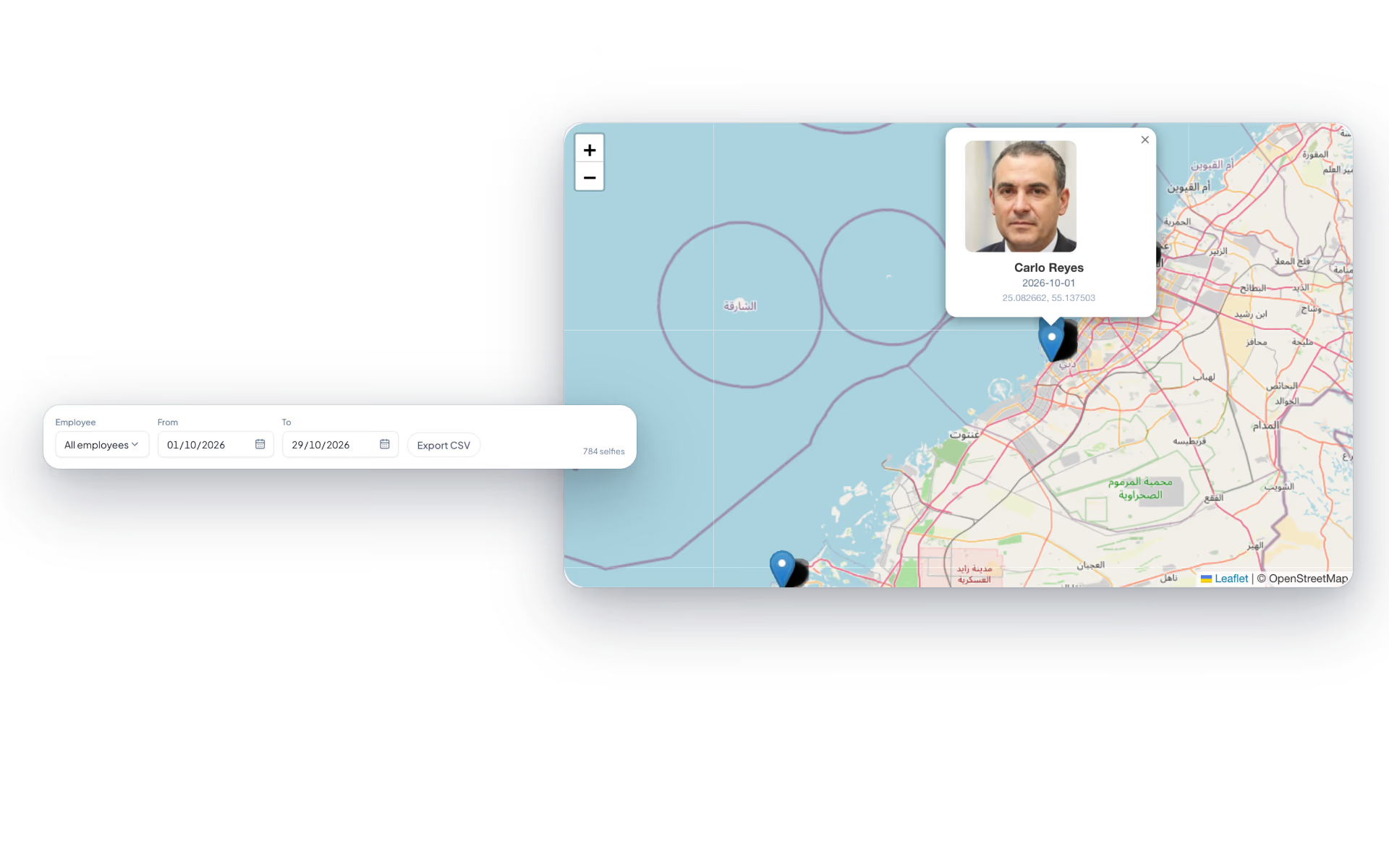
- Selfie map
- Managers see a map with a marker for every check-in, filtered by employee and date range. Click a marker to open the photo.
- Selfie list and export
- A grid of thumbnails with name, date and coordinates, and a CSV with accuracy and time for each one.
- Private by construction
- Photos sit in private storage and open only through links that expire after 30 minutes. There is no public address to guess.
Geofence zones
A circle on a map around each place people are allowed to start work from.
Geofenced attendance needs the Advance Tracking plan or one above it.
- Draw a zone
- Name it, pick the centre on a map and set the radius, from 10 metres up to 10 kilometres. The default is 100 metres.
- Per branch or company-wide
- A branch with its own zones uses only those. Everyone else falls back to the organization's.
- Checked when work starts
- Starting the timer from a phone needs a location inside one of the person's zones. Outside it, the start is refused with a plain message.
- Leaves the zone, stops the clock
- The mobile timer stops itself when the person walks out of the allowed zone.
- Work-from-home days are exempt
- An approved work-from-home day switches the fence off for that person for that day.
Time corrections
What other systems call regularization: the employee says what really happened, and somebody with authority agrees or does not.
- Fix punch times
- Pick the date, give the real punch in and out, and say why. On approval the punch is added to the day.
- Extra time
- Add between 1 and 600 minutes to a day's record with a note. It corrects the record; it is not a claim for overtime pay.
- Guard rails
- One pending request per date. No extra time on a holiday or a full day of leave. Nothing at all once that month's payroll is locked.
- Approve, decline or forward
- The reviewer can pass the request to someone else with a note. Each request shows where it is waiting.
- Runs on the approval engine
- So it can follow a multi-stage chain if you have set one up.
Holiday calendar
The days nobody is expected in, by country and by branch.
- Holiday details
- Date, name, country and, where you have more than one branch, either all branches or one.
- The right people see it
- An employee sees a holiday only if it matches their country and branch.
- Feeds everything else
- Holidays show on the attendance calendar, do not count as leave days, earn a day in lieu when worked, and block extra-time requests.
- Branch managers stay in their lane
- A manager limited to certain branches can add holidays for those branches, not for the whole company.
Break tracking
Start a break, end a break, and the day's total takes care of itself.
- Start and end
- A live elapsed timer with an optional reason. One break at a time.
- The work timer pauses
- Starting a break stops the running timer, so break time is never counted as work.
- Today and history
- Each break with its start, end, reason and length, a total for today, and history by date.
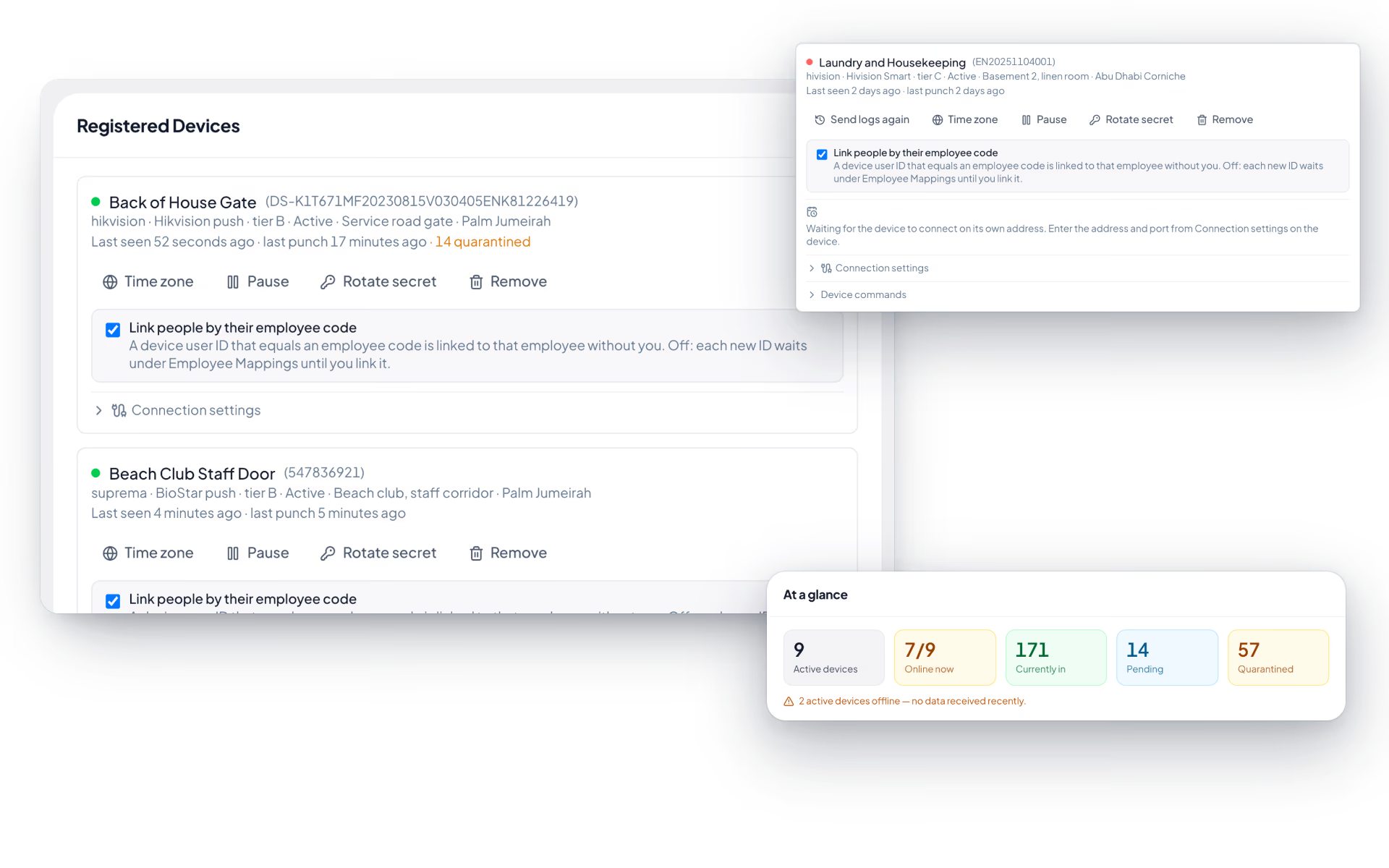
Biometric devices
Fingerprint and face terminals at the door, registered once, with every punch landing in the same attendance day as a phone check-in.
- Vendors and protocols
- ZKTeco and eSSL push (ADMS), Hikvision push, HiVision Smart, a generic JSON webhook for anything else, and an on-site agent for older devices that cannot reach the internet.
- Register a device
- Name, serial number, vendor, protocol, timezone, location and branch. The device secret is shown once.
- At a glance
- Active devices, how many are online, who is currently in, and how many punches are pending or held back.
- Locked to its network address
- A push device is tied to the address of its first connection. A connection from anywhere else is refused until an admin approves it.
- Employee mapping
- Punches match on their own when the device user ID equals the employee code. Anything unmatched is listed with its punch count and a Map button.
- Sync employees to the terminal
- For ZKTeco push devices, send employee codes and names to the device from the browser.
- Quarantine
- Punches from an unknown user, a former employee or a payroll-locked month are held, never applied quietly. Fix the cause and reprocess them.
- CSV import
- Up to 10,000 rows of employee code and time. Preview shows valid, invalid and unmapped rows before you import, and loading the same file twice does no harm.
- Health checks
- Every 15 minutes. A device silent for more than an hour is flagged and the admins are told once.
- Duplicate taps ignored
- Two taps within 60 seconds count as one.
- On-site connector
- A small program on a PC in your office polls older ZKTeco and eSSL devices and forwards punches over outbound HTTPS. No inbound ports, no VPN, and punches are kept on disk through an outage.
- No templates stored
- Fingerprint and face templates stay on the device. We store who punched and when.
Attendance warning ladder
Rules that turn a pattern of lateness or no-shows into a drafted warning, so HR is not counting days by hand.
- Write a rule
- Count late arrivals or unmarked absences, set a threshold and a rolling window in days, and choose the warning it produces. Three lates in thirty days is the starting suggestion.
- Draft or issue
- By default the warning is drafted for HR to review. Tick a box and it is issued without the draft step.
- Runs every morning
- A scan at 07:30, plus a Scan now button that reports what it drafted or issued.
- Never written up twice
- The days behind a warning are recorded, so the same days cannot trigger the same rule again.
- Half-day leave is not lateness
- Arriving late on a day with approved half-day leave does not count.
- Detection ledger
- Who was flagged, the count, the window, the rule and the status of the warning it produced.
Overtime requests
Overtime that is agreed before it reaches a payslip. Payroll pays overtime from approved requests and nothing else.
- Request it
- Date, from, to and why. Hours are worked out for you. One stretch cannot pass 12 hours, and the date can be up to a week back.
- Straight from the dashboard
- Work past your shift and a button offers to request the extra, with the measured stretch already filled in.
- Pay rule
- Admins set the rate multiplier, from 1 to 3 times, and an optional monthly cap in hours. The UAE starting point is 1.25.
- Into the payroll run
- Approved hours flow into the month's run, and the request later shows which month it was paid in.
- No double counting
- A day that already earned a day in lieu cannot also be claimed as overtime.
- Thresholds in hours
- On the approval engine, so long stretches can need a second approver.
Questions
Attendance questions, answered.
How does geofencing work?
You define a geo-zone for each site, and attendance can be checked against the employee's location at the moment they punch. Field and remote teams also capture a geo-tagged selfie at check-in, and administrators get a map view showing where the whole team checked in from.
Can we keep using our existing biometric terminals?
Yes. Fingerprint and face terminals connect directly, and punches flow automatically into attendance and payroll. Device health monitoring tells you when a terminal stops reporting, and an on-prem connector agent handles devices that sit on a local network. Historical data can be brought across with a bulk CSV import.
What happens when someone forgets to punch?
The employee raises a regularization request against the affected day. It moves through the same approval chain as everything else, so a manager or administrator can approve, reject or forward it, and the correction is recorded against the attendance record.
How are shifts and overtime handled?
Shift patterns are configurable and assigned per employee, with shift allowance rules applied automatically. Overtime is calculated by rules you configure, so the hours that reach payroll already reflect your contracts rather than a manual spreadsheet at month end.
Does attendance connect to leave and payroll?
Yes, because attendance, leave and payroll are one system. The organization-wide holiday calendar feeds attendance and payroll, approved leave shows against the calendar, and worked hours and overtime flow into the monthly payroll run without an export step.
What can employees see themselves?
Every employee gets their own attendance history, break records, leave balances and pending requests through self-service on web and mobile, so routine questions never reach the HR inbox.
Keep reading
Guides
Bring your whole workforce onto one platform.
See how DenwaysHR handles HR, attendance and leave across the GCC, and payroll with the WPS file in the UAE.

