

HR helpdesk software: Every HR request
in one queue, with SLA targets.
Employees raise a request instead of messaging HR privately: categories, SLA targets, assignment and escalation, a template library for the letters people ask for, and a knowledge base for the repeats.
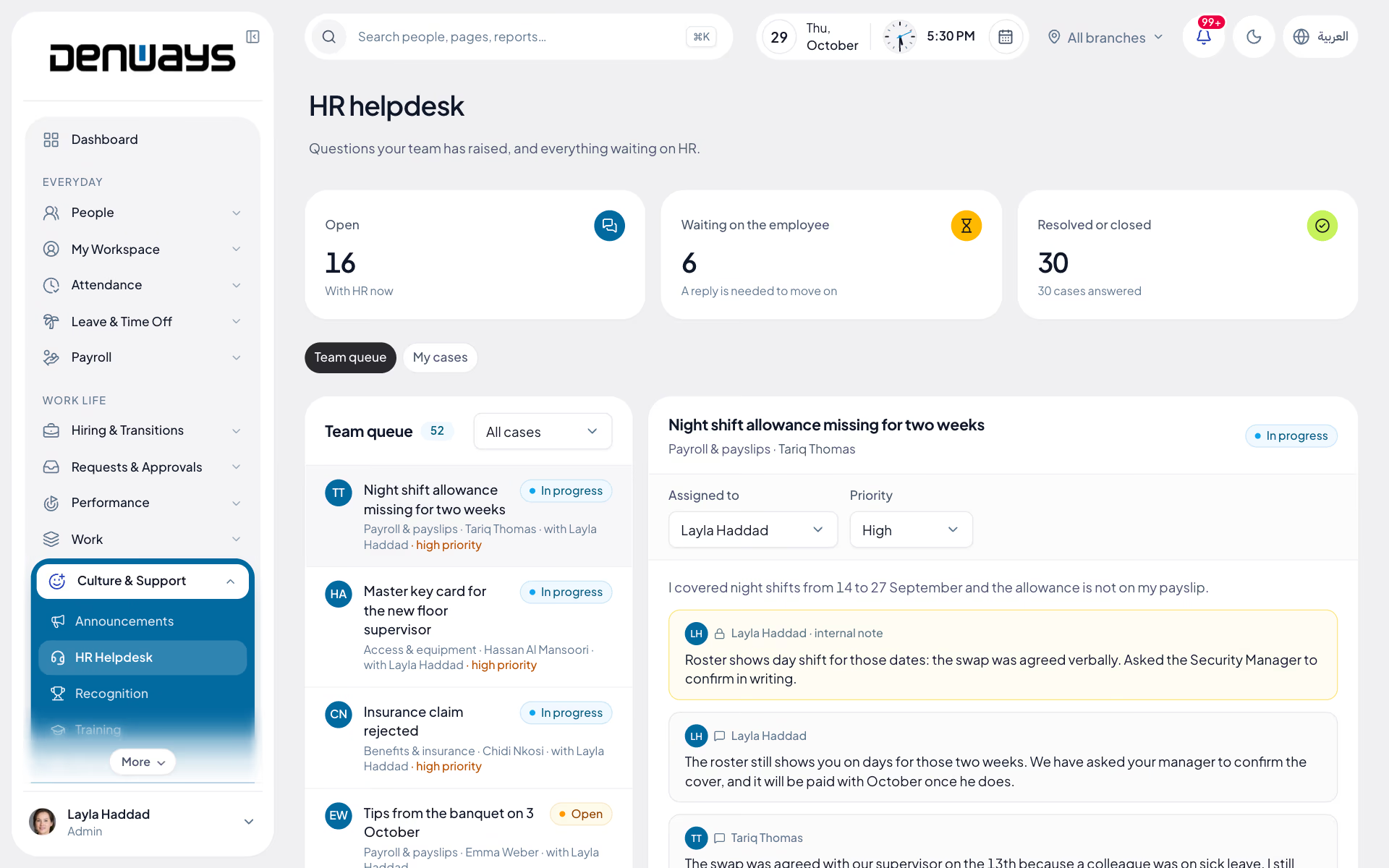
Requests, letters and cases with a due date
- Request Categories
- SLA Targets
- Assignment Rules
- Escalation
- Letter Templates
- Confidential Cases
- Knowledge Base
- Case History
Helpdesk
Helpdesk, in 3 parts.
3 parts. Swipe across.Keep scrolling.
A request, not a message on somebody's phone
HR work that arrives as a private message has no queue, no owner and no record. A raised request has all three from the moment it is submitted.
- Categories for letters, payroll queries and complaints
- One owner assigned per case
- SLA target attached to the category
- Status visible to the employee who raised it

The letters Gulf employees ask for constantly
Salary certificates, NOC letters and visa letters make up a large share of every HR inbox in the region. A template library turns each one into a generated document rather than a retyped page.
- Templates for salary certificates and NOC letters
- Visa and employment letters from the same library
- Employee data filled in from the record
- Issued letter filed against the employee

Grievances handled apart from everything else
A complaint about a manager cannot sit in the same queue that manager can read. Confidential categories restrict handling to the people you nominate.
- Private handling for grievance cases
- Restricted visibility by role
- Escalation when an SLA target is missed
- Knowledge base answering the repeat questions

Helpdesk, screen by screen.
The product itself, on a demo company's data. Nothing here is drawn for the website.
Same questions. Fewer times.
Most of an HR inbox is four or five questions arriving again and again from different people.
The employee
- Raise a request from web or mobile
- See where it stands without chasing
- Find the answer in the knowledge base first
The HR team
- One queue with owners and due dates
- Letters generated from templates
- Escalation when a target slips
- Full history on the employee record
The HR head
- Volume by category over time
- Where SLA targets are being missed
- Grievances visible only to the nominated few
The full list
What does the Helpdesk module include?
27 features across 4 parts of the product, each one built into the application. Where one depends on a plan, a setting or a release, the note under its module says so.
HR helpdesk
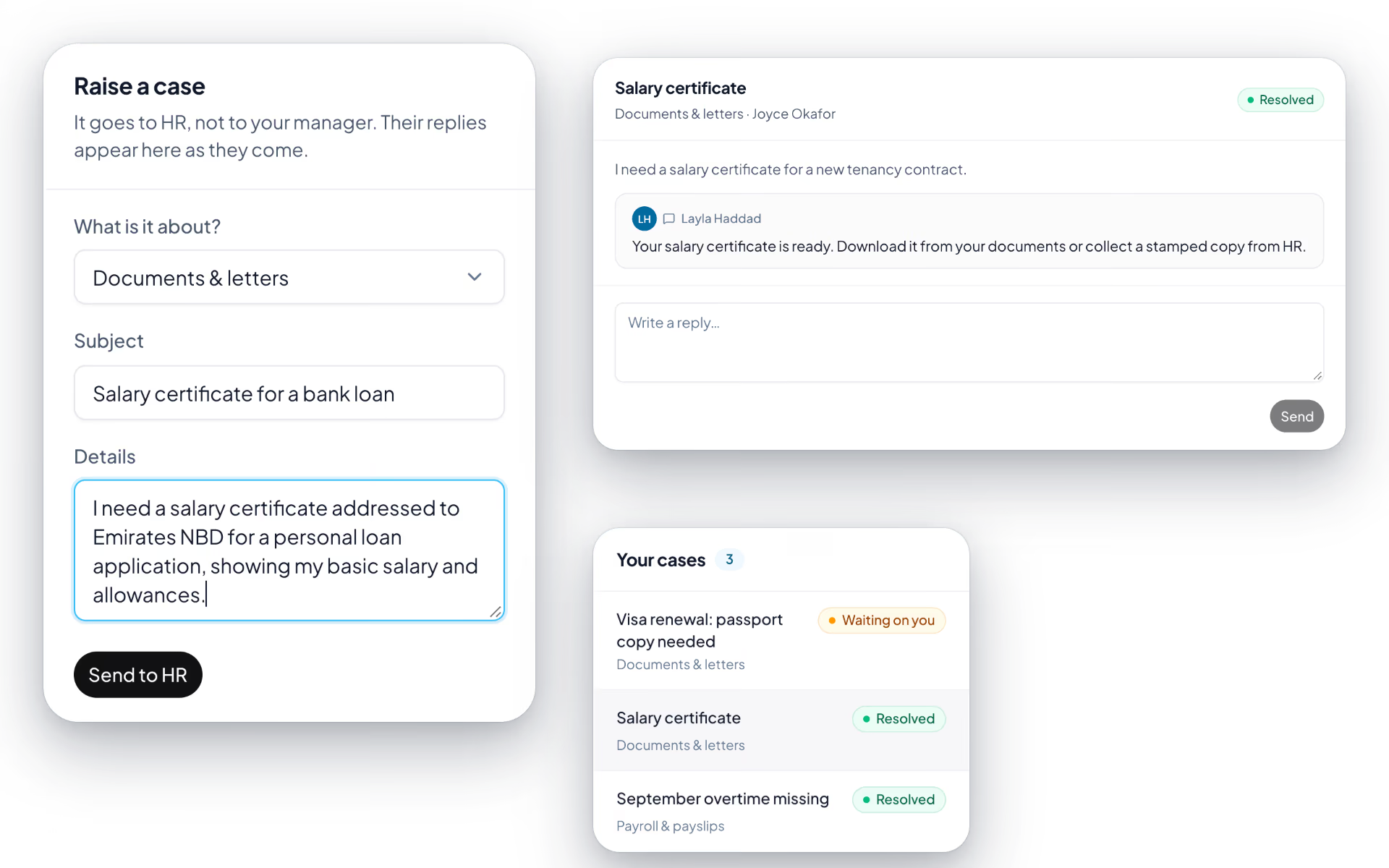
A question to HR as a case with a thread, not a message on somebody's phone.
- Raise a case
- Choose what it is about, give it a subject and the details, and send it to HR.
- Six categories
- Payroll and payslips, leave and attendance, benefits and insurance, documents and letters, access and equipment, and something else.
- Response targets
- 24 hours for payroll, leave and access, 48 for the rest. The target is fixed on the case when it is raised, and a case past it is tagged overdue in the queue.
- Statuses that move themselves
- HR's first reply moves a case to waiting on the employee. The employee's reply moves it back to in progress.
- Internal notes
- An agent can add a note the employee never sees. It does not count as a response.
- Confidential from the line manager
- Cases go to HR. A manager cannot see their team's cases, and an employee sees only their own.
- Team queue and my cases
- Cases still with HR come first, and three tiles count open, waiting and resolved.
Letter requests
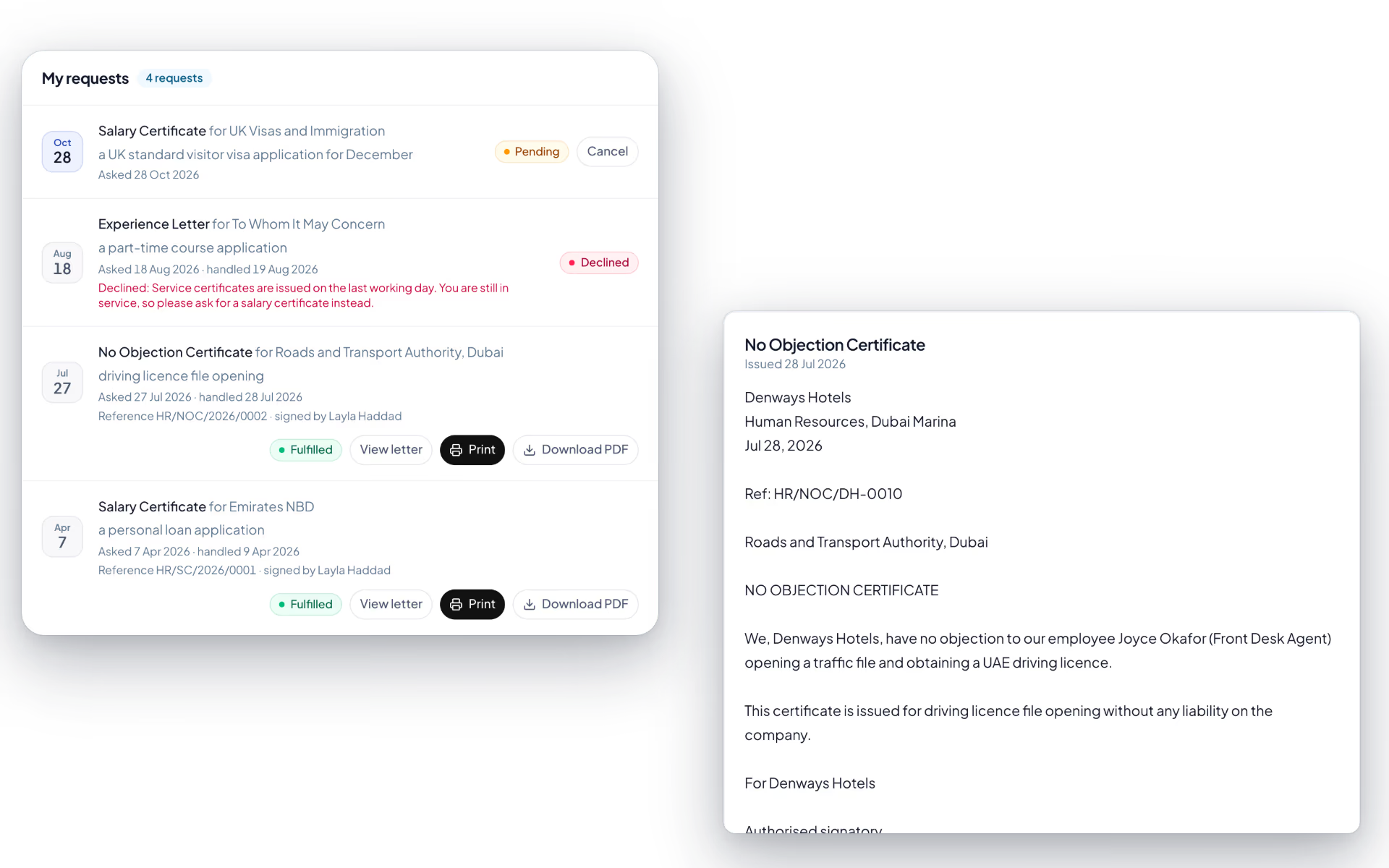
The salary certificate the bank wants, requested in a minute and issued by HR in one step.
- Three letters on request
- Salary certificate, no objection certificate and experience letter.
- Addressed properly
- Say who it is addressed to and what it is for, and both are merged into the wording.
- Preview, issue or decline
- HR previews the letter exactly as it will read, issues it in one click, or declines with a reason the employee sees.
- View and print
- The employee opens the issued letter and prints it from a clean print layout.
- Issued to you
- Letters HR issued without a request, such as a confirmation or appointment letter, sit in the same place.
- Notifications
- HR hears about a new request. The employee hears when the letter is ready or declined.
HR letters
Seven standard letters, filled from the employee record, with a signing link when acknowledgement matters.
- Seven types
- Offer, appointment, confirmation, salary certificate, no objection certificate, experience and relieving letters.
- Filled from the record
- Name, employee code, designation, department, joining date, manager and annual pay come from the record.
- Issue for signature
- Issuing produces a one-time signing link, valid for 30 days. Reissue replaces it and void kills it.
- Status per letter
- Draft, issued, accepted, declined or void, with the name the signer typed.
- Pay stays restricted
- Letters that carry pay are withheld from anyone without payroll rights.
- Written by other modules too
- Confirming probation, hiring a candidate and sending a contract each create their letter in the same list.
Speak up
An anonymous channel built so that anonymity is a property of the database, not a promise.
- Raise a concern
- Seven categories: harassment or bullying, discrimination, health and safety, fraud or financial misconduct, policy or legal breach, retaliation, and something else.
- No reporter on the record
- The report has no field for who sent it, and submitting one is not written to the audit log.
- Access key
- The reporter gets a key, shown once. Only a hash is stored, so nobody can recover it or trace the report back.
- Dates, never times
- Handlers see the date only, and their alert goes out after a random delay of one to six hours.
- Two-way thread
- The reporter comes back with the key to read replies and add more. Handlers appear as "Handler", the reporter as "Reporter".
- Outcome
- Received, being looked into, resolved or closed without action, with an outcome note the reporter can read.
- Choose the handlers
- Every admin by default, or up to twenty named people who need not be admins.
- Honest about its limits
- The page states the one thing it cannot hide: ordinary web server logs outside the application.
What do employees raise here?
Salary certificates, NOC letters, visa and employment letters, payslip and payroll queries, document requests and complaints. You define the categories, and each one carries its own SLA target and assignment rule.
How do letter templates work?
You hold a template per letter type and the employee's details are filled from their record rather than retyped. The issued letter is filed against that employee, so the next request for the same document starts from what was sent last time.
Are grievances kept confidential?
Yes. Confidential categories restrict handling to the roles you nominate, so a complaint does not land in a queue the subject of it can read. Visibility follows the same role-based access used across the platform.
What happens when a request is not answered in time?
The SLA target on the category makes the case overdue, and escalation raises it to the next person in the chain. Escalation and delegation come from the same approvals engine the rest of the platform uses.
Does the knowledge base reduce the queue?
The knowledge base is there for the questions that repeat: leave policy, payslip components, how to request a letter. Employees see the answer while they are raising the request, which is where a self-service article deflects a ticket.
Keep reading
Bring your whole workforce onto one platform.
See how DenwaysHR handles HR, attendance and leave across the GCC, and payroll with the WPS file in the UAE.

