

HR approval workflow software: One approvals inbox
instead of six chases.
Multi-step and conditional routing, delegation while an approver is on leave, escalation on timeout, and a full audit trail of who approved what and when across every module.
One approval engine behind every module
- Multi-Step Routing
- Conditional Rules
- Parallel Approvers
- Sequential Approvers
- Delegation
- Timeout Escalation
- Approvals Inbox
- Audit Trail
Workflows
Workflows, in 3 parts.
3 parts. Swipe across.Keep scrolling.
The same engine behind every request
Leave, expenses, attendance regularization, letters, salary changes and asset requests all need approving. They run through one engine, so a rule written once applies wherever it is relevant.
- Leave, expenses and regularization
- Letters, salary changes and asset requests
- Rules defined once, used across modules
- Consistent behaviour on web and mobile

Routing that reflects how you sign things off
Some approvals go up a line, some need two people at once, and some depend on the amount or the department. Steps can be sequential, parallel or conditional on what is in the request.
- Multi-step chains up the reporting line
- Parallel approvers when two must agree
- Sequential steps when order matters
- Conditional routing on amount, type or department

Nothing waits on one person's calendar
The usual cause of a stalled request is an approver on leave. Delegation hands their authority over for the period, and escalation moves a request on when it times out.
- Delegation while an approver is away
- Escalation after a configured timeout
- One approvals inbox on web and mobile
- Actor, decision and timestamp on the audit trail

Workflows, screen by screen.
The product itself, on a demo company's data. Nothing here is drawn for the website.
One engine. Every module.
Approval rules written separately in six modules become six different behaviours nobody can explain.
The rule
- Steps in sequence or in parallel
- Conditions on amount, type or department
- Written once, applied across modules
The approver
- One inbox for everything awaiting them
- Approve or reject from a phone
- Delegate the queue before going on leave
- Escalation if nothing happens in time
The auditor
- Who approved what and when
- The rule the request followed
- The same trail across every module
The full list
What does the Workflows module include?
25 features across 5 parts of the product, each one built into the application. Where one depends on a plan, a setting or a release, the note under its module says so.
Approval engine
One engine behind thirteen kinds of request, so an approval works the same way whether it is a day off or a payroll run.
- Thirteen request types
- Leave, time edits, resignations, expense claims, travel, overtime, work from home, weekly timesheets, salary revisions, comp-off, bank detail changes, loans and advances, and payroll run sign-off.
- Sensible default
- With no rule set, a request goes to the reporting manager, then the nearest superiors, then the admins.
- No self-approval
- Nobody approves their own request. People who have left are dropped from reviewer lists.
- In-flight requests finish as they started
- Changing a rule does not reroute requests already on their way.
- Admins as backstop
- Admins always keep review authority, so a request cannot get stuck behind a missing approver.
Routing rules
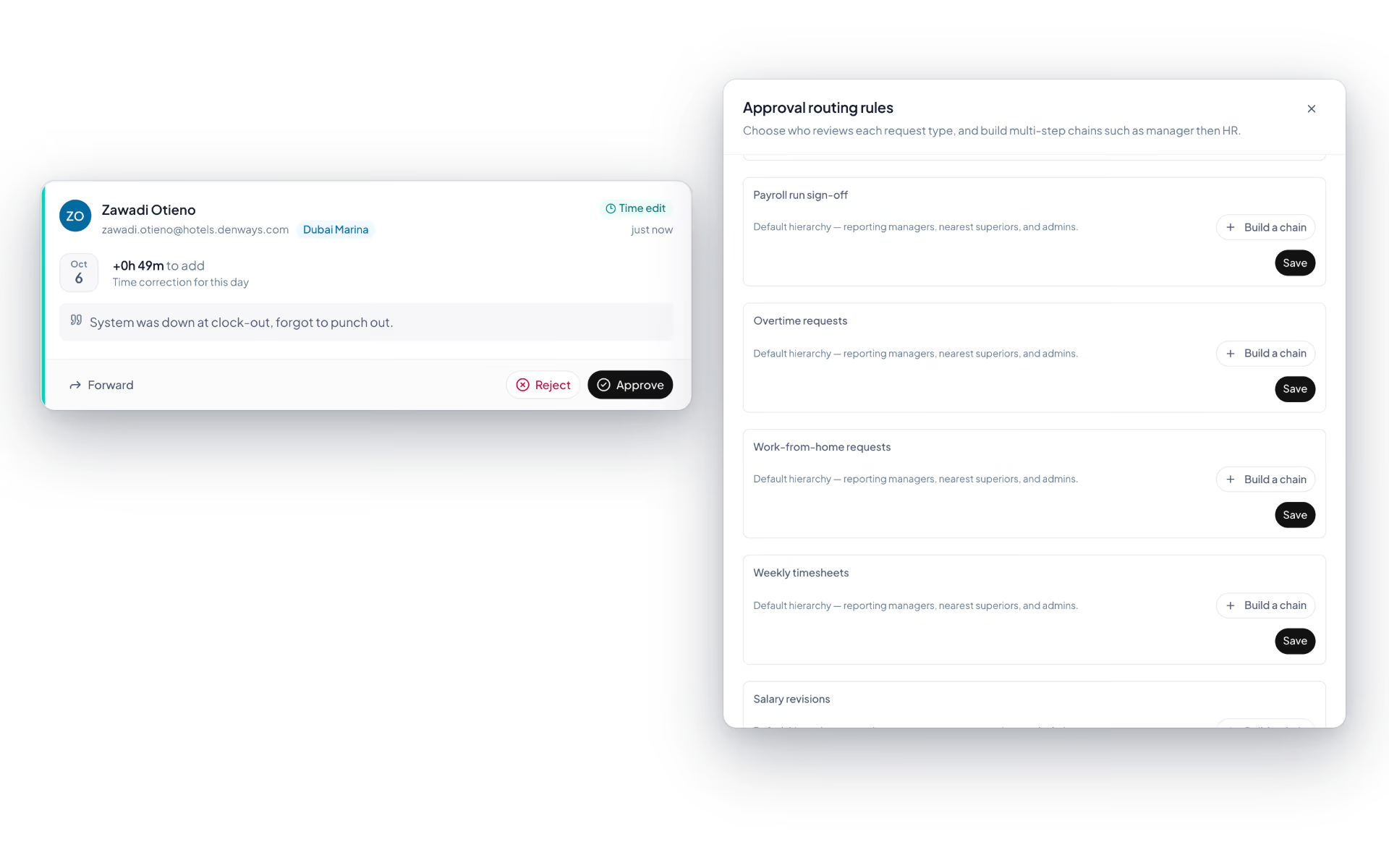
Build the chain your company signs things off with, one request type at a time.
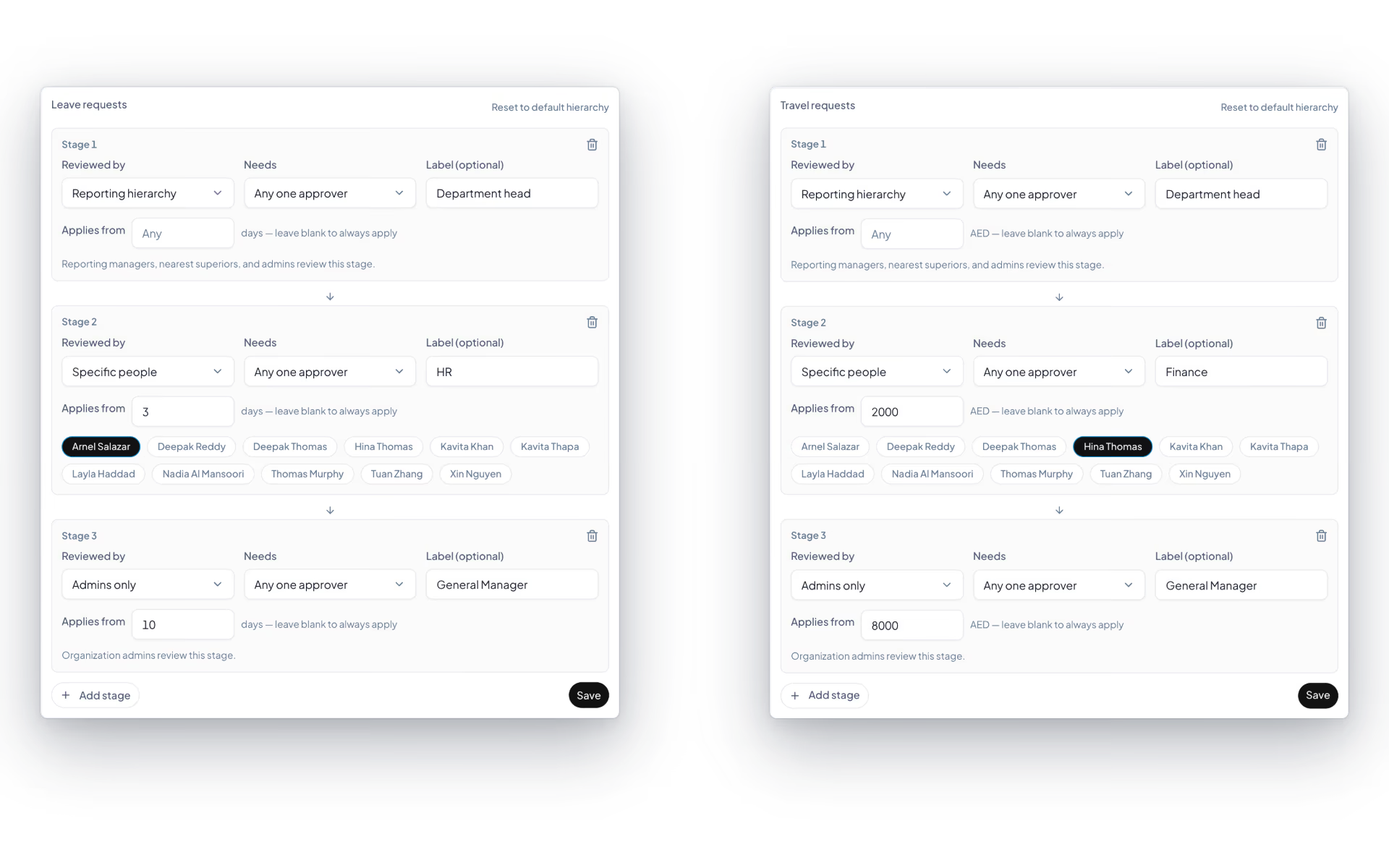
- Up to five stages
- In order, each with an optional label such as HR or Finance.
- Who reviews
- The reporting hierarchy, the employee's manager, admins only, or specific named people.
- How many must agree
- Any one approver, every approver, or a set number.
- Applies from
- A stage can kick in only above a threshold: days for leave, hours for overtime and timesheets, money for expenses, travel, loans and salary revisions. Below it, the stage is skipped.
- Password to change
- Saving a rule can require the admin's password again, and every change is on the audit log.
- Stage shown to reviewers
- A request reads "Stage 2 of 3" or "Waiting on another approver", so nobody wonders why it has not moved.
Out-of-office cover
Going on leave should not freeze your team's requests. Name a stand-in and a date.
- Delegate to a manager or admin
- With an optional end date and reason. Leave the date blank and it runs until you revoke it.
- Branch access is checked
- The stand-in must be able to see every branch you cover.
- No chains
- A delegate cannot delegate onward, and cannot act on their own request.
- Visible both ways
- A status line shows who you are covering for and who is covering for you.
Approval inbox
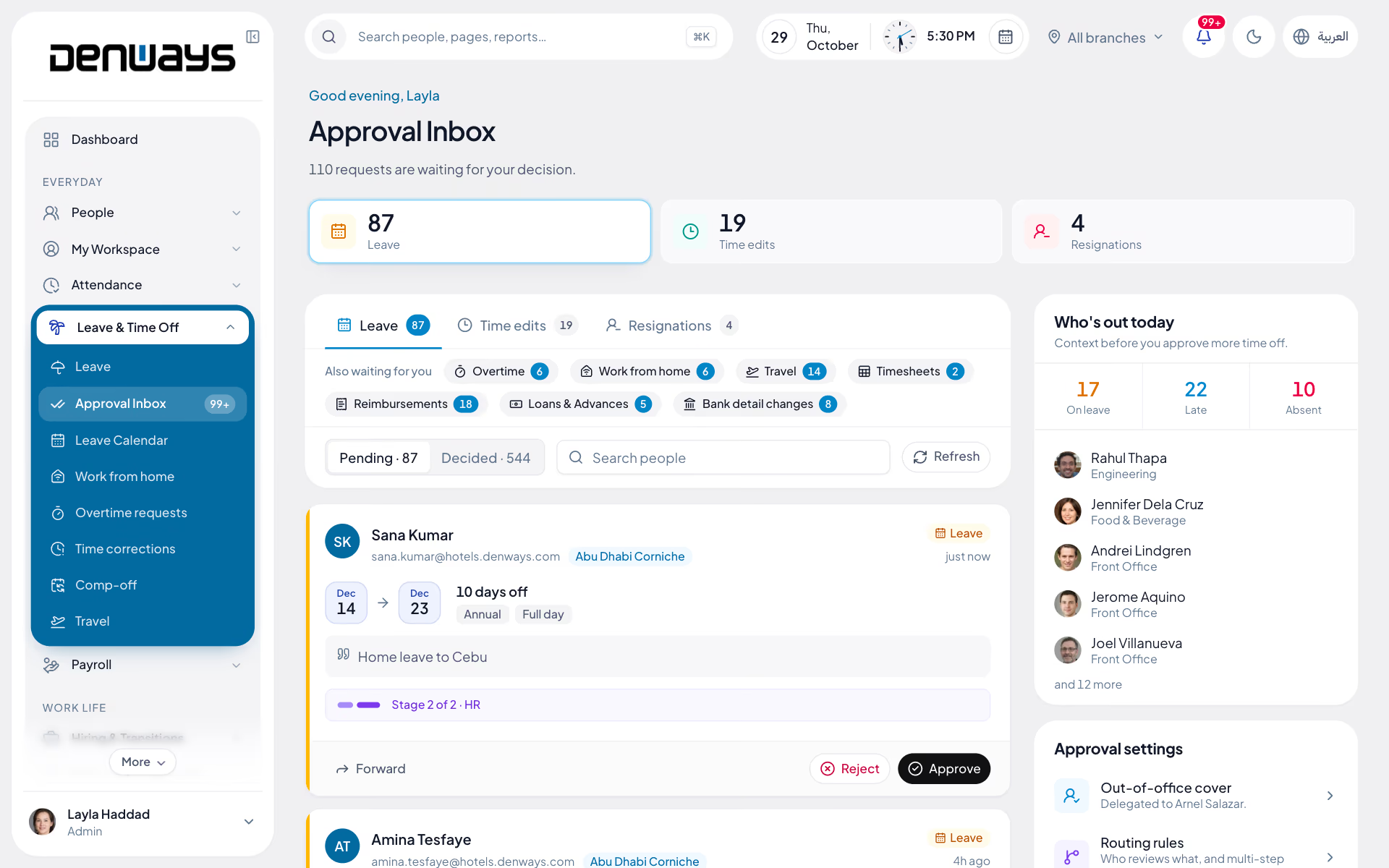
A review queue for leave, time corrections and resignations, with enough context beside each request to decide it properly.
- Pending and decided
- Tabs per request type with counts, search by name, email or branch, and a decided list showing who decided and when.
- Everything on the card
- Dates, category, reason, stage, the medical certificate if there is one, and Approve, Reject and Forward.
- Leave insights
- Pick a window of today, 2, 5 or 7 days, or custom dates, and see leave days, people on leave, who is out today and the busiest department, with a chart of people on leave per day.
- Who is out today
- On leave, late and absent counts beside the queue, so you know the cost of saying yes.
- Counts in the sidebar
- Pending leave, time corrections and resignations are counted in the navigation as they arrive.
- Other requests, their own pages
- Overtime, work from home, comp-off, timesheets, travel and expenses each have a review queue on their own page, and Team overview totals them all.
Team overview
A manager's morning page: who is in, what is waiting on you and what needs attention this week.
- Today
- Everyone in your team marked in, remote, on leave or not in yet.
- Waiting for a decision
- Counts with links for leave, time edits, travel, overtime, work from home, timesheets, comp-off, air tickets and letters.
- Out this week
- Who is on leave or remote over the next six days.
- Needs attention
- Probation decisions due within 30 days, one-to-ones overdue, documents expiring within 60 days, open exit handovers and work anniversaries coming up.
Which requests run through this engine?
Leave, expense claims, attendance regularization, letter requests, salary changes and asset requests. Using one engine means an approver has a single inbox rather than checking six modules for things waiting on them.
Can an approval depend on the amount?
Yes. Conditional routing can branch on the amount, the request type, the department or the branch, so a small expense claim takes a shorter chain than a large one and a salary change routes differently from a leave request.
What is the difference between parallel and sequential approvers?
Sequential steps run in order, so the second approver only sees the request once the first has acted. Parallel steps go to several approvers at the same time, which suits cases where two departments must both agree but neither needs to wait for the other.
What happens when an approver goes on leave?
An approver's authority can be delegated for the period, so pending and incoming requests go to the person covering for them. If nothing is delegated and a request sits past its timeout, escalation moves it to the next approver in the chain.
How do we prove who approved something a year later?
The audit trail records the actor, the decision, the request and the timestamp, and the same trail runs across every module. That turns a dispute about an old approval into a lookup rather than an investigation.
Keep reading
Bring your whole workforce onto one platform.
See how DenwaysHR handles HR, attendance and leave across the GCC, and payroll with the WPS file in the UAE.

