

HRMS support and customer success: Help on the days
the payroll calendar is tight.
In-product tickets, email and a help centre covered across the Gulf working week, with priority tiers, a defined escalation path and a dedicated contact on the Enterprise plan.
Channels, priorities and payroll-week cover
- In-Product Tickets
- Email Support
- Priority Support
- Dedicated Contact
- Escalation Path
- Payroll-Run Cover
- Help Centre
- In-Product Guidance
Support
Support, in 3 parts.
3 parts. Swipe across.Keep scrolling.
Raise it where the problem is happening
In-product support ticketing carries the account, the module and the user with it, so nobody starts by asking which company you are from. Email reaches the same queue for people who prefer it.
- In-app support tickets with account context attached
- Email support on every plan
- Help centre articles and in-product guidance
- The AI HR assistant for routine policy questions, once it is switched on

Priority decides the queue, not who shouts loudest
Every ticket is classified on impact rather than tone. A blocked payroll disbursement and a report formatting request are not the same problem and are not treated as one.
- Critical: payroll, attendance or login blocked for the organization
- High: a core workflow broken for a team or a branch
- Normal: a defect with a workaround, or a configuration question
- Low: cosmetic issues, guidance and feature requests

Cover through the cut-off and the disbursement window
Most payroll questions arrive in the same few days every month. Cover is aligned to the Gulf working week and weighted to the period between the payroll cut-off and disbursement.
- Business-hours cover across the Sunday to Thursday working week
- Attention concentrated on cut-off, approval and disbursement days
- WPS file and bank rejection issues handled as payroll-blocking
- A defined escalation path when a ticket is not moving
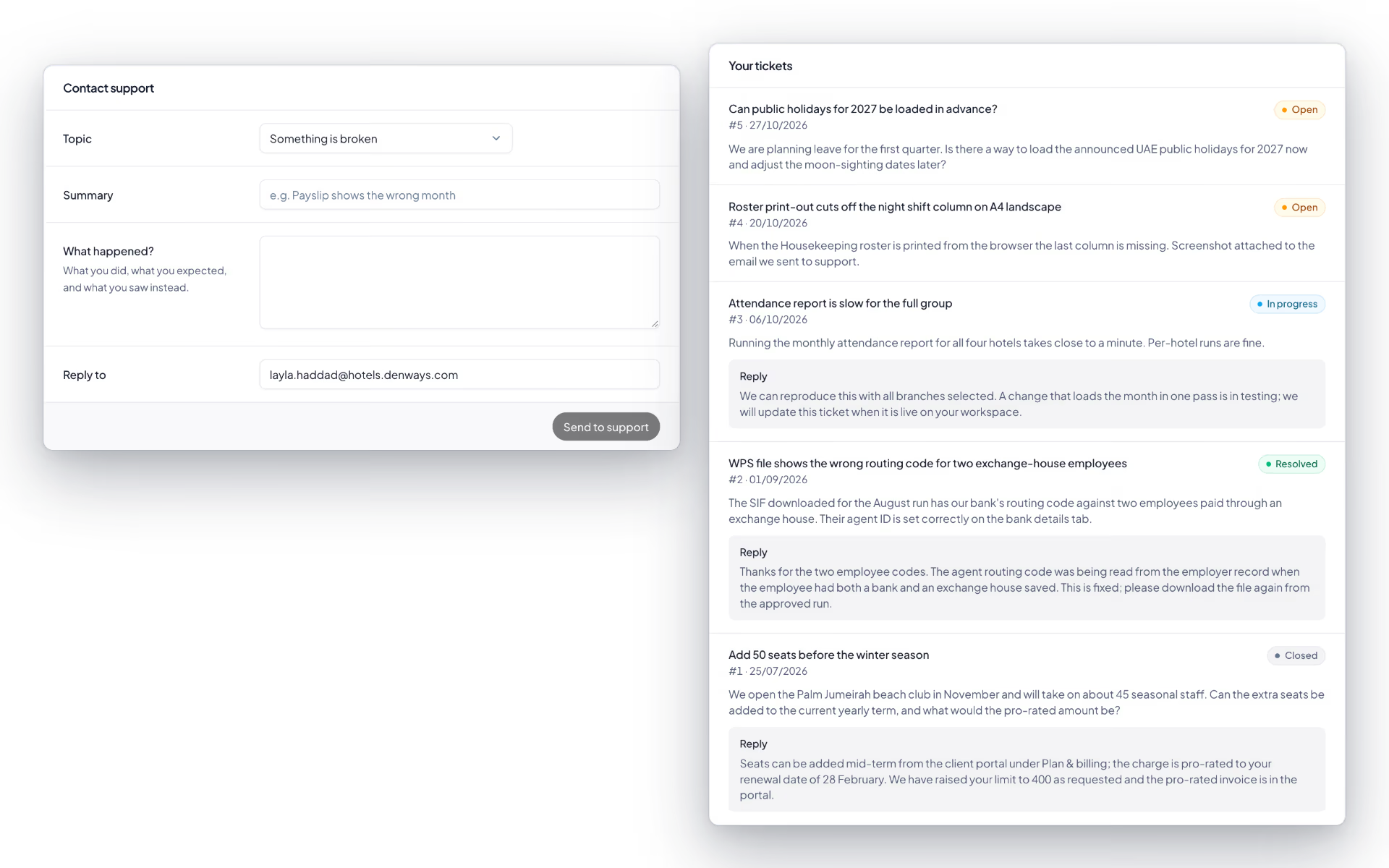
Support, screen by screen.
The product itself, on a demo company's data. Nothing here is drawn for the website.
Five plans. Three levels of cover.
Support is part of what you are buying, so it is worth knowing exactly what your plan includes before the first payroll run.
Basic Tracking
- Email and in-product ticketing
- Help centre and in-product guidance
- Standard priority handling
Advance Tracking and Basic Payroll
- Everything in standard support
- 24-hour support cover
- Payroll-run issues treated as time-critical
Professional Payroll and Enterprise
- Priority handling and a dedicated account manager
- Escalation without re-explaining the setup
- Support for security and procurement reviews
- Contracted targets set out in the service level agreement
The full list
What does the Support module include?
8 features, each one built into the application. Where one depends on a plan, a setting or a release, the note under its module says so.
Support tickets
A ticket with an urgency, a thread and a rule: we cannot look inside your workspace unless you say so.
- Raise a ticket
- Pick the organization, a category (payroll, attendance, billing, access, bug, feature idea, other) and an urgency.
- Three urgencies
- "It's on fire", usually answered within two hours. "It's annoying", within eight. "Whenever you can", within a day.
- Attachments
- Up to five files a message, 10 MB each, kept private.
- Consented access
- Allow our staff into the workspace for 24 hours, 3 days or 7 days. Extend or revoke it whenever you like. It ends on its own when the time runs out or the ticket is resolved.
- Every visit is listed
- Each staff visit appears on the ticket, and staff sessions cannot approve payroll, change approval rules or create tokens.
- Resolve and reopen
- Mark a ticket resolved yourself and reopen it within fourteen days.
- Rate the answer
- One to five stars and a comment on any resolved ticket.
- Help inside the workspace
- Any employee can report an issue from Settings and follow their own tickets.
What hours are you available?
Business hours across the Gulf working week, Sunday to Thursday, which is when payroll cut-offs, approvals and disbursements usually fall. Tickets can be raised at any time through the product and are picked up in the next covered period.
How quickly will somebody respond?
Response time depends on the priority the ticket carries, and the contracted targets are set out in the service level agreement rather than promised on a marketing page. What is fixed is the classification: a payroll run blocked for the organization is critical, a defect with a workaround is not, and the two are never queued together.
What happens if payroll is blocked on disbursement day?
Blocked payroll is treated as a critical issue and escalated immediately rather than waiting in the normal queue. Because the audit trail records every step of the run, we can see exactly where it stopped instead of asking you to reconstruct it. Bank file rejections and WPS submission failures fall into the same category.
How are bugs and feature requests handled differently?
A bug is reproduced, classified by impact and fixed on the release schedule, with critical defects pulled forward. A feature request is logged against your account and weighed with everything else on the roadmap; we will tell you whether it is planned, being considered or not going to happen, rather than leaving it open indefinitely.
Do we get somebody who knows our account?
On Professional Payroll and Enterprise, yes, a dedicated contact who already knows your entity structure, payroll calendar and integrations, so an escalation does not start with an explanation. On other plans the ticket carries your account context automatically, which covers most of the same ground.
Keep reading
Bring your whole workforce onto one platform.
See how DenwaysHR handles HR, attendance and leave across the GCC, and payroll with the WPS file in the UAE.

