

Shift scheduling and rostering software: Rosters your crew
can read a week in advance.
Build rosters from shift templates and rotation patterns, publish them to everyone's self-service, and let attendance measure against the shift somebody was given.
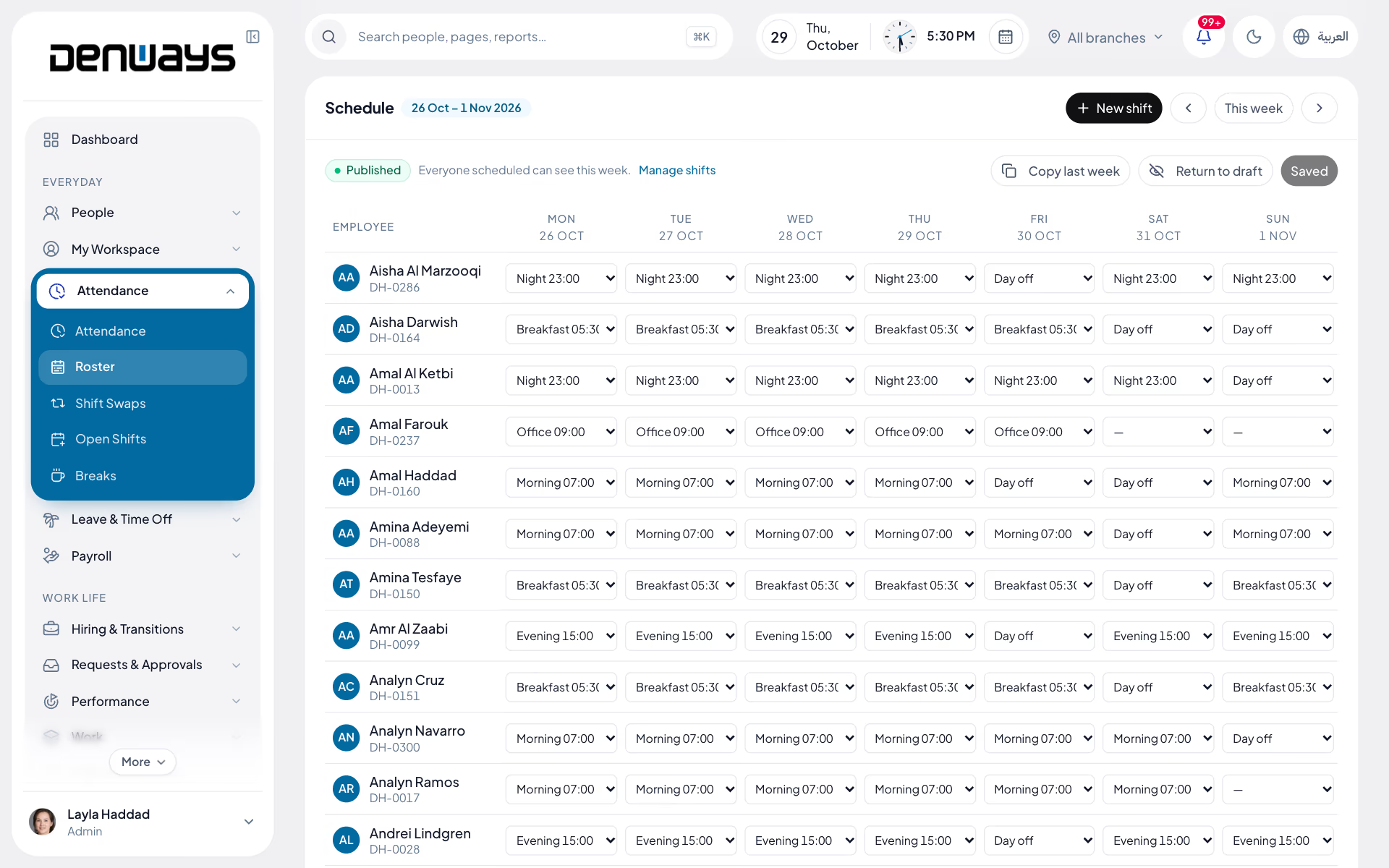
Shift templates, rosters and coverage
- Shift Templates
- Rotation Patterns
- Split Shifts
- Night Shifts
- Coverage Gaps
- Swap Requests
- Ramadan Hours
- Mobile Publishing
Scheduling
Scheduling, in 3 parts.
3 parts. Swipe across.Keep scrolling.
A roster built from patterns, not retyped every week
Site crews, retail floors and drivers work the same shapes month after month. Templates and rotation patterns mean you set those shapes once and apply them.
- Shift templates per site, floor or route
- Rotation patterns applied across a whole crew
- Split shifts and night shifts that cross midnight
- Ramadan working hours as a configurable pattern

The hole in the rota shows while there is still time
A coverage gap found on the morning of the shift is a phone call nobody wants to make. Gaps are flagged as the roster is built, and swaps go through approval.
- Coverage gaps flagged before the roster is published
- Swap requests raised by the employee in the app
- Approval required before a swap takes effect
- The revised roster republished to everyone affected

Attendance measures against the shift you published
A generic nine-to-five makes a night-shift driver permanently late. Punches are compared with the published shift, and overtime starts where that shift ends.
- Published rosters visible on a phone
- Punches compared with the rostered shift
- Late, early and absent marks from the real schedule
- Overtime calculated from hours beyond the shift

Scheduling, screen by screen.
The product itself, on a demo company's data. Nothing here is drawn for the website.
Who works when. Settled once.
A roster kept in a spreadsheet is out of date the moment two people agree to swap.
The planner
- Templates and rotation patterns
- Split, night and Ramadan shifts
- Coverage gaps before publishing
- One roster per site or branch
The employee
- Next week's shifts on the phone
- Swap requests raised with a reason
- Punching in against the right shift
Payroll
- Hours measured against the shift
- Overtime from beyond the roster
- The same records the run reads
The full list
What does the Scheduling module include?
27 features across 5 parts of the product, each one built into the application. Where one depends on a plan, a setting or a release, the note under its module says so.
Shifts
The building blocks of a roster: when a shift starts, when it ends, and how late is late.
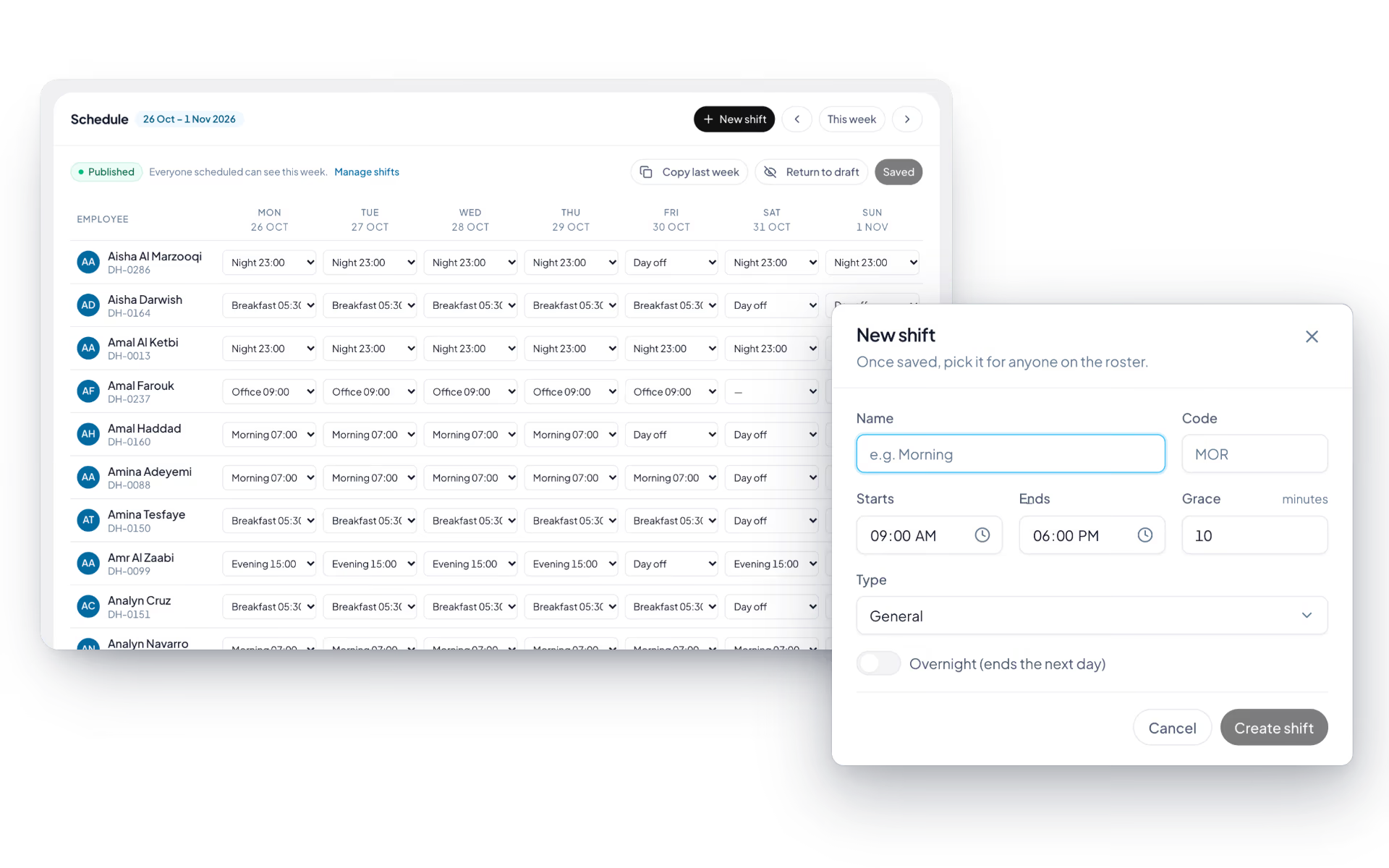
- Shift definition
- Name, code, type (general, morning, evening, night or rotating), start and end time, and a grace period in minutes.
- Overnight handled
- Set an end time earlier than the start and the shift is marked overnight on its own.
- Standing assignments
- Give a person a shift from an effective date. A new assignment closes the old one.
- Required skills
- Attach skills and a minimum level to a shift. The roster then warns when someone is scheduled without them.
- Drives attendance
- The shift sets the start, the late-after time, the daily target and the overnight handling for everyone on it.
Weekly roster
A Monday-to-Sunday grid, one row per person, that stays a draft until you publish it.
- A cell per day
- A shift, a day off, or a dash that leaves the day to the person's usual pattern.
- Draft and publish
- A draft is invisible to employees and does not touch attendance. Publish it and it does both. Return it to draft if you published too soon.
- Copy last week
- Fills the empty cells from the week before and leaves what you have already set.
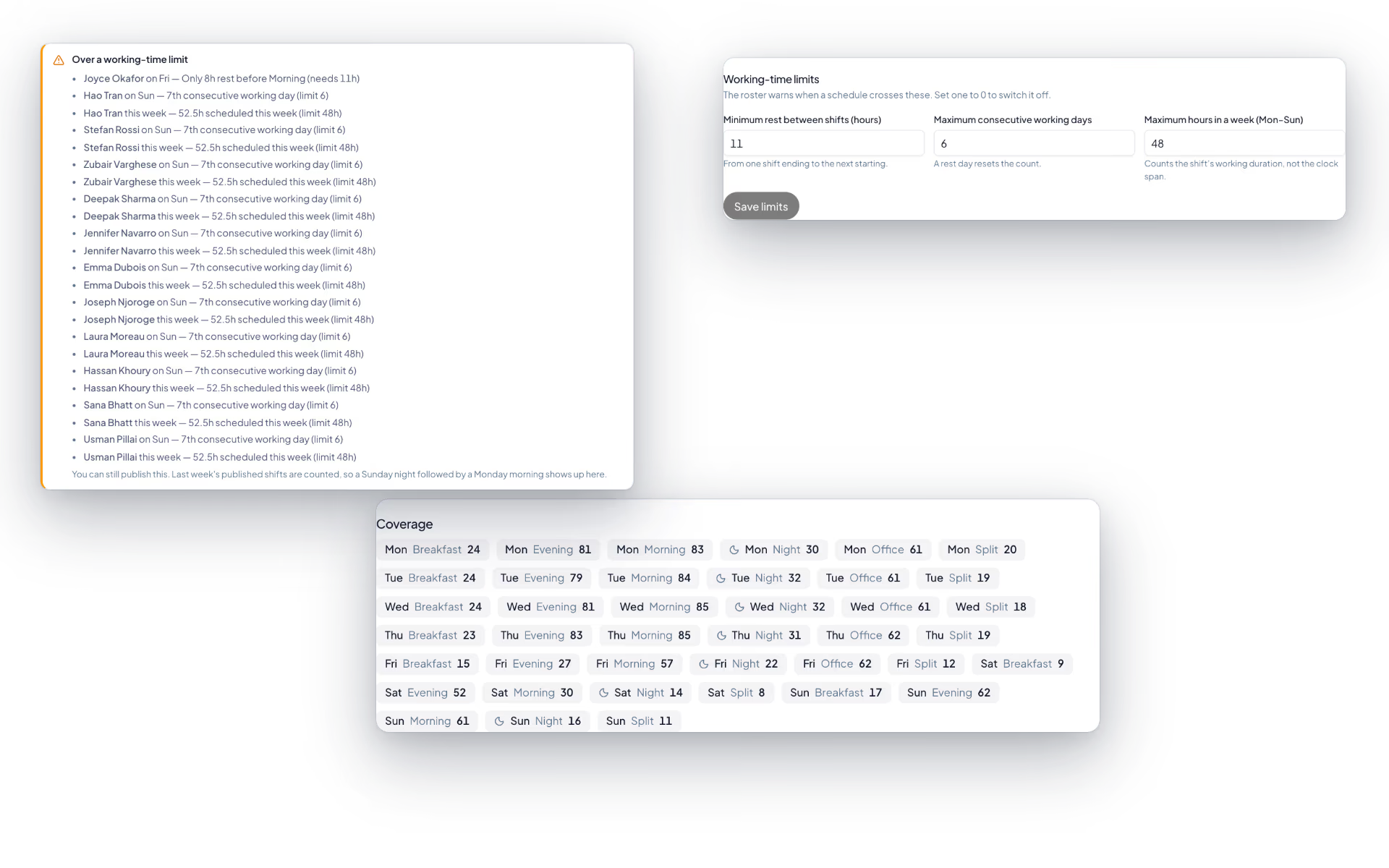
- Coverage
- How many people are on each shift each day, with night shifts marked.
- Skill warnings
- Someone rostered onto a shift without the required skill, below the level, or with the skill claimed but not confirmed, is listed.
- The roster wins
- A published entry overrides the standing shift for that date. A rostered day off is a rest day even midweek, and a rostered Friday is a working day.
- My shifts
- Employees see their published shifts for this week and next, with times and any note.
Working-time limits
Three limits the roster checks as you build it, so a tired crew is a decision and not an accident.
- Rest between shifts
- A minimum number of hours between one shift ending and the next starting. Eleven by default.
- Consecutive days
- The most days in a row a person can be rostered. Six by default.
- Weekly hours
- The most hours in a Monday-to-Sunday week. Forty-eight by default.
- Looks across the week boundary
- A Sunday night followed by a Monday morning is caught, because published neighbouring weeks are included.
- Warns, never blocks
- The scheduler sees the breach and decides. The same warnings appear when approving swaps and open-shift claims.
Shift swaps
Two colleagues agree first. The manager only hears about swaps that are already settled between them.
- Ask a colleague
- Pick one of your upcoming shifts and a colleague, and either trade for one of theirs or hand yours over with nothing back.
- Colleague accepts or declines
- With a reason if they decline. You can withdraw while it is pending.
- Manager approval
- The agreed swap reaches a manager with the skill and working-time warnings for the schedule it would create.
- Roster updates itself
- Approval moves the shifts on the roster. No retyping.
- Sensible refusals
- One swap per shift at a time, no deciding a swap you are part of, and no approval if the roster has changed underneath it.
Open shifts
A shift nobody can cover, posted to the people who are free that day.
- Post a shift you cannot make
- Pick the shift, add a note, post it. It goes to everyone eligible.
- Managers post unfilled slots
- A shift, a day and a branch that still needs someone.
- Claim it
- Employees only see shifts on days they are free, with any skill or hours warning shown before they claim.
- First claim holds
- The first person to claim keeps it until a manager approves or sends it back with a reason.
- Approval moves the roster
- Open, claimed, filled. Once approved the shift sits on the claimer's row.
How is a roster built?
From shift templates and rotation patterns rather than cell by cell. You define the shifts a site or route runs, apply a rotation across the crew, and adjust the exceptions. Split shifts and night shifts that cross midnight are handled as shifts rather than as two separate days.
Can we set shorter Ramadan working hours?
Yes. Ramadan working hours are configured as a pattern applied over the period rather than by rewriting every roster by hand. Attendance and overtime then measure against those hours for the duration.
How do shift swaps work?
The employee raises a swap request in self-service and it goes to approval before anything changes. Once approved, the roster is republished so both people and their supervisor see the same version.
Does the roster change how attendance is judged?
Yes, and that is the point. Late, early and absent marks are calculated against the shift the employee was published, so a night-shift driver is not marked late every day by a default working pattern.
How does scheduling affect overtime?
Overtime is calculated from hours worked beyond the rostered shift rather than beyond a fixed daily figure. Those hours flow into the payroll run with the rest of the attendance data.
Keep reading
Bring your whole workforce onto one platform.
See how DenwaysHR handles HR, attendance and leave across the GCC, and payroll with the WPS file in the UAE.

