

Core HR software and employee records: Every employee,
on one record you can rely on.
Personal details, government IDs, bank accounts and documents in one place, with onboarding, the org chart and offboarding running off the same record.
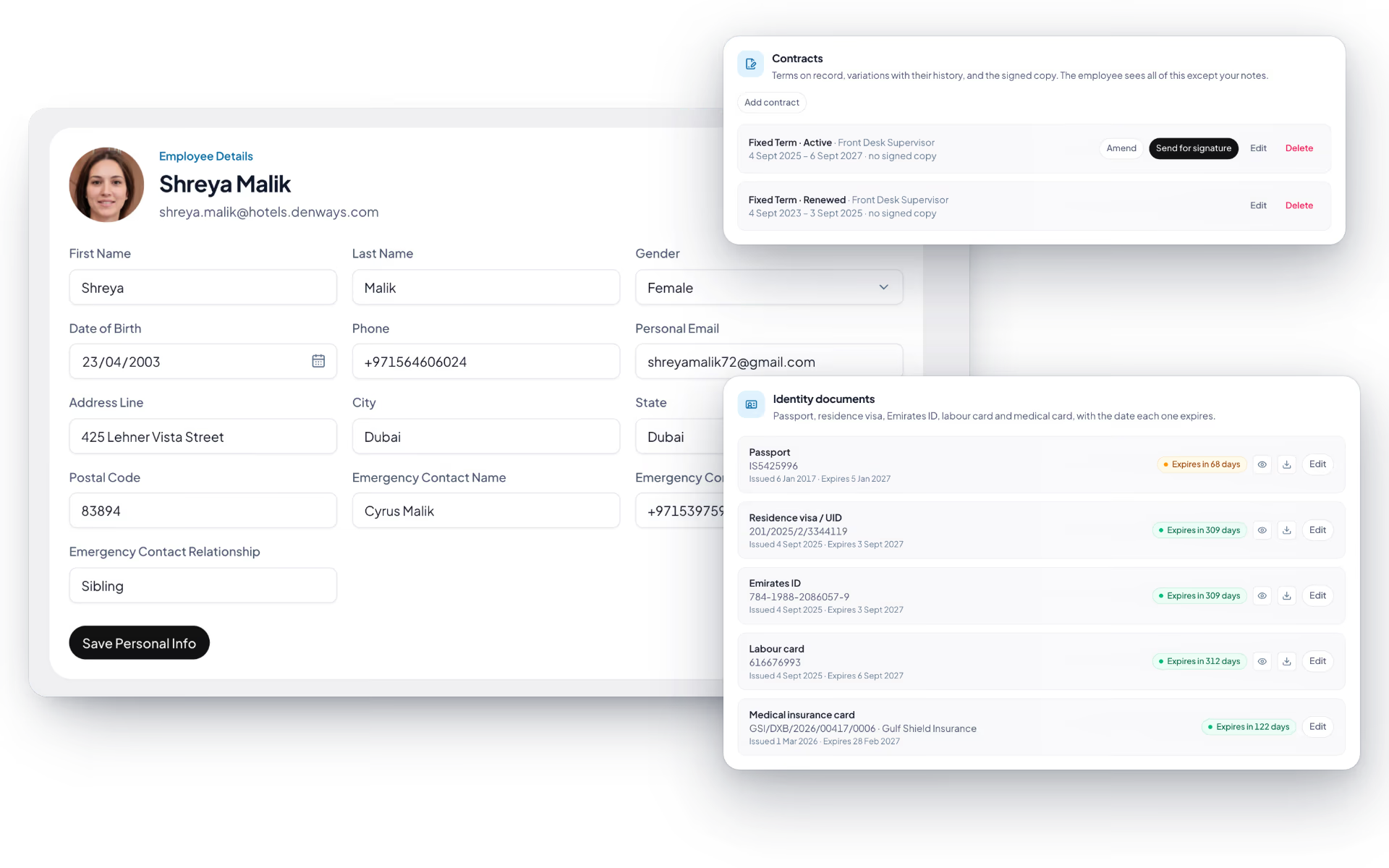
One record that holds the whole person
Personal details in one system, government IDs in another and bank details in a spreadsheet is how HR data goes wrong. Here it is one record.
- Personal details, employment and work information
- Government IDs including Emirates ID and labour card
- Bank account details, encrypted at rest
- Document storage and a 360° view of the full record
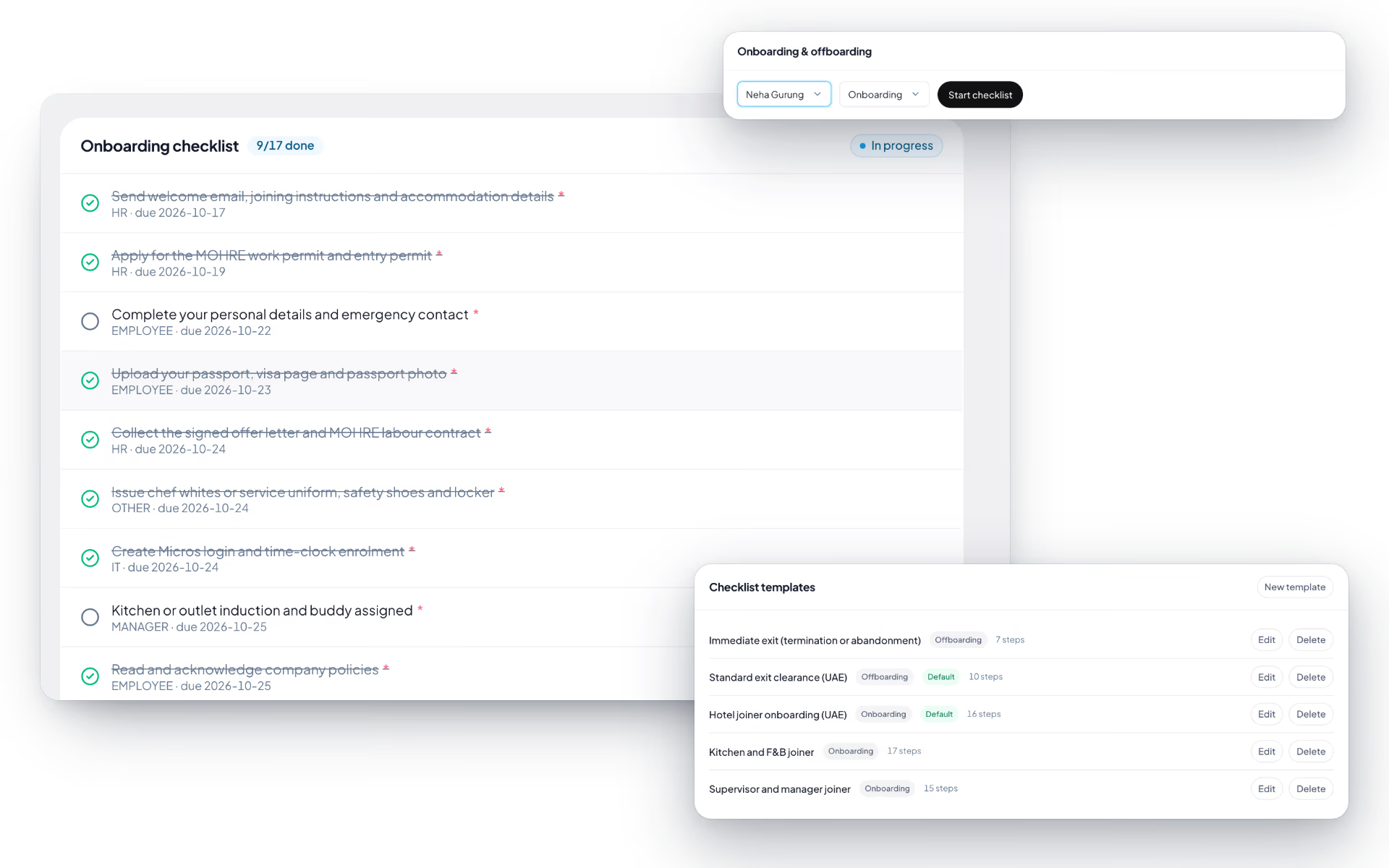
Onboarding that finishes itself
New hires complete their own profile and upload their own documents, against a checklist that says who owns what and when it is due.
- Guided profile-completion flow for new hires
- Document collection as part of the process
- Configurable checklists with per-item ownership
- Due dates, so nothing sits unnoticed for a month
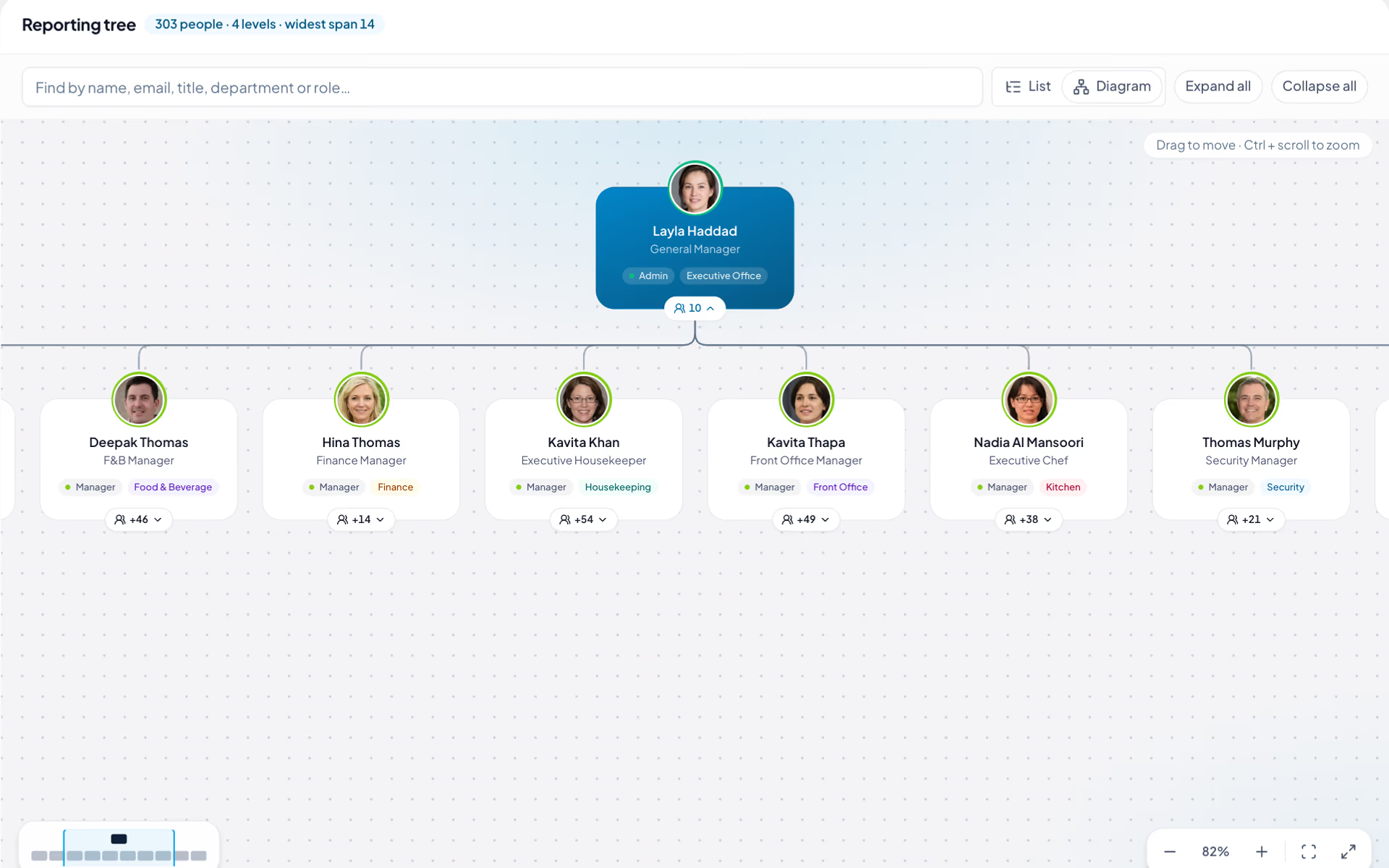
An org chart that also decides who sees what
Departments, teams and the reporting hierarchy are not just a diagram. They drive access, so a manager sees their own line and nobody else's.
- Departments, teams and reporting hierarchy
- Interactive org chart and org-tree view
- Group-based data access down the reporting line
- Branch-scoped visibility for multi-branch organizations
The exit handled as carefully as the hire
Resignations follow an approval chain, offboarding runs on a checklist, and the final settlement picks up the same record rather than starting fresh.
- Resignation requests with an approval chain
- Offboarding checklists and clearance tracking
- Full and final settlement, including gratuity
- Exit interviews recorded against the employee
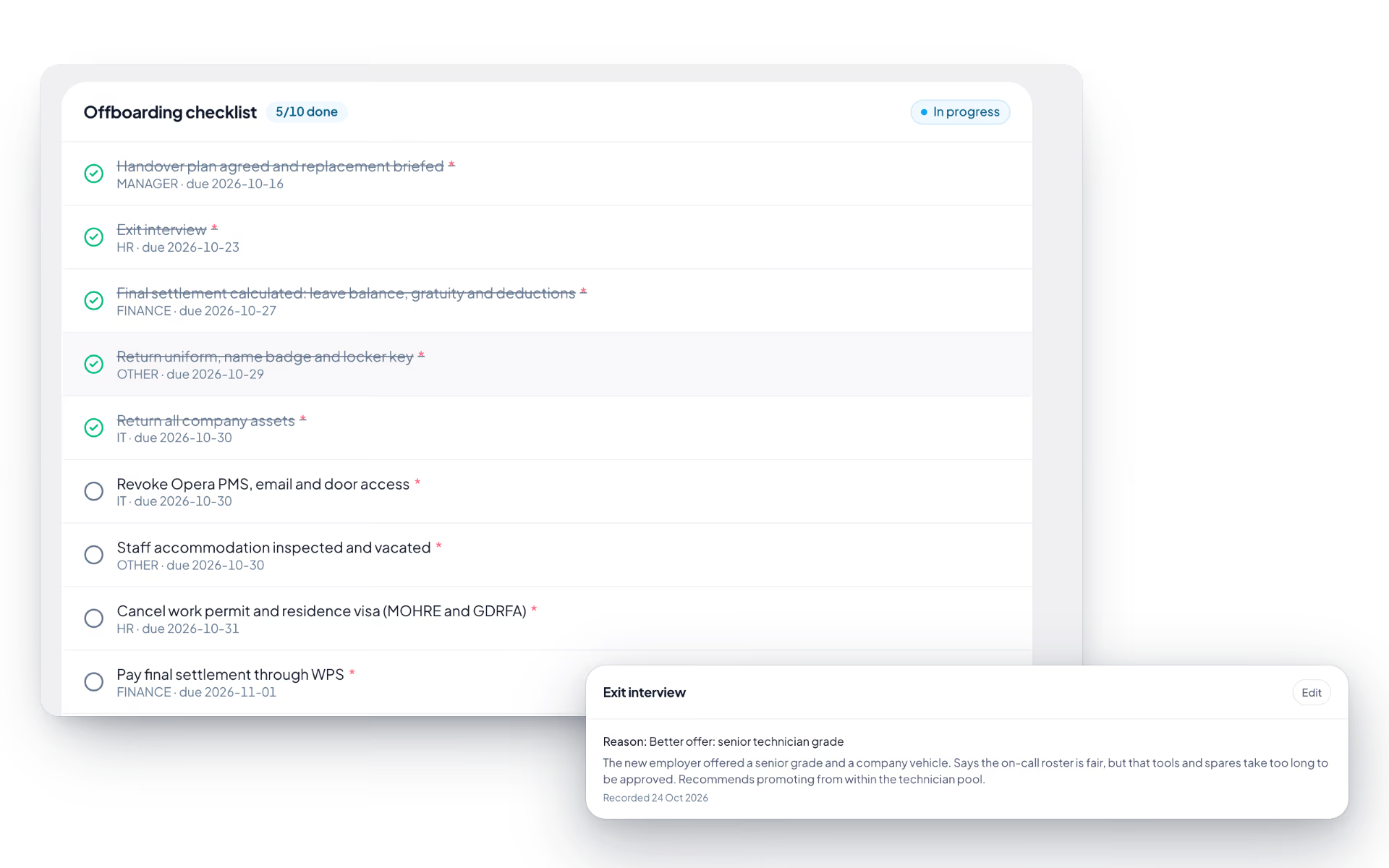
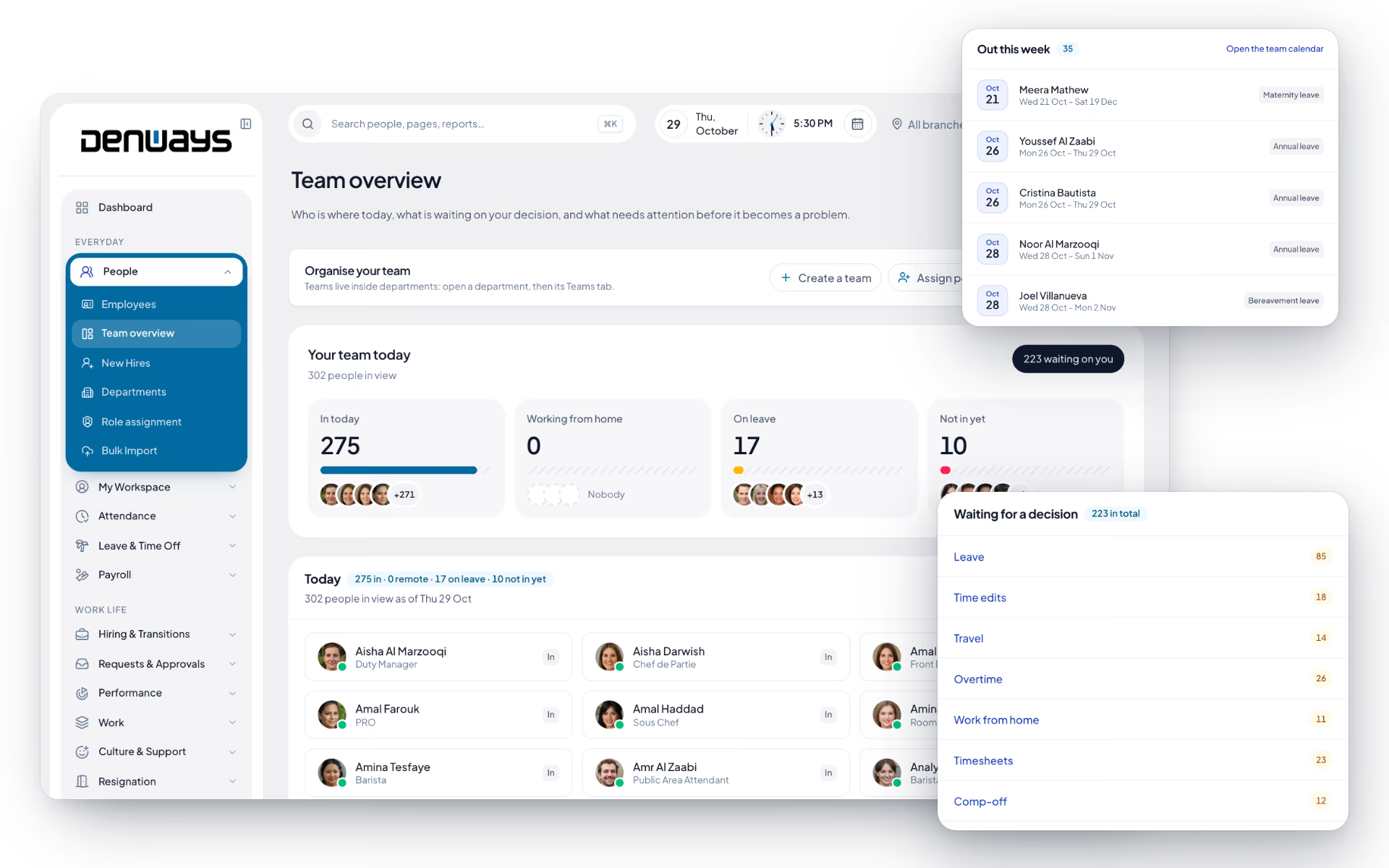
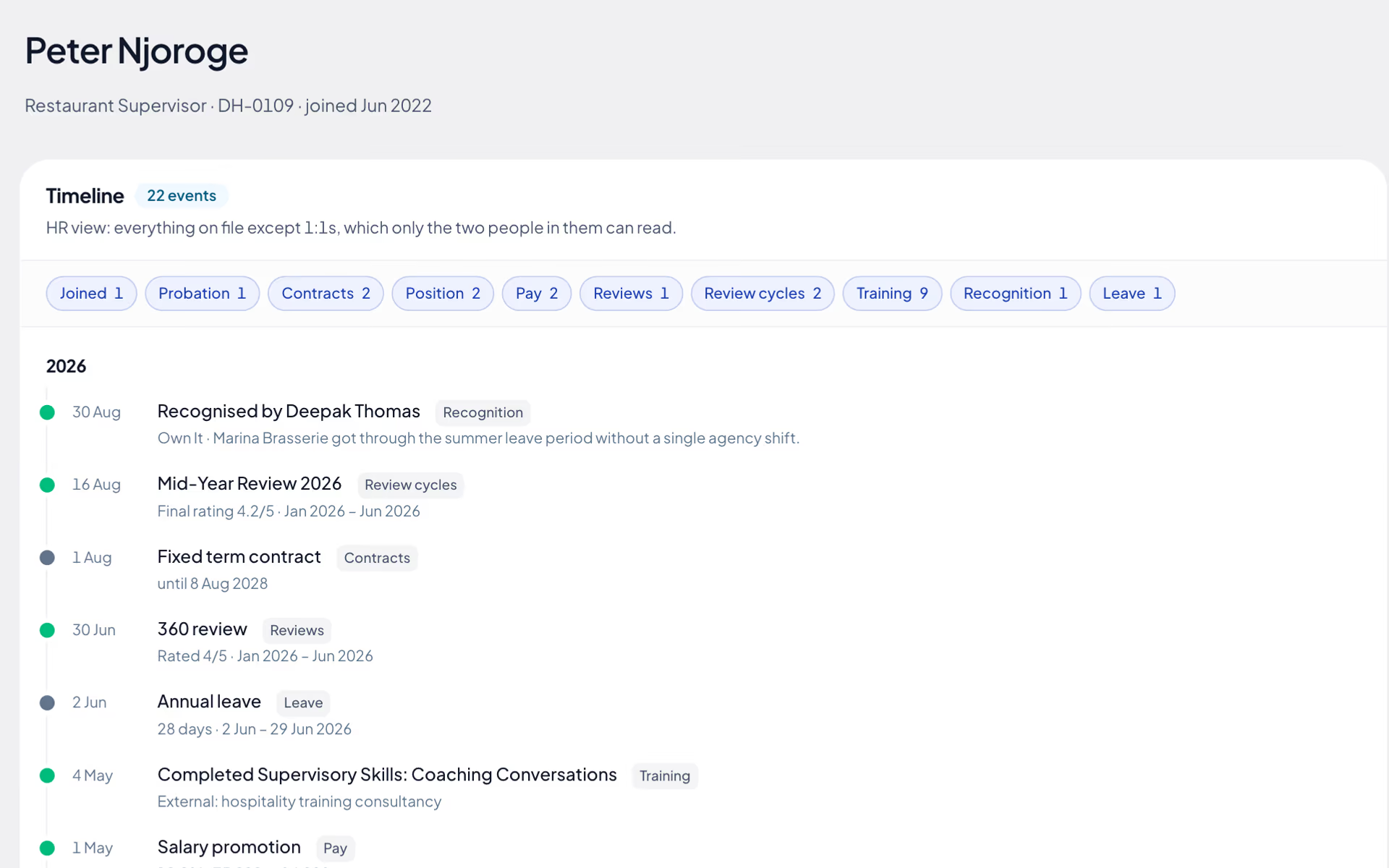
Core HR, screen by screen.
The product itself, on a demo company's data. Nothing here is drawn for the website.
The org chart is also the permission model.
Select anyone below to see the organization through their eyes. Who reports to whom is what decides who can open a record.
Signed in as Layla Farouk
Manager · OperationsLayla Farouk can open 3 records. Her own reporting line only. The finance team is invisible to her. Faded cards are records this person cannot open at all.
Three people. Three different systems.
Everyone signs in to the same platform and sees a different one. Roles are configurable, and larger organizations add their own on top of these.
The employee
- Their own record and documents
- Attendance, leave balance and payslips
- Tasks and their own team
The manager
- Their own team, and nobody else's
- Approvals for leave and regularization
- Team calendar and attendance
The administrator
- Every record, across every branch
- Custom roles and permission groups
- Every action on the audit trail
Whatever you configure is enforced twice, at the API route and again in the business logic, with the database refusing another organization's rows on its own authority.
The full list
What does the Core HR module include?
51 features across 8 parts of the product, each one built into the application. Where one depends on a plan, a setting or a release, the note under its module says so.
Employee records
One page per person, opened by their employee code, holding everything from an emergency contact to the IBAN payroll pays into.
Bank accounts and HR-uploaded documents appear on plans that include payroll.
- Personal details
- Name, gender, date of birth, phone, personal email, full address and an emergency contact with their number and relationship.
- UAE identity block
- Emirates ID in its 784-YYYY-NNNNNNN-C format, labour card number, MOHRE person code and nationality. Marking someone as an Emirati national is what feeds the Emiratisation figures.
- Work information
- Employee code, designation, employment type (full-time, part-time, contract, intern, temporary), work location (office, hybrid, remote), expected start time and timezone, with the organization default shown when a field is left empty.
- MOHRE skill level and ILOE status
- For UAE organizations: a MOHRE skill level from 1 to 5, whether the person is enrolled in ILOE, exempt or not enrolled, and when the policy expires. DenwaysHR stores five skill levels, while the UAE Government portal now describes nine, so check each level against the portal.
- Government IDs with a format check
- Emirates ID, labour card, passport, Iqama, GCC residence or civil ID, plus Aadhaar, PAN, driving licence and voter ID for India. The number is checked against the expected format as you type, and the proof document is stored with it.
- Bank accounts
- Bank name, IBAN and routing code (or account number and IFSC), branch, account type and an optional proof file. One account is marked as the default payroll pays into.
- Documents on the record
- HR uploads by category: education, experience, identity, address proof or other. Each file can be opened or downloaded from the record.
- Contracts and amendments
- Contract type, status, job title, start and end dates and salary. An amendment records the new title, salary, hours a week and notice period with an effective date, keeps the old values beside the new ones, and can be sent to the employee for signature.
- Teams and team leads
- Add a person to teams inside their department and make them a lead. A lead sees and approves their own team's requests.
- Assigned assets
- The laptops, phones and other company items the person currently holds, shown on the record.
- Masked numbers
- Identity numbers and bank details are masked for anyone below HR, and the forms that edit them are not shown at all. Both are encrypted in the database.
- Who can edit
- HR, anyone given the employee-edit permission, and the person's own direct manager. Everyone else who can open the record reads it.
- Per-person switches
- Attendance on or off, whether the person may request time edits, whether they can see payroll, task assignment, and how often the desktop app captures a screenshot (every 1, 3, 5, 10, 15 or 30 minutes).
- Employee list with filters
- Filter by person, department, branch, timezone and joining window (last 7 days, 30 days, 3 months or a year). A New Hires view shows who joined this month and last.
Adding people
Four ways to get someone onto the system, depending on whether you are adding one manager or three hundred site workers with no work email.
- Create a profile
- A three-step wizard: the person, the job, the access level, and optionally their annual pay, salary structure and pay group. You read everything back before the account is created, and nothing is saved until you confirm.
- Duplicate check
- If the email already belongs to someone, the wizard offers to open their profile. A half-finished setup can be resumed or removed and started again.
- Finish the record in the same sitting
- After the account exists you can add personal details, a government ID with proof, a bank account with proof and the résumé, experience and education certificates.
- Welcome email
- Finishing sends a link to set a password. If it bounced, send it again from the same screen.
- Invite by email
- Paste one address or fifty. Everyone on the list gets the same access level, departments, timezone and tracking settings, and those apply the moment they accept.
- Invite link
- A single-use sign-up link tied to one email address, to send over WhatsApp, SMS or a printed joining pack.
- Import a file
- CSV or Excel, one person per row, with a template to download. Add them straight to the employee list (for staff with no work email) or send each one an invitation. Rows that fail are listed; the rest go through.
- Invitations that cannot be altered
- An invitation expires after 72 hours, and the person accepting cannot change the email or the role they were invited with.
- Seat meter
- The side panel shows how many seats are used. When none are free, the admin is told before the last step rather than after it.
- First sign-in profile
- New members are asked for their own details, address and emergency contact, with a completion percentage. They can skip it and come back.
Bulk import
The page a migration runs through: departments, employees, opening leave balances and salary structures, each checked before a single row is written.
- Four import types
- Departments, employees (with reporting manager, employment type, joining date, Emirates ID and more), opening leave balances, and salary structures by annual pay with basic and housing percentages.
- Dry run first
- Validate reports total rows, valid rows, what will be created, what will be skipped and every error with its line number. Nothing is imported until you confirm.
- Error report to download
- Failing rows come back as a CSV you can fix and upload again.
- Safe to re-run
- The employee code (or department slug) is the key, so uploading a corrected file updates the matching records instead of duplicating them.
- Templates and column help
- Each type has a downloadable CSV template and a description of every column it expects.
- Import history
- When each import ran, its type, mode, status, row count and result.
- Permissions per type
- Importing salaries needs payroll rights, importing balances needs leave rights. You are only offered the types you are allowed to run. Up to 5,000 rows per file.
Custom fields
The fields your company needs that no vendor would think to ship: uniform size, camp room number, driving licence category.
- Five field types
- Text, number, date, yes or no, and a choice list with up to 50 options.
- Required or optional
- Mark a field required and HR is asked for it on every record.
- HR-only or visible to the employee
- A visible field shows on the employee's own profile under "On your record". An HR-only field never leaves the HR view.
- Usage count
- The settings table shows how many records have each field filled in.
- Retire without losing data
- Deactivate a field you no longer collect and reactivate it later, or delete it outright.
Departments and teams
Departments hold people; teams sit inside departments and have managers. Both decide whose requests and records a manager can see.
- Departments
- Create, rename and describe departments. A rename shows everywhere at once. Add members, remove them or move them to another department.
- Teams inside a department
- Create a team, add and remove members, and name its managers. A team can have as many managers as it needs.
- Headcount at a glance
- Total departments, people placed in one, average size, and a chart of headcount per department that opens the department you click.
- Visibility follows structure
- A manager sees the departments and teams they manage. Seeing the whole organization is a separate permission that has to be granted.
Org chart
The reporting tree, drawn from the reporting lines on file, with a findings panel that points at what is broken in it.
- List and diagram views
- An indented list you can expand and collapse, or cards joined by connectors and tinted by role. The first two levels open by default.
- Search that opens the tree
- Search by name, email, title, department or role and the chart unfolds to the match.
- Shape of the organization
- People, levels, the widest span of control and how many people have no manager.
- Findings
- People with no manager (and who their requests reach meanwhile), people with no department, managers with more than eight direct reports, people still reporting to someone who has left, and reporting loops.
- Reassign reports
- HR ticks who moves and picks the new manager. It is offered right beside the "manager has left" finding, which is where it is usually needed.
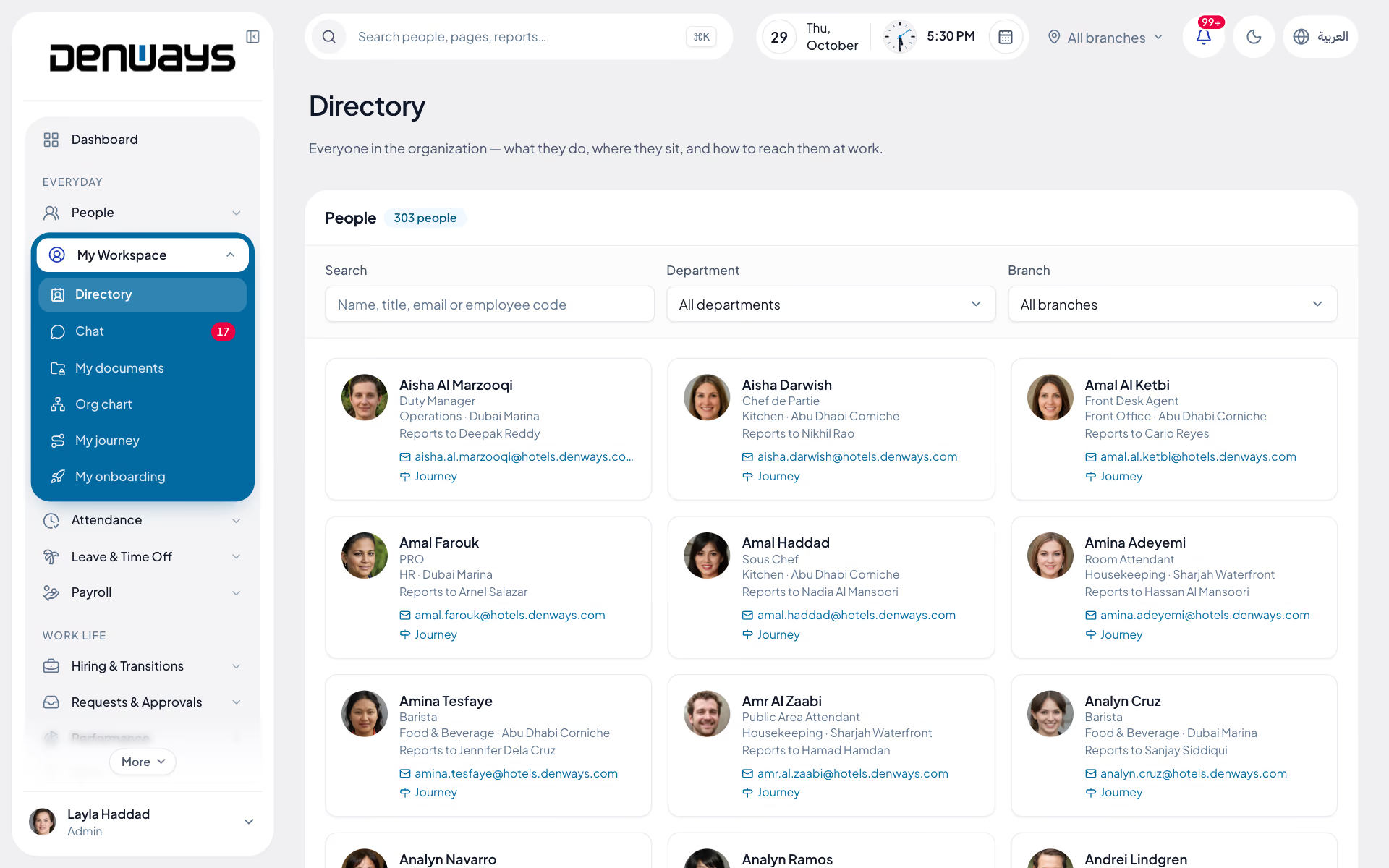
Directory
Who works here and how to reach them, open to everyone, with nothing private in it.
- A card per person
- Photo, name, designation, department, branch, who they report to and their work email.
- Search and filters
- By name, title, email or employee code, narrowed by department and branch.
- Work details only
- The directory does not read personal profiles at all, so phone numbers, addresses and ID numbers cannot leak through it.
Employee journey
One person's whole employment as a timeline, written by the other modules as things happen. Nobody types it.
- Fourteen kinds of event
- Joined, probation, contracts, position, pay, reviews, review cycles, goals, training, recognition, one-to-ones, leave, conduct and exit, grouped by year.
- Show and hide by kind
- Each kind has a chip with its count. Click one to take it out of view.
- Three views of the same history
- The employee sees their own journey except reviews marked confidential. A manager sees work events and only the one-to-ones they held. HR sees everything on file except one-to-ones. Pay, contracts and conduct stay with HR.
Questions
Core HR questions, answered.
What is held on an employee record?
Personal details, employment and work information, government identifiers such as Emirates ID and labour card, bank account details, and uploaded documents. A 360° view brings the whole record together in one place instead of spreading it across tabs.
Can a manager see salaries for people outside their team?
No, unless you give them a role that allows it. Group-based data access scopes managers to their own reporting line, and branch managers to their own branch. Compensation visibility is a role decision your administrators make, and it is enforced at the API and again in the business logic.
How does onboarding work for a new hire?
The new hire gets a guided profile-completion flow and uploads their own documents, so HR is not re-typing a passport number. Alongside it runs a configurable onboarding checklist where each item has an owner and a due date.
Do you support companies with several branches?
Yes, on every plan. One account covers multiple physical locations, each managing its own employees, policies and reporting, with branch-scoped visibility so a branch manager sees their own site rather than the whole company.
What happens when somebody resigns?
The resignation goes through an approval chain, an offboarding checklist tracks clearance, and full and final settlement runs from the same record, including end-of-service gratuity where it applies. Exit interviews are recorded against the employee.
Can we track company assets against people?
Yes. Laptops, phones and equipment are tracked with an assign and return workflow, so you can see what is checked out to whom, and clearance at offboarding is a lookup rather than a hunt.
Keep reading
Guides
Bring your whole workforce onto one platform.
See how DenwaysHR handles HR, attendance and leave across the GCC, and payroll with the WPS file in the UAE.

