

Leave management system for the UAE: Nobody should have to
ask how many days are left.
Policy-driven requests routed by your reporting hierarchy, real-time balances per leave type, a comp-off ledger and encashment that reaches payroll.
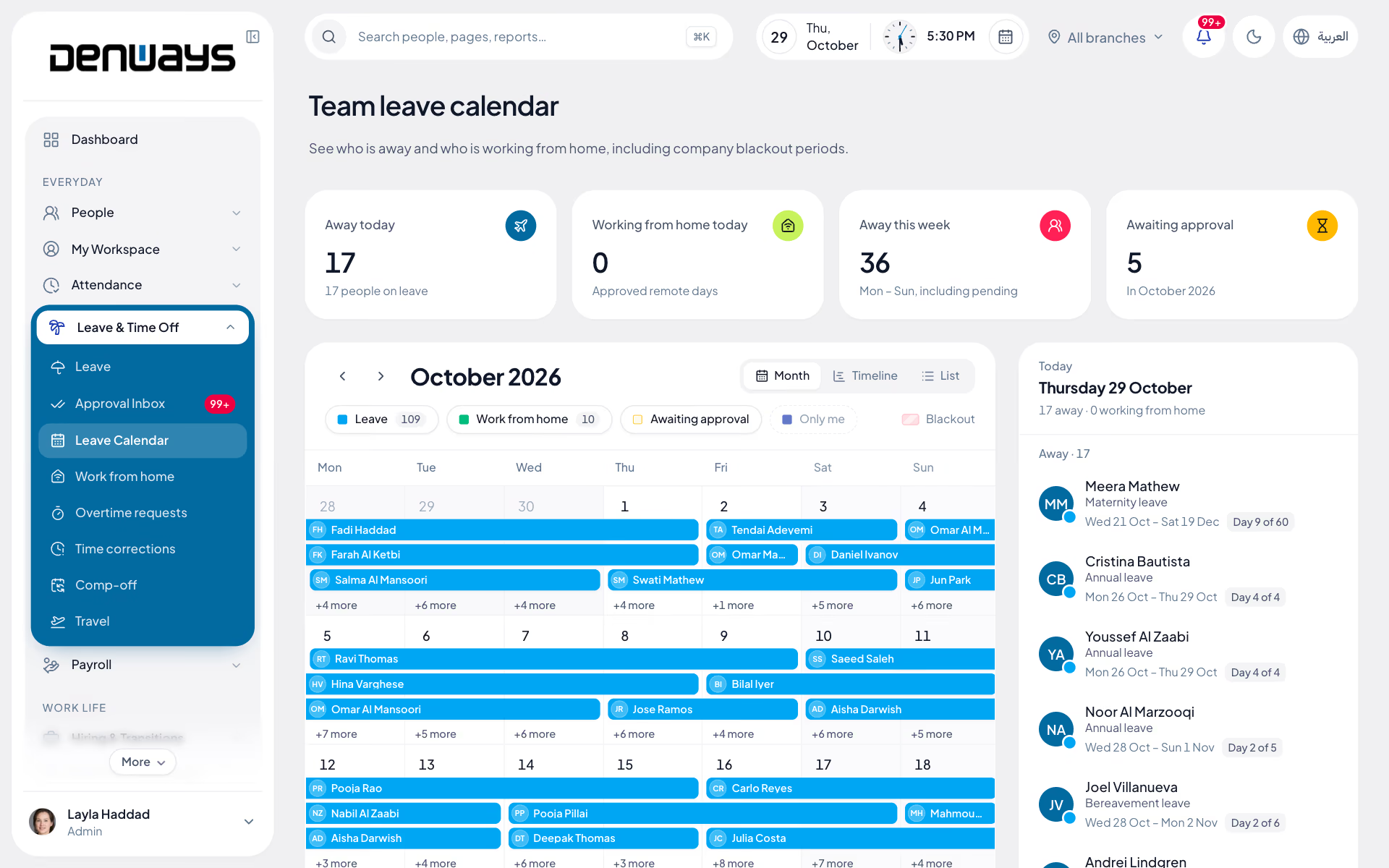
Requests that route themselves
Leave follows the reporting hierarchy you already configured, so nobody has to remember who approves what while their manager is away.
- Apply, track status and revoke a request
- Approval chain built from the team hierarchy
- Transfer a request to a different approver
- Approvals inbox on web and mobile
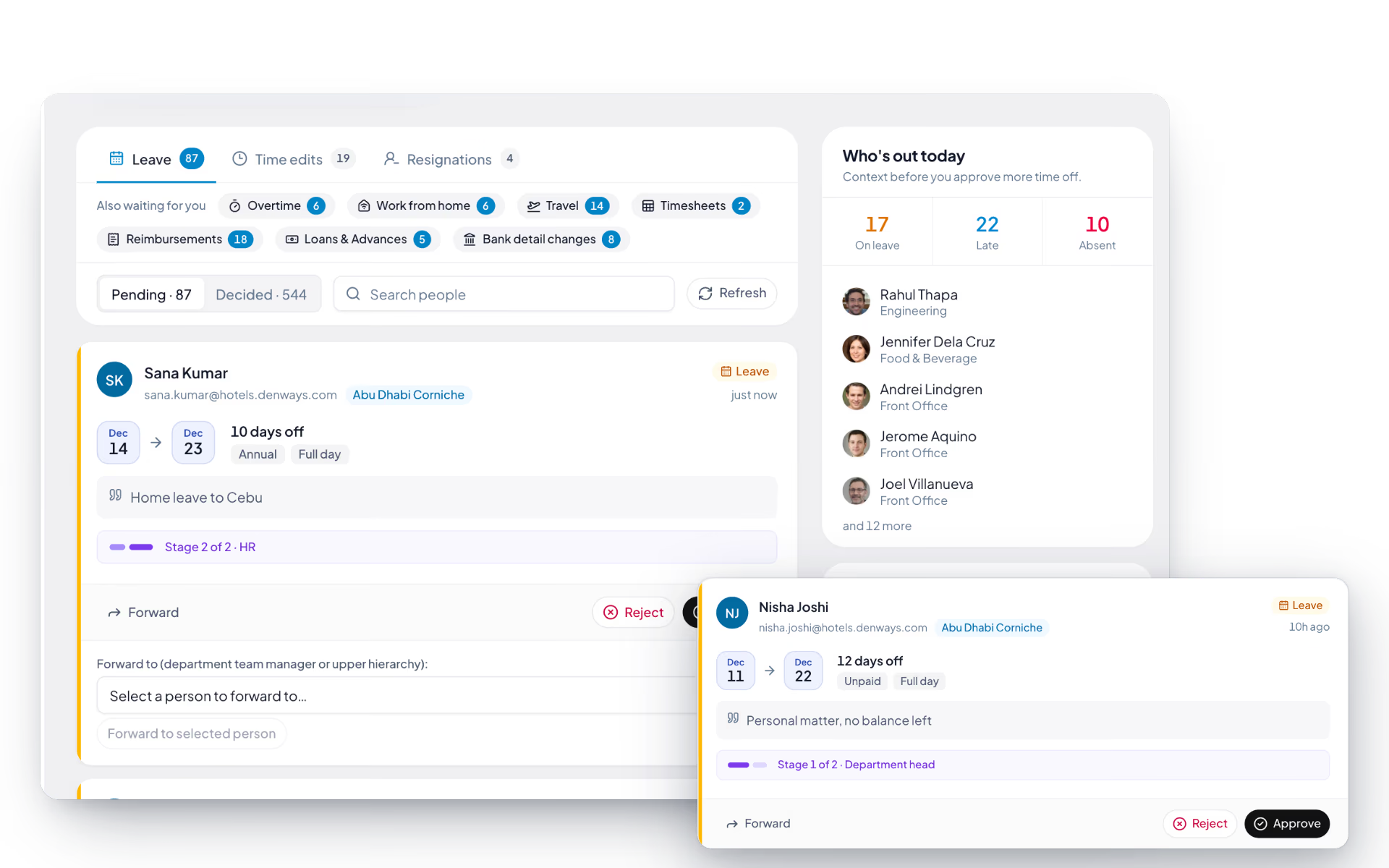
Balances everyone can see, in real time
The most common HR question is how many days are left. Employees answer it themselves, per leave type, without opening a ticket.
- Real-time balance visibility per leave type
- Self-service access on web and mobile
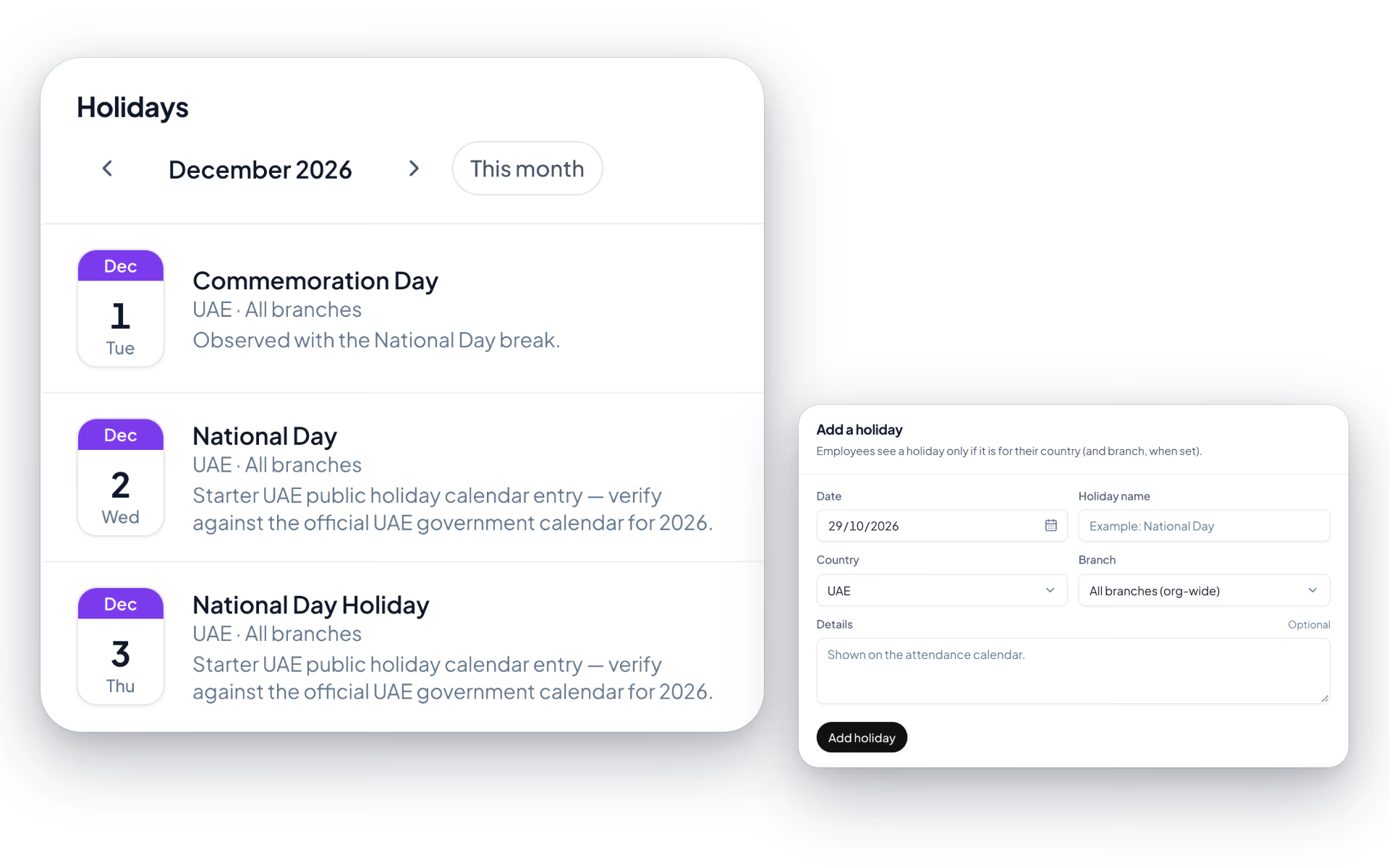
- Holiday calendar feeding attendance and payroll
- Balances that reflect approvals immediately
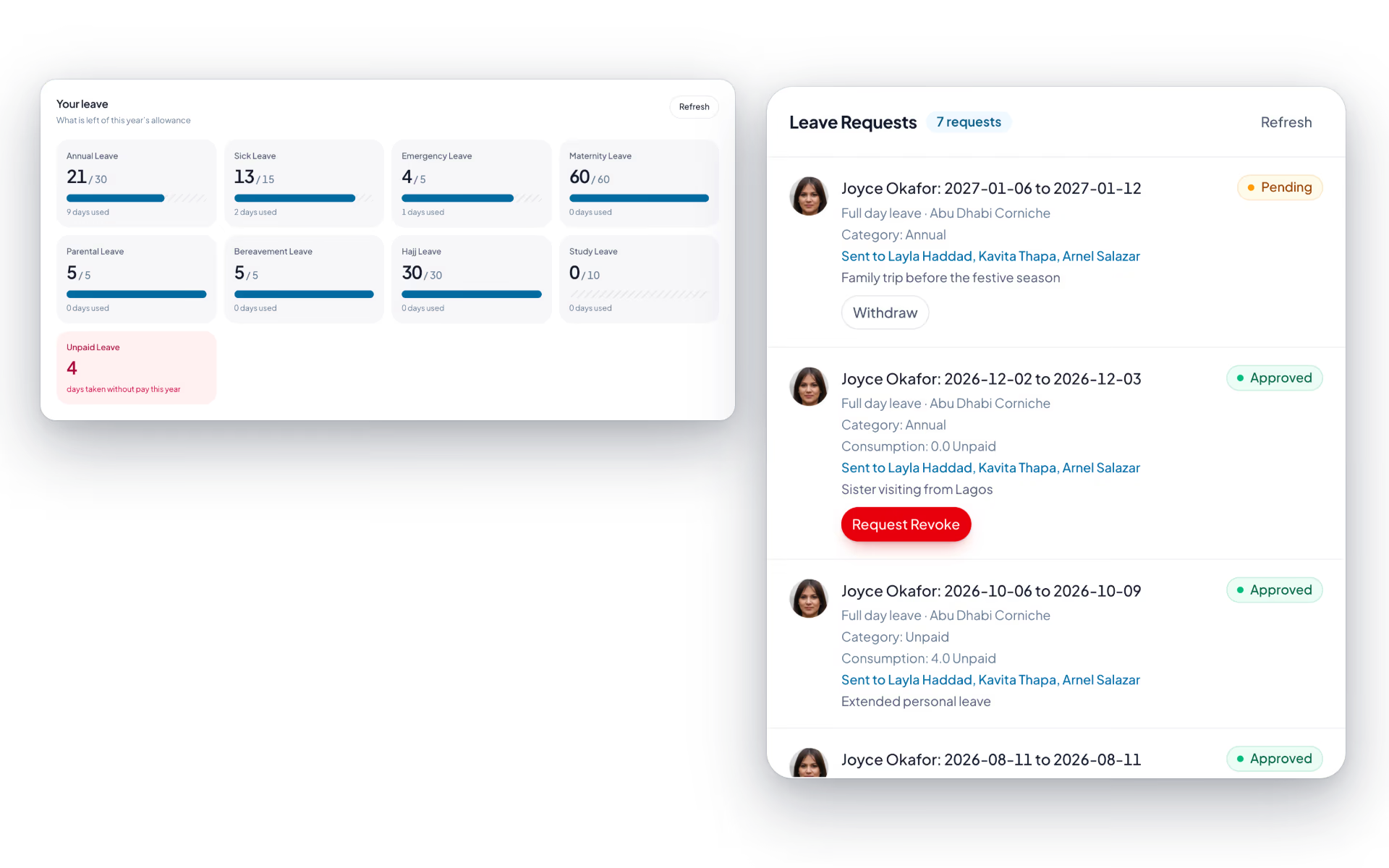
Comp-off with a ledger, not a memory
Time worked on a rest day becomes a tracked balance with a transaction history, rather than an informal promise that gets forgotten.
- Earn compensatory time off against extra work
- Redeem it like any other leave type
- A transaction ledger with a running balance
- Visible to the employee and their manager
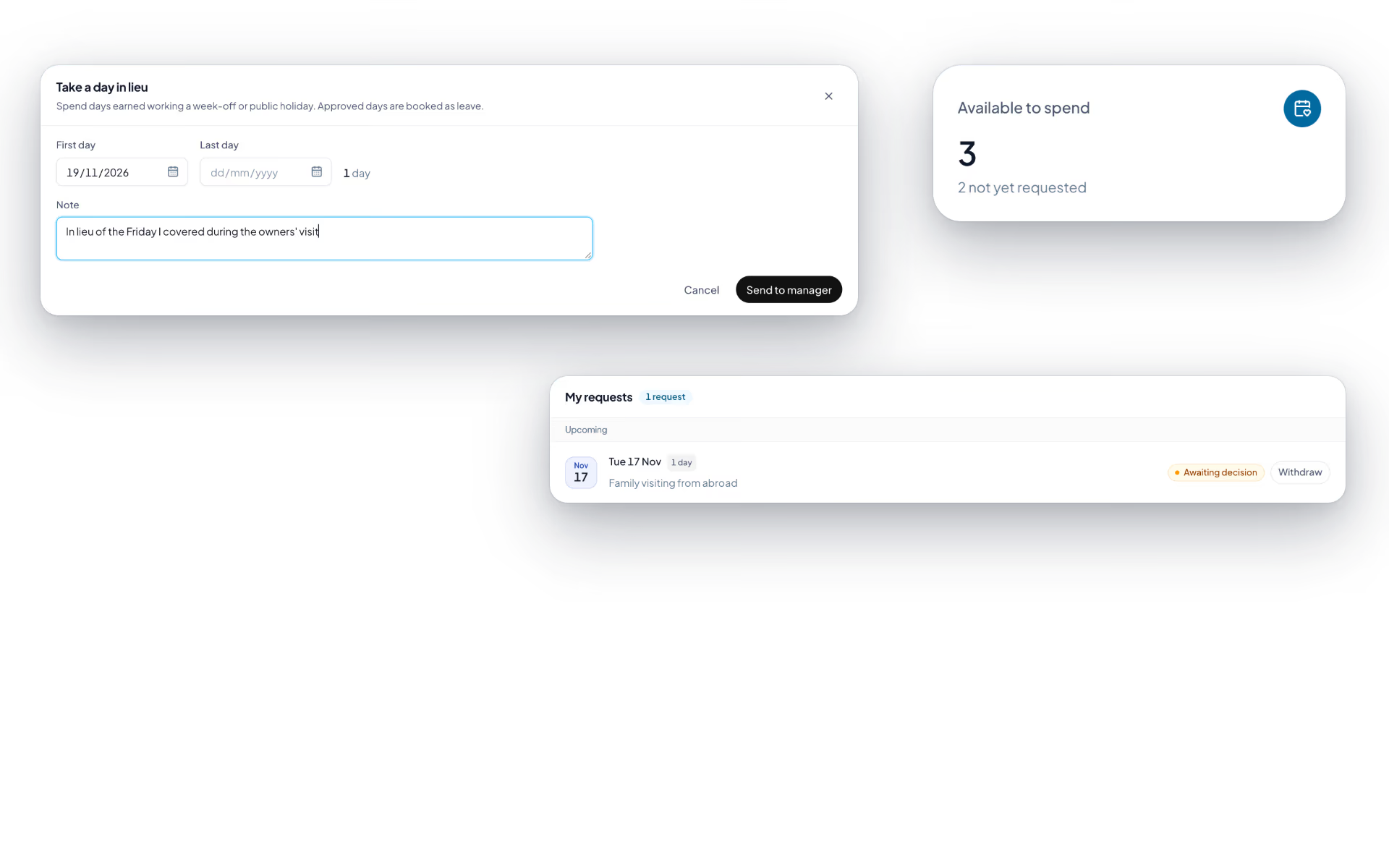
Encashment and a calendar managers use
Unused leave can be cashed out through an approval flow, and managers can see who is out before they approve the next request.
- Leave encashment requests and approvals
- Team leave calendar showing who is out and when
- Coverage visible before an approval decision
- Encashment flowing into the payroll run
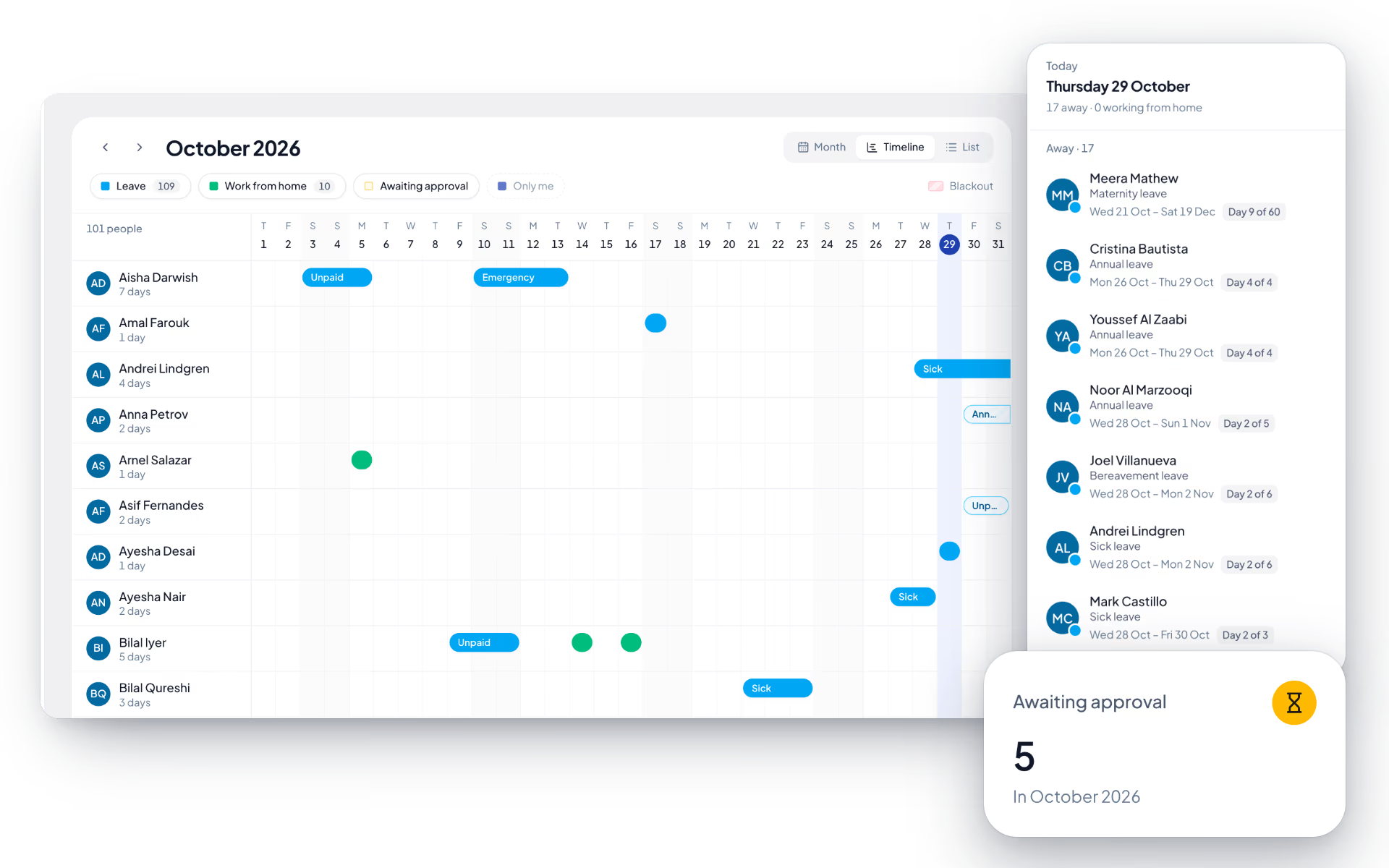
Leave, screen by screen.
The product itself, on a demo company's data. Nothing here is drawn for the website.
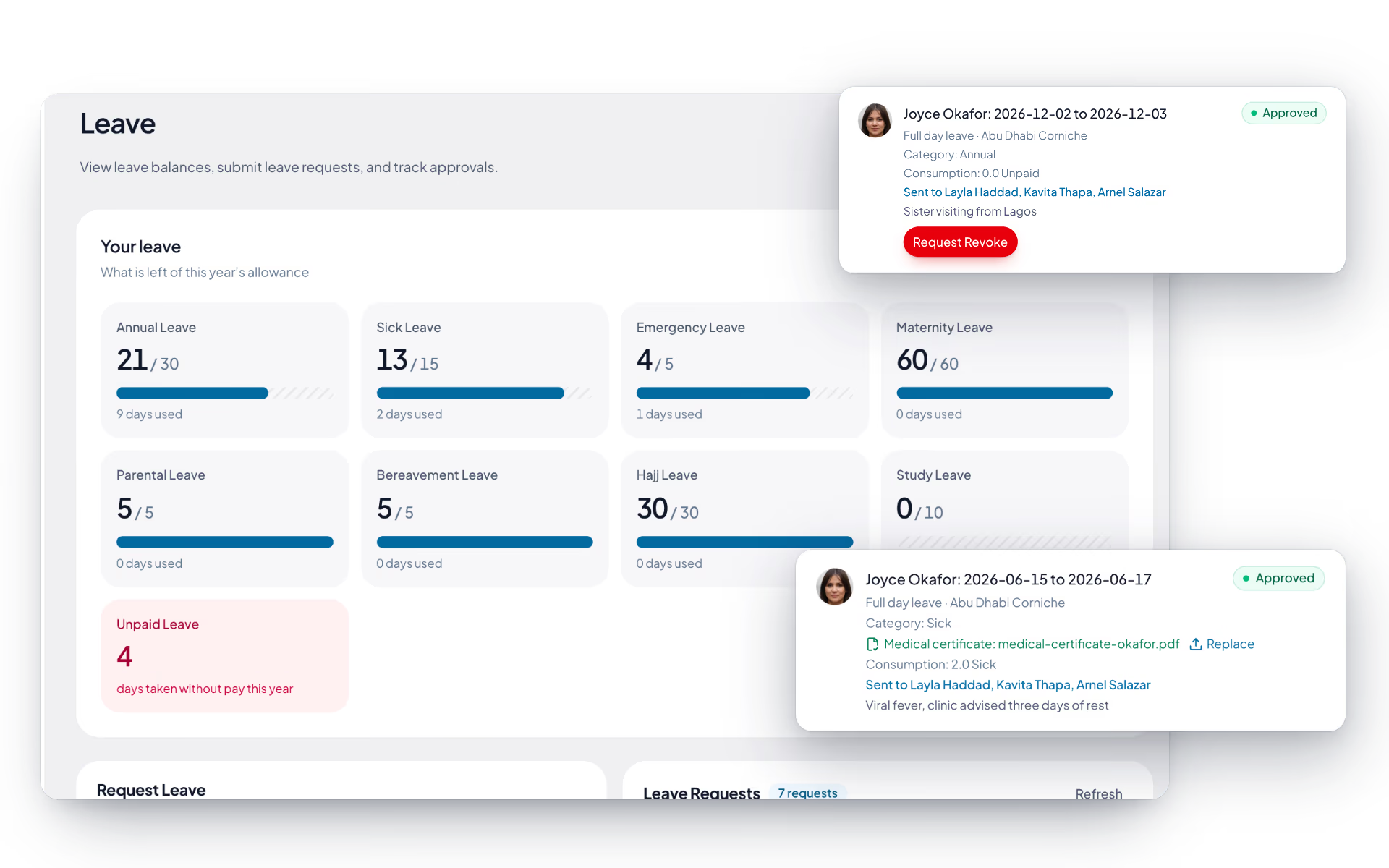
Book four days off. Watch the balance answer.
The question employees ask most is how many days they have left. Here they never have to ask anybody.
Days requested
Accrued per your policy and visible in real time.
Annual leave balance
Aisha Rahman17
days left after this request
4 of 21 used
Approval chain
The chain is built from your reporting hierarchy. If the manager is away, the request can be transferred to a different approver rather than sitting in an empty inbox.
One policy. Three people served.
Leave goes wrong when the employee, the manager and HR are each looking at a different version of the truth.
The employee
- Their balance, per leave type, in real time
- Apply, track and revoke from mobile
- Comp-off ledger with a running balance
The manager
- Who is out and when, across the team
- Approve, reject or transfer a request
- Coverage visible before deciding
The HR team
- Policies and leave types configured once
- Encashment approvals and payout
- Holidays feeding attendance and payroll
The full list
What does the Leave module include?
36 features across 6 parts of the product, each one built into the application. Where one depends on a plan, a setting or a release, the note under its module says so.
Leave requests and balances
Ask for leave against a balance you can see, and get an answer from someone who can see the whole team.
- Balance cards
- Remaining and used for every leave type, plus unpaid leave taken.
- Full day or half day
- A half day is a single date and counts as 0.5.
- Only working days count
- Weekly off days are skipped, using the person's own branch calendar.
- Checked before it is sent
- Overlapping leave, a request over the remaining balance, dates inside a blackout period and requests with no working days in them are all refused with the reason.
- Approve, reject, forward
- Reviewers can pass a request to a named person with a note. The request shows where it is waiting.
- Revoke an approved leave
- Until the day before it starts, the employee can ask to take it back. The reviewer approves or rejects the revoke.
- Medical certificates
- Upload a JPG, PNG, WebP or PDF against a sick-leave request. Leave longer than two days is flagged when no certificate is attached.
- Certificates stay private
- Only the employee, the reviewer, the reporting manager and HR for that branch can open one. A replacement after approval is logged and the original is kept.
- Team balances
- Managers get a table of remaining leave per person per type, filtered by employee, department or branch.
- Stale requests clean themselves up
- A pending request whose dates have passed with no decision is cancelled automatically, checked every hour.
- Attendance agrees
- Approved leave shows on every calendar and blocks punch-in for that day.
Leave types
Your leave policy as a short list: what each kind is called and how many days a year it carries.
- Up to fifteen types
- Each with a name, a code and days per year in half-day steps.
- Gulf presets
- One-click starting points for annual (30), sick (15), maternity (60), paternity (5), compassionate (5), Hajj (30) and study leave (10).
- Unpaid leave is automatic
- You never define it. It is tracked whenever someone takes leave without pay.
- Cannot remove what is in use
- A type with leave booked against it stays until that is resolved, and removal has an undo until you save.
Team leave calendar
Who is away, who is working from home and which dates are closed to leave, in one view the whole team can open.
- Three views
- Month, a timeline with one row per person, and a plain list.
- Leave and remote days together
- Approved and pending leave alongside approved and pending work-from-home days.
- Filters
- Leave, work from home, awaiting approval, or only me.
- Today's numbers
- Away today, working from home today, away this week and awaiting approval this month.
- Blackout periods
- Admins mark date ranges with a reason, such as year-end close or an audit week. New leave on those dates is refused and the reason is shown.
Comp-off
Work a Friday or a public holiday and the day in lieu is credited without anyone filling in a form.
- Earned automatically
- At least four hours worked on a weekly off day or a public holiday earns one day. The check runs every morning and looks back 45 days.
- Branch calendar applies
- Off days and holidays follow the person's own branch.
- Not paid twice
- A day already paid as approved overtime does not also earn a day in lieu.
- Take a day
- Request up to ten days at a time against what is available. Tiles show available, requested and taken this year.
- Books real leave
- Approval creates approved leave, so calendars and attendance show the person as away. Revoking it returns the days.
- Lapses at year end
- Balances are kept per calendar year and unused days lapse on 31 December. The oldest days are spent first.
Work from home
A remote day requested, approved and visible to the team, with the geofence stepping aside for the day.
- Request a day or a stretch
- First day, last day and why. Up to a month in one request.
- At a glance
- Next remote day, days approved this year and what is awaiting a decision.
- On the team calendar
- Approved and pending remote days sit beside leave.
- Geofence off for the day
- An approved day lets the person start work from outside the office zone.
- Thresholds in days
- On the approval engine, so a long stretch can need a second approver.
Absence patterns
The Bradford factor, calculated for you: frequent short absences score higher than one long one.
- Spells squared, times days
- Over a rolling window, 365 days by default. A spell is not broken by a weekend or a holiday.
- Five bands
- No concern, worth a conversation, formal conversation, formal review and needs a decision, with counts across the top.
- See the spells
- Expand a person to see each absence with its dates and length.
- Choose what is scored
- Admins set the window and which leave categories count. Sick leave is the default.
- A prompt, not a verdict
- The page says so itself: a high score is a reason to talk to someone, nothing more.
Questions
Leave questions, answered.
How is the approval chain decided?
The approval chain is built from the team hierarchy you already configured in the org structure, so leave follows the same reporting line as everything else. A request can also be transferred to a different approver when the usual manager is away.
Can employees see their own balances?
Yes, in real time and per leave type, through self-service on web and mobile. Balances reflect approvals immediately, which removes the most common question the HR inbox receives.
How does comp-off work?
Compensatory time off is earned against extra work and redeemed like any other leave type. It runs on a transaction ledger with a running balance, so both the employee and their manager can see how it was earned rather than relying on memory.
Can unused leave be paid out?
Yes. Employees raise a leave encashment request, it goes through approval, and the approved amount flows into the payroll run rather than being handled as a separate manual payment.
Can a manager see who else is off before approving?
Yes. The team leave calendar shows who is out and when across their team, so coverage is visible at the moment of the decision instead of being discovered afterwards.
Do public holidays affect leave and payroll?
The organization-wide holiday calendar is configured once and feeds both attendance and payroll, so a public holiday is not deducted as leave and is treated consistently across the platform.
Keep reading
Guides
Bring your whole workforce onto one platform.
See how DenwaysHR handles HR, attendance and leave across the GCC, and payroll with the WPS file in the UAE.

