

HR document management with expiry alerts: Visas and IDs that
get renewed in time.
A document vault on every employee record, with expiry dashboards, staged reminders before a passport, visa or labour card lapses, version history and e-signature for contracts.
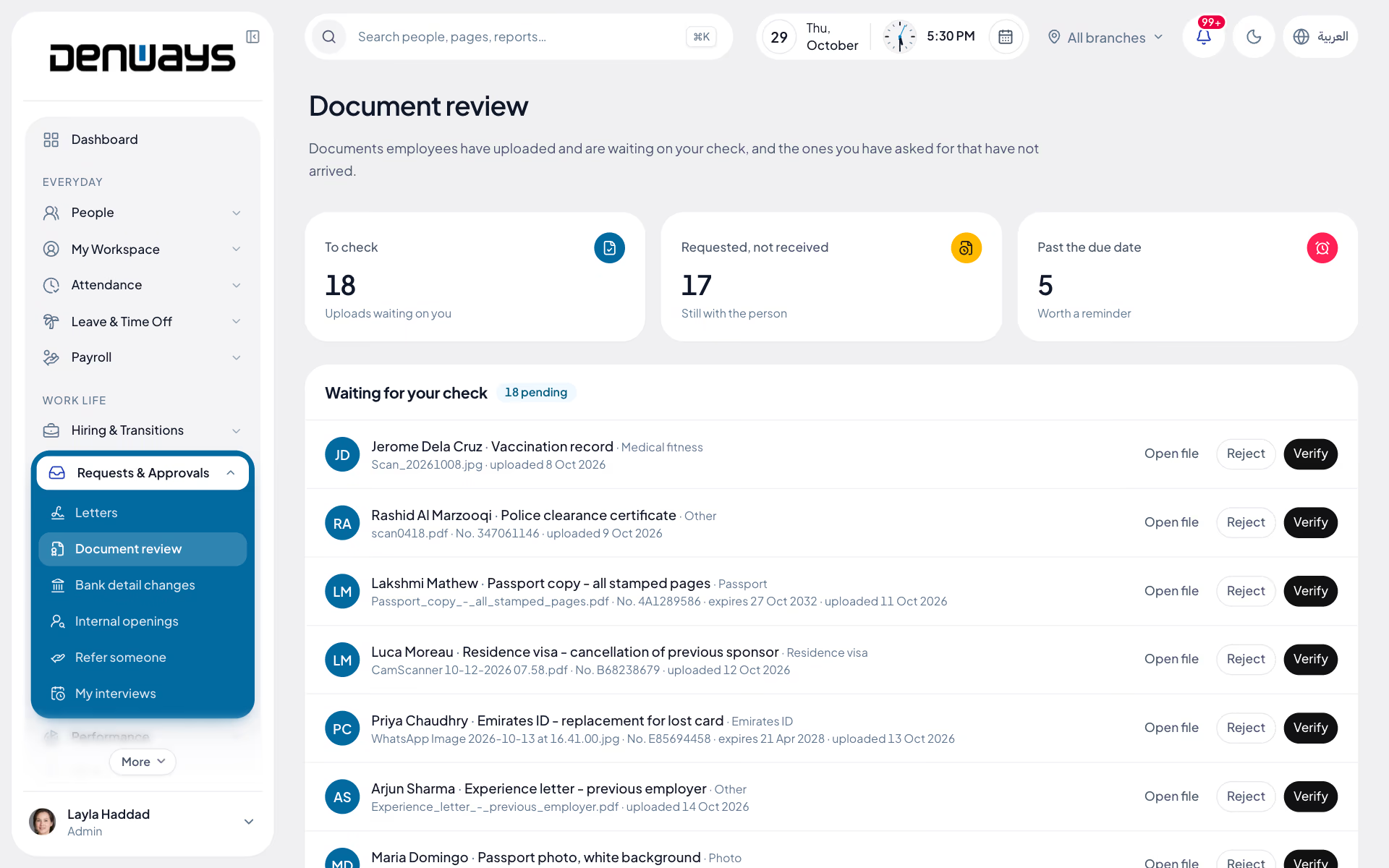
The vault and the expiry dates behind it
- Document Vault
- Expiry Dashboard
- Staged Reminders
- Bulk Upload
- Version History
- Role-Based Access
- E-Signature
- Policy Acknowledgement
Documents
Documents, in 3 parts.
3 parts. Swipe across.Keep scrolling.
Every document on the record it belongs to
Passports, visas, Emirates ID, labour cards, driving licences, trade licences and insurance certificates sit on the employee they relate to. Nothing lives in a shared drive whose permissions nobody has reviewed.
- Vault on each employee record
- Bulk upload when you migrate a filing cabinet
- Version history when a document is replaced
- Access scoped by the roles you configure

The renewal window is the thing teams miss
An expired visa is not a filing problem, it is a work-stoppage problem. Reminders run in stages ahead of the date so a renewal starts while there is still time to complete it.
- Expiry dashboard across the workforce
- Staged reminders at set intervals before expiry
- Filtered by document type, branch or department
- Renewals cleared as the new document is uploaded

Signed, acknowledged and on file
Contracts, amendments and policy documents need a signature and a record that it was given. E-signature captures both without printing, scanning and losing the middle copy.
- E-signature for contracts and amendments
- Policy acknowledgement tracked per employee
- Signed copy filed against the record
- Who signed and when on the audit trail

Documents, screen by screen.
The product itself, on a demo company's data. Nothing here is drawn for the website.
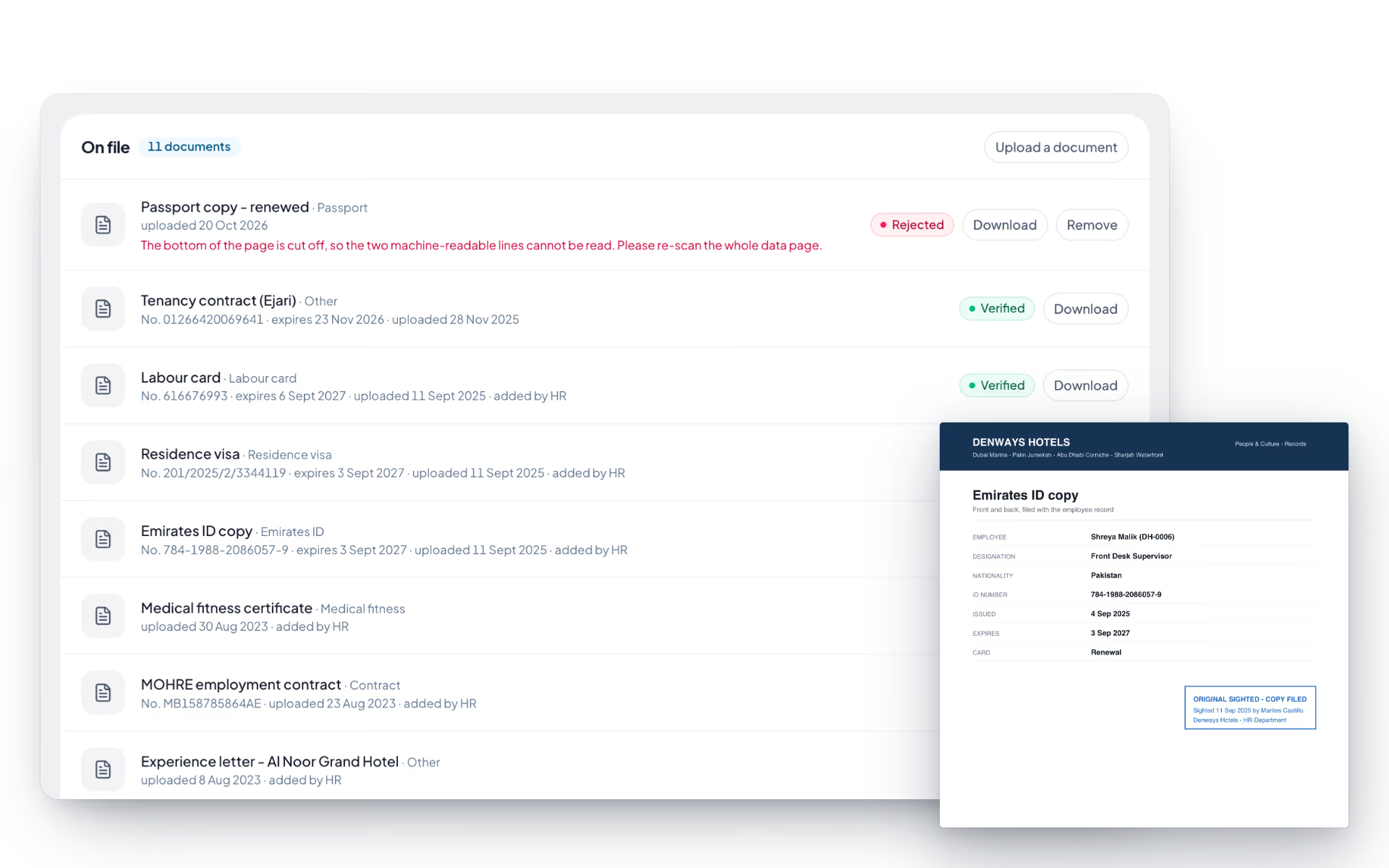
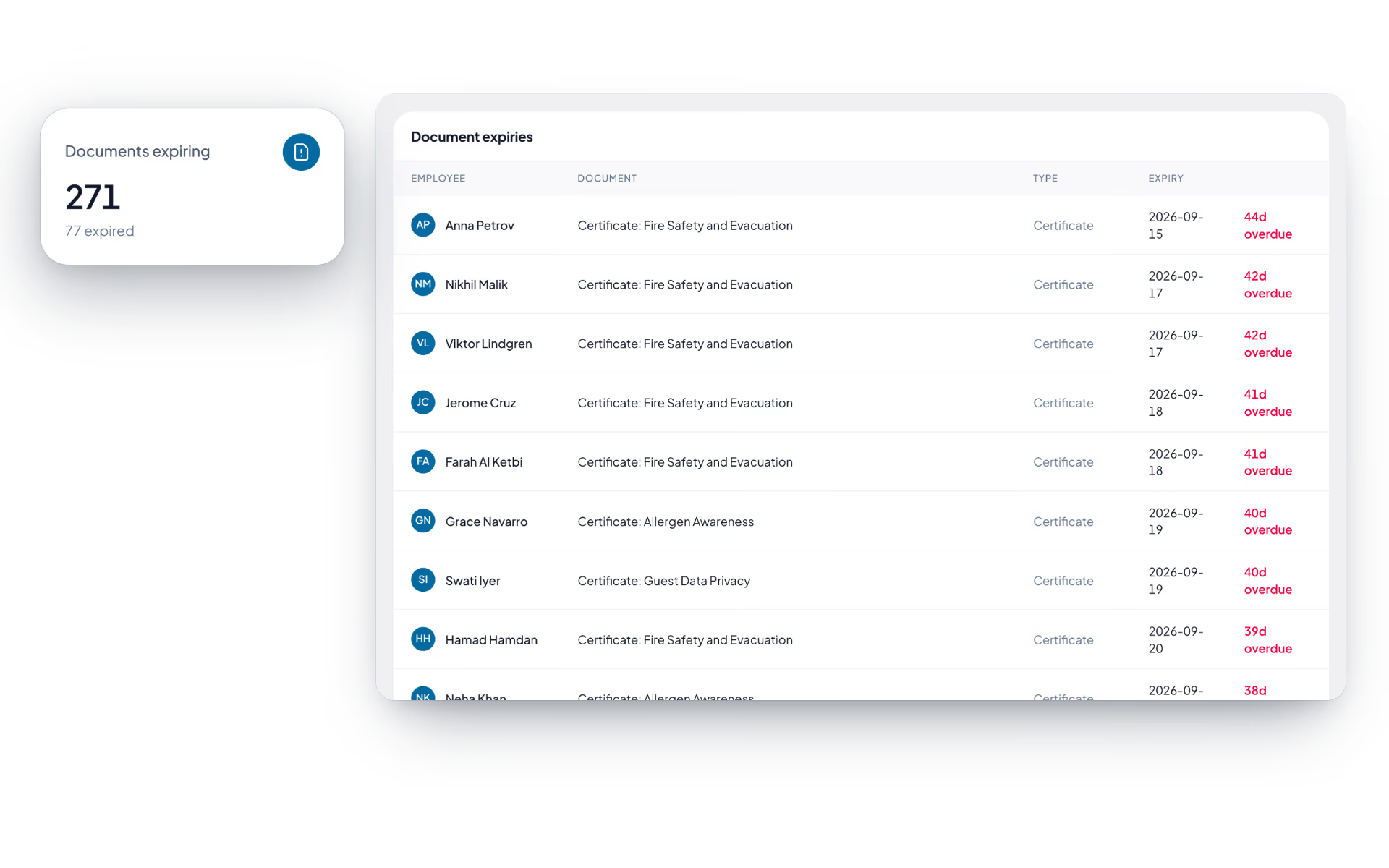
Three dates. All watched.
In the Gulf, most HR emergencies started as a renewal window somebody was not tracking.
The person
- Passport, visa and national ID
- Labour card and driving licence
- Uploaded once, versioned after that
The company
- Trade licence and insurance certificates
- Contracts and signed amendments
- Policy acknowledgements per employee
- Access limited by role
The calendar
- Dashboard of what expires next
- Staged reminders before the date
- Filtered by branch and department
The full list
What does the Documents module include?
21 features across 4 parts of the product, each one built into the application. Where one depends on a plan, a setting or a release, the note under its module says so.
My documents
Each employee's own document shelf: what is on file, what HR is waiting for, and what runs out in the next ninety days.
- Upload with the details that matter
- PDF, JPG, PNG, WebP or Word up to 15 MB, with a title, a type (passport, Emirates ID, residence visa, labour card, degree, medical fitness, contract, photo or other), the document number and the expiry date.
- Renew soon
- Everything of yours that expires within 90 days or already has: IDs, documents, your dependants' documents, medical cover and training certificates.
- What HR is asking for
- Each open request shows who asked, why, the due date and an upload button. Overdue ones are marked.
- Status on every file
- Waiting for HR, verified, or rejected with the reason HR gave.
- Your contract, readable
- Contract type, job title, dates, basic and total salary, hours a week, notice period, probation and MOHRE contract number, with every change listed and a Read and sign button when a signature is due.
Document review
HR's side of the shelf: a queue to check, a list of what was asked for and never arrived.
- Verify or reject
- Open the file and verify it, or reject it with a one-line reason the employee reads. Rejecting a document that answered a request reopens the request.
- Ask someone for a document
- Pick the person, say what you need, set a type, an optional due date and a note. They are notified at once.
- Chase list
- Everything requested and not yet received, with overdue markers and the option to cancel.
- Both sides are told
- The employee hears when a document is verified or needs another look. The person who asked hears when it is uploaded.
- On the audit log
- Every verify, reject and request is recorded with who did it.
Expiry alerts
A scan that runs at seven every morning across every date that can lapse, and tells the right people once per threshold.
- IDs and documents
- Government IDs and uploaded documents with an expiry date alert at 90, 60, 30 and 7 days.
- Dependants
- A spouse's visa, a child's Emirates ID, passports and insurance on the same 90, 60, 30 and 7 day ladder.
- Medical cover and certificates
- Insurance policies and training certificates that lapse are watched the same way.
- Trade licences and establishment cards
- Company documents alert the admins, since there is no employee to tell.
- Probation and contracts
- Probation end dates at 30, 14, 7 and 1 days. Fixed-term contract end dates at 90, 60, 30 and 7, and a contract past its end date is marked expired.
- Who hears about it
- Every admin and the workspace owner, with a link to the compliance page. For a person's own document, that person too, with a link to upload the renewal.
- No repeats
- Each threshold notifies once per record. People who have left are skipped.
Establishment documents
The company's own paperwork, held per legal entity, on the same expiry ladder as everyone's visas.
- Document types
- Trade licence, MOHRE establishment card, immigration establishment card, Chamber of Commerce membership, Ejari or tenancy contract, and other.
- Number, authority, expiry
- Each record holds the document number, who issued it and when it runs out.
- Days remaining
- Amber at thirty days or less, red once expired.
- Renewed to
- Set the new expiry date when the renewal comes through and the alert ladder starts again.
Which documents does the expiry dashboard cover?
Anything with a date on it that you store: passports, residence visas, Emirates ID, labour cards, driving licences, trade licences and insurance certificates. The dashboard shows what expires next across the workforce and can be filtered by document type, branch or department.
When do reminders go out?
In stages ahead of the expiry date, at the intervals you configure, rather than as a single alert on the day. That gives HR the lead time a visa or licence renewal needs instead of notice that it has already lapsed.
Can we move an existing filing cabinet in?
Yes. Bulk upload is there for the migration, so documents can be brought across against the right employee records rather than added one at a time. Once inside, replacing a document keeps the previous version rather than overwriting it.
Who can open somebody's passport scan?
Only the roles your administrators allow. Access is role-based and follows the same scoping as the rest of the platform, so a line manager does not see identity documents unless you have given them a role that includes it.
What can e-signature be used for?
Contracts, contract amendments and policy acknowledgements. The signed copy is filed against the employee record and the audit trail records who signed and when, which is what you need when someone later says they never received the policy.
Keep reading
Guides
Bring your whole workforce onto one platform.
See how DenwaysHR handles HR, attendance and leave across the GCC, and payroll with the WPS file in the UAE.

