

UAE payroll software with WPS and gratuity: Payroll your finance team
can trust.
A guided monthly run, from the pre-payroll checklist to the WPS file for your bank and a record of every payment. Built for the UAE.
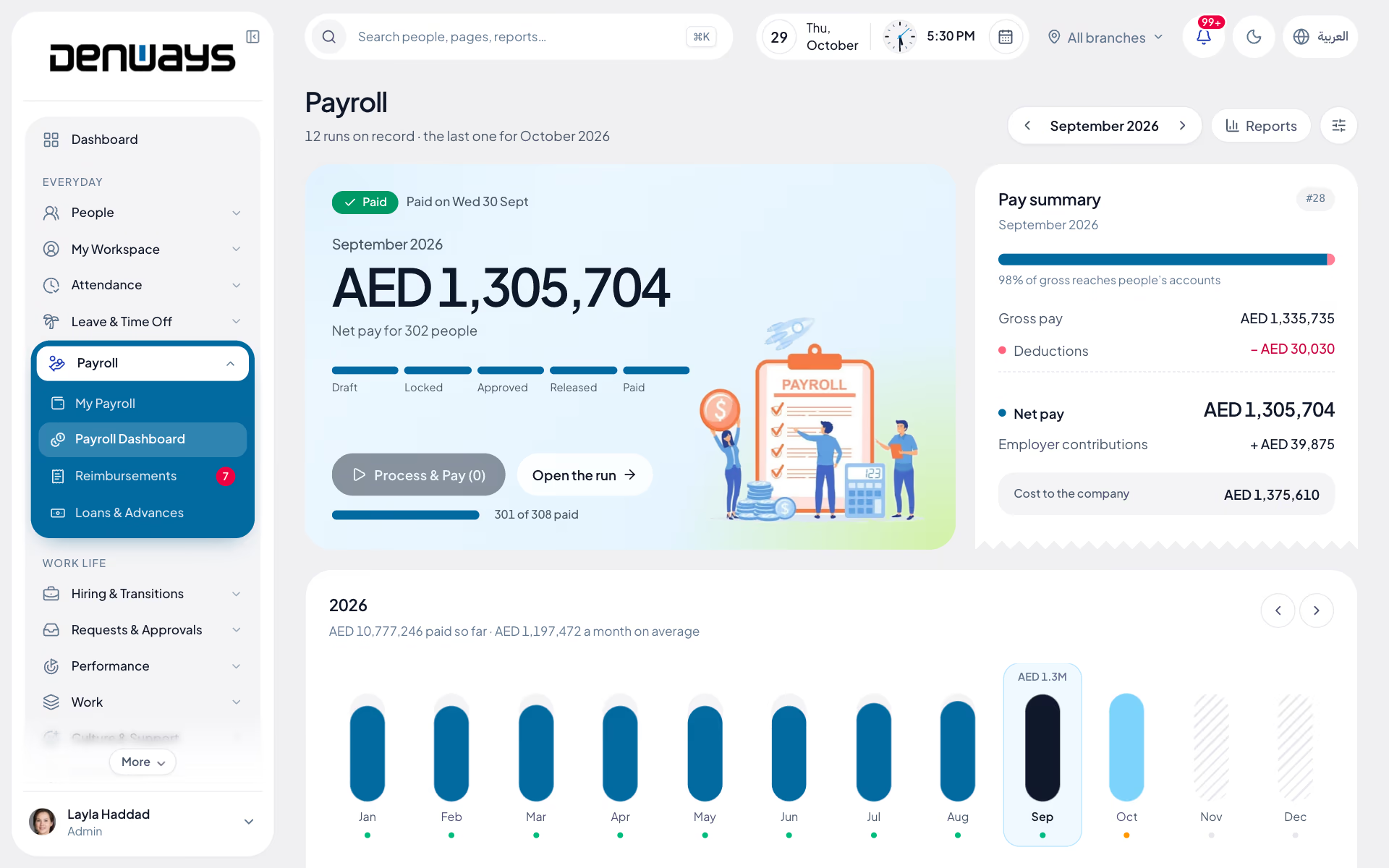
DenwaysHR payroll is the monthly payroll module of an HRMS for UAE employers. Each run follows a guided sequence, from a pre-payroll checklist through lock, approval and release to a WPS salary file (SIF) for each establishment and a record of every payment. End-of-service gratuity and its liability are handled in the same module. Statutory payroll is complete for the UAE and available for organizations registered in India. In Saudi Arabia and Qatar, DenwaysHR runs records, attendance, rosters and leave; their wage files are not built yet.
Everything payroll touches, in one engine
- WPS / SIF Files
- Gratuity & EOSB
- Salary Formula Engine
- Pay Groups
- PDF Payslips
- Pre-payroll Checklist
- Bank Detail Changes
- Reimbursements
- Salary Revisions
- Arrears
- Final Settlement
- Payroll Register
How does a payroll run work?
Every month follows the same gates. Nothing gets paid before it's checked, locked and approved, and every action lands on the audit trail.
- Pre-payroll checklist & validation
- Lock, approve and release, then record each payment
- Rules-driven salary formula engine with pay groups
- Payroll register & bank reconciliation reports
How does DenwaysHR handle WPS and UAE compliance?
Statutory rules are part of the engine, not a spreadsheet at month-end. The WPS file is built straight from the approved run, ready to upload to your bank's portal.
- WPS salary file (SIF) for each establishment
- Automatic gratuity calculation
- Missing IBANs and MOHRE codes named before the file is built
- Country rules kept in the engine, UAE first
How do employees get payslips and pay history?
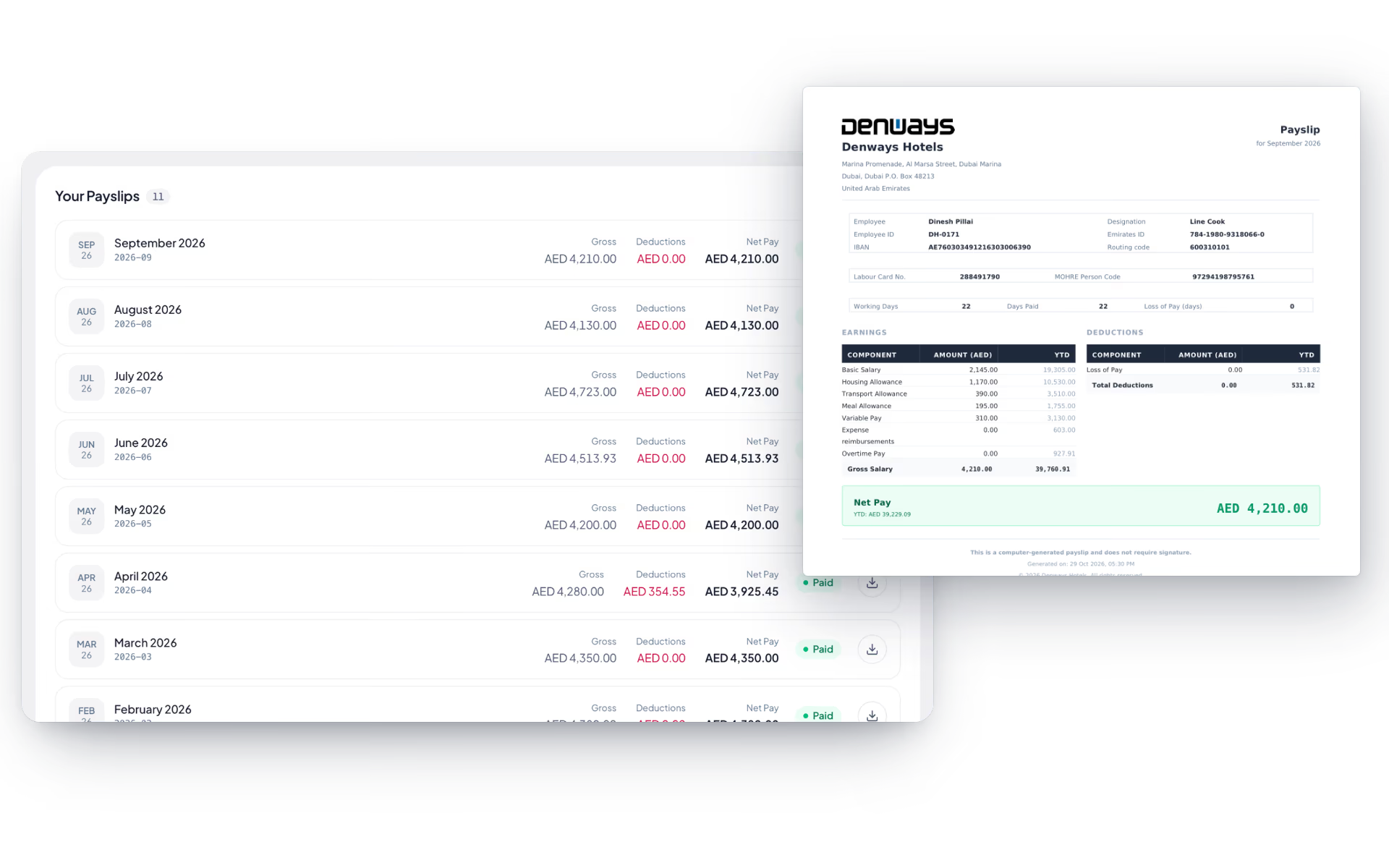
Employees get their own answers: this month's payslip, every earlier one and what they are owed at the end of service, without a single email to HR.
- Generated PDF payslips with download & history
- Year-to-date earnings and deductions on every payslip
- End-of-service figure on the employee's own page
- Bank detail changes requested with proof, approved by HR
What about reimbursements, revisions and final pay?
Everything else that changes a salary is handled in the system that runs the payroll, and paid in the same cycle.
- Reimbursements with two-stage approval, paid with salary
- Salary revision letters with approval and an effective date
- Arrears drafted for back-dated changes
- Full and final settlement behind a clearance gate
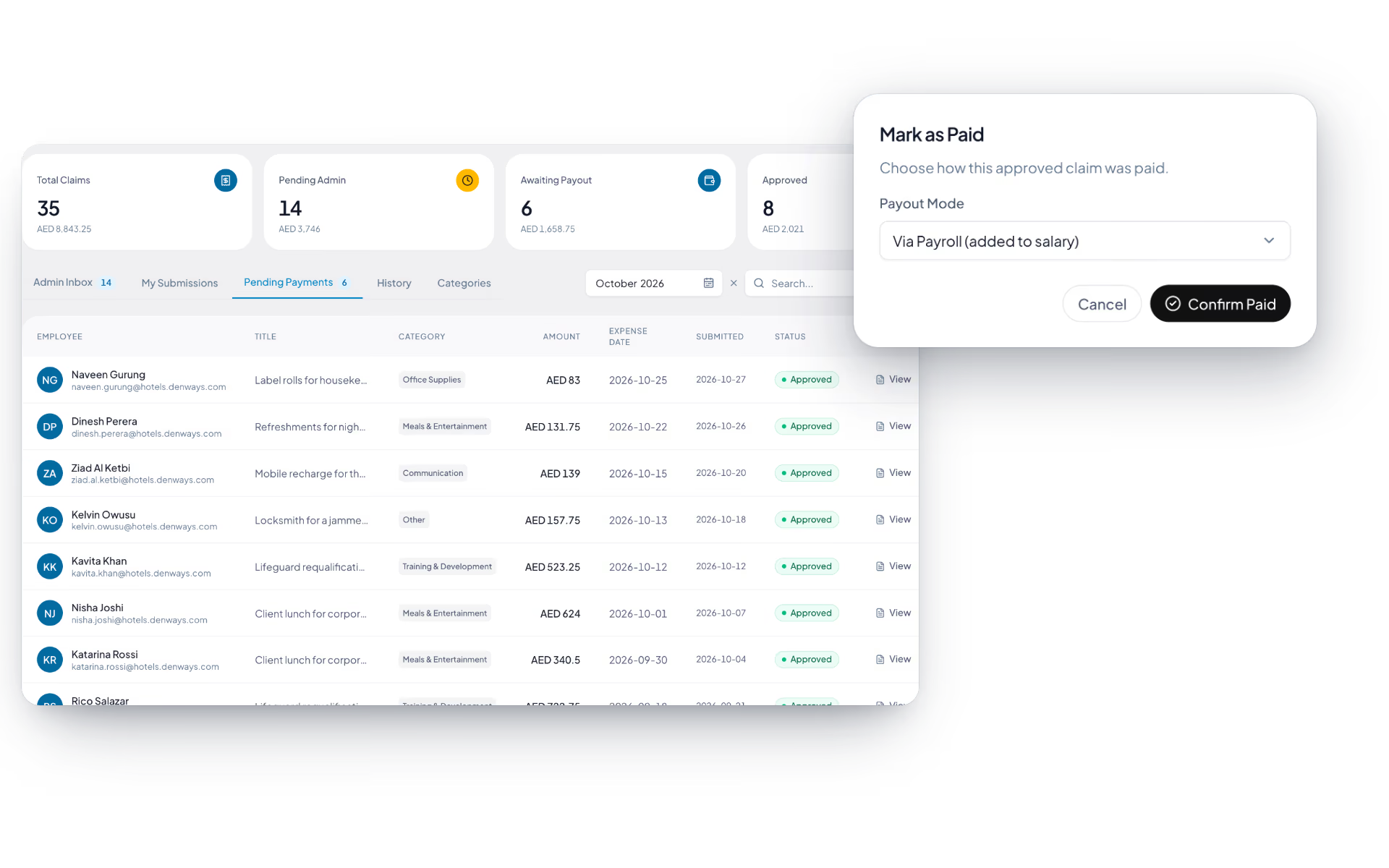
Payroll, screen by screen.
The product itself, on a demo company's data. Nothing here is drawn for the website.
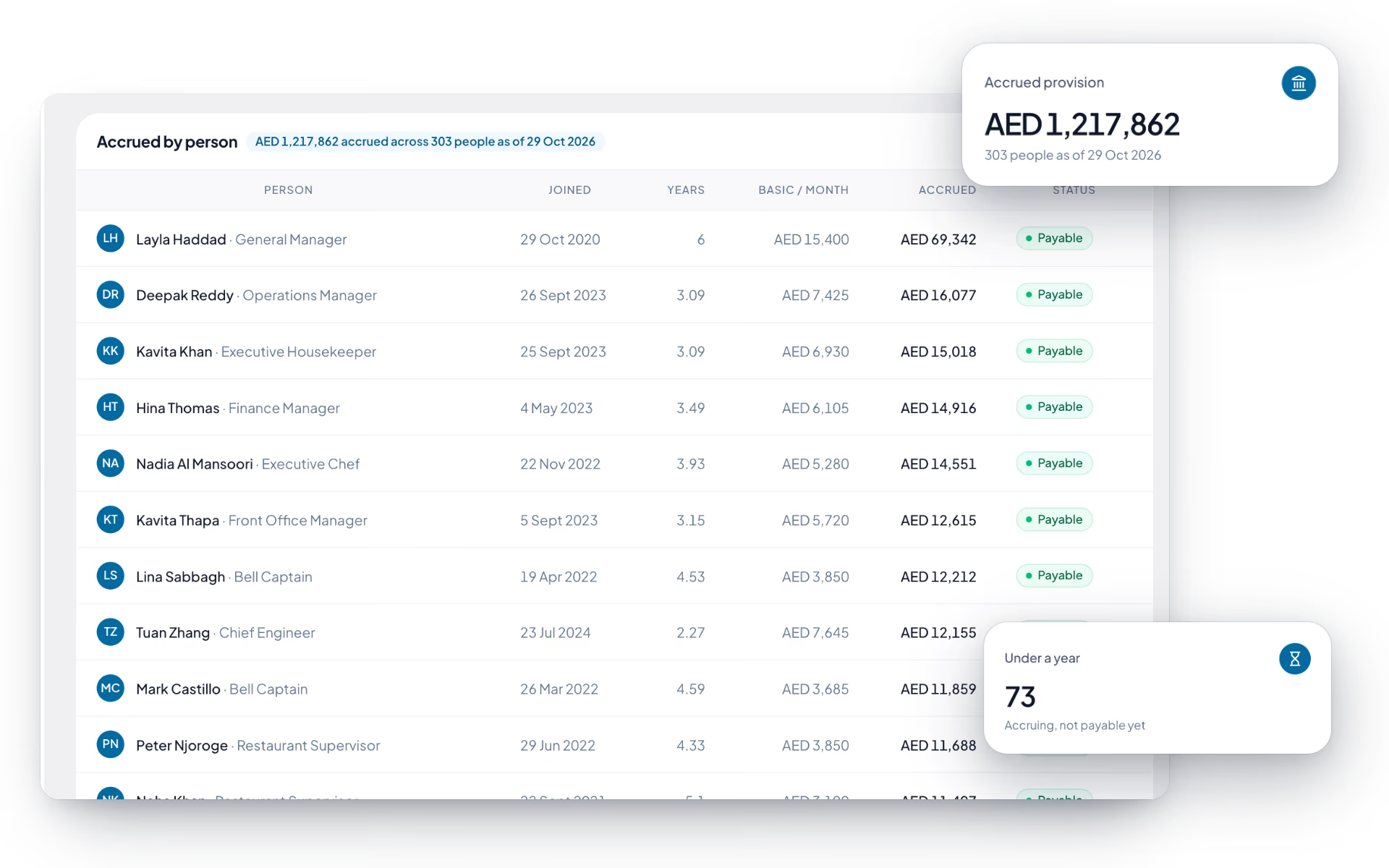
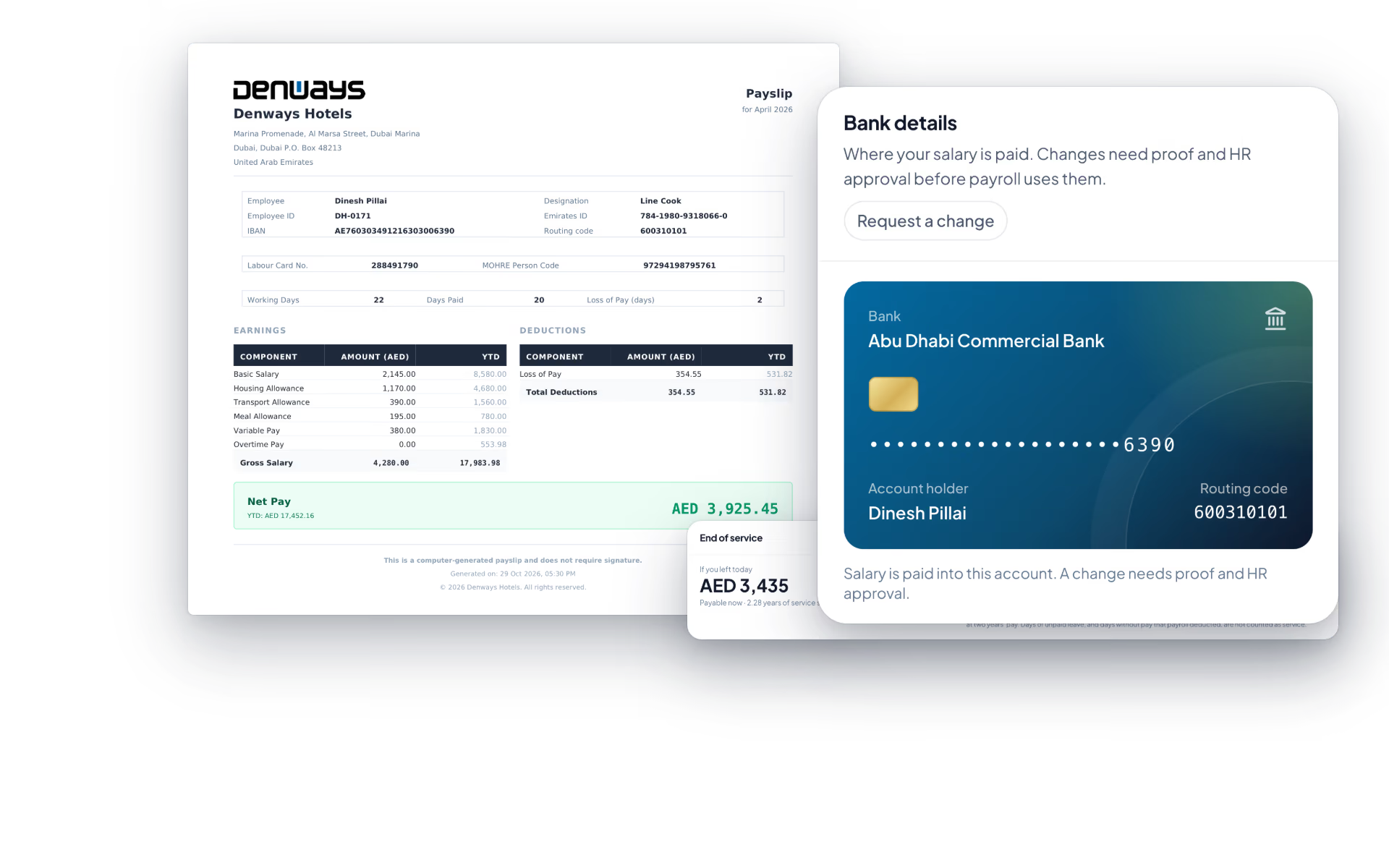
Payroll where it is finished, not where it is promised.
Statutory payroll is complete for the UAE. Teams elsewhere in the Gulf run HR, time and leave on the platform today.
United Arab Emirates
- WPS salary file (SIF) for each establishment
- End-of-service gratuity and liability
- Monthly run with lock, approval and release
Saudi Arabia and Qatar
- Records, attendance, rosters and leave
- End-of-service checked with the free calculator
- Wage files (Mudad, Qatar WPS) not built yet
India
- PF, ESI, professional tax and TDS
- Tax declarations and Form 16
- For organizations registered in India
Payroll runs on a pluggable provider architecture, so more countries can be added without reworking the core engine.
The full list
Payroll features, in full.
86 features across 14 parts of the product, each one built into the application. Where one depends on a plan, a setting or a release, the note under its module says so.
Payroll dashboard
The month on one screen: who has been processed, who has not, what it is costing and how that compares with last month.
On plans that include payroll.
- Pick the month
- A month timeline, calendar year for the UAE. It remembers where you were when you come back.
- Four numbers that matter
- Total net pay, total employees, pending processing and paid this month with a completion percentage.
- Charts
- Pay by department, the monthly payroll trend with its highest, lowest and average, and earnings against deductions.
- Needs attention
- When people are still unprocessed, the dashboard says so and puts the Process button next to the count.
- Run history
- Every run with its month, run number, headcount, net pay and status. Click one to open it.
- Branch-aware
- An admin limited to certain branches sees and acts on those branches' employees only, in every total and every file.
Pay groups
Optional groupings for payroll, when departments are not how you pay people.
On plans that include payroll.
- Create and assign
- Name a group and pick its employees from a searchable list.
- Group screen
- A card per employee with annual pay, net pay and paid or pending. Search, sort and filter, then run payroll for the selection.
- Progress per group
- The dashboard shows each group's headcount, a progress bar, total net pay and how many are paid.
- Unassigned employees
- A list of everyone not yet in a group, so nobody is left out by accident.
- Works without them
- If you never create a pay group, totals fall back to departments.
Salary components and formulas
Earnings and deductions defined once for the company, including ones calculated by a formula you write.
On plans that include payroll.
- Component types
- Earning or deduction, valued as a flat amount, a percentage of annual pay, basic or gross, or a formula.
- Formula editor
- Write an expression using IF, MAX, MIN, ROUND, ABS, FLOOR and CEIL with ordinary arithmetic, and click to insert variables such as Basic, Gross, WorkingDays, PresentDays and LOP.
- Test before you save
- Validate runs the formula and shows the result. A formula with an unknown variable is rejected instead of quietly paying zero.
- Applied on every run
- Active formula components are evaluated for each employee and appear as their own lines on the payslip.
- Switch on and off
- Deactivate a component without deleting it.
- UAE structure
- Basic as a percentage of annual pay, housing as a percentage, and the remainder as special allowance. New employees start at 40 and 50 per cent, editable per person.
The monthly run
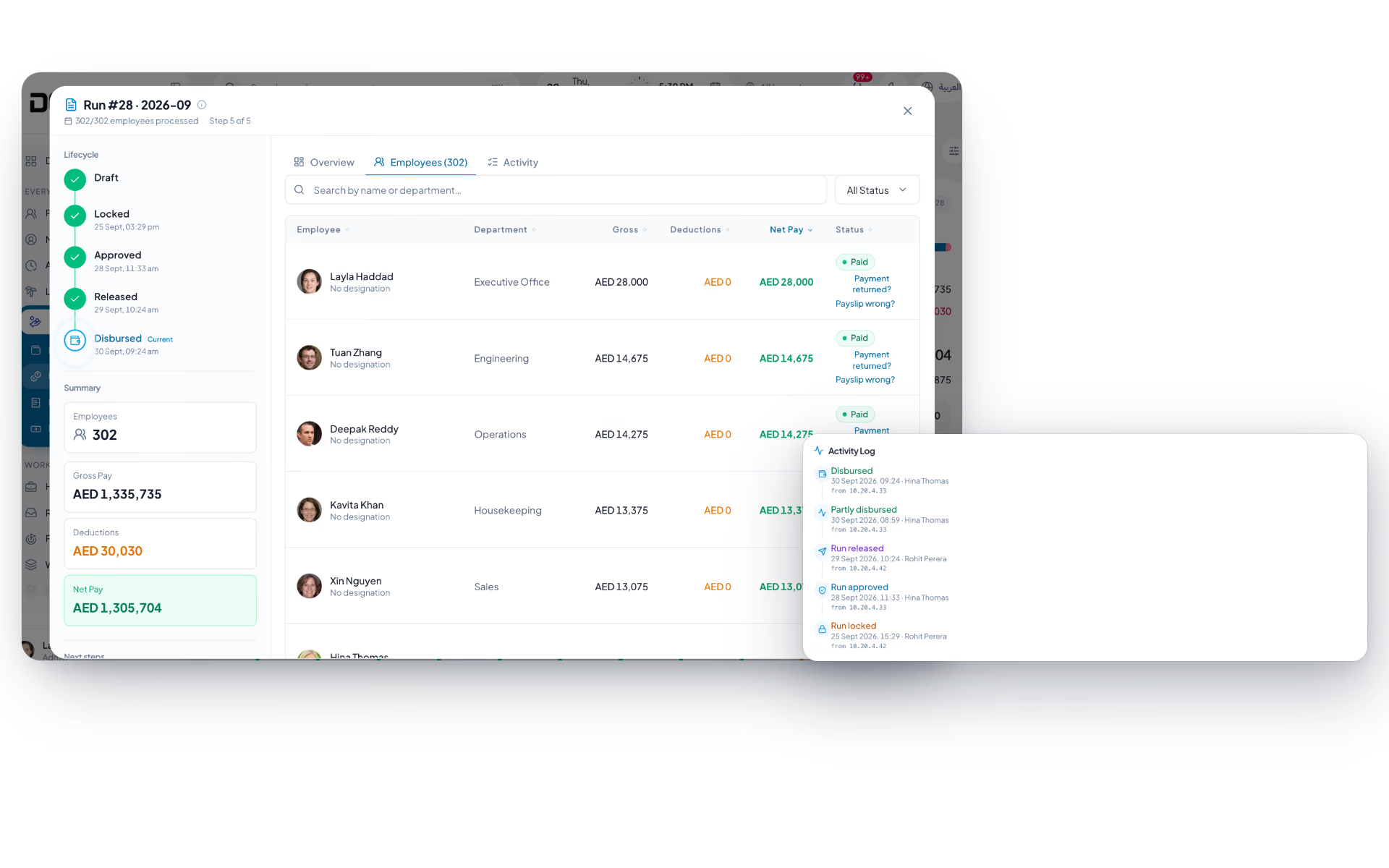
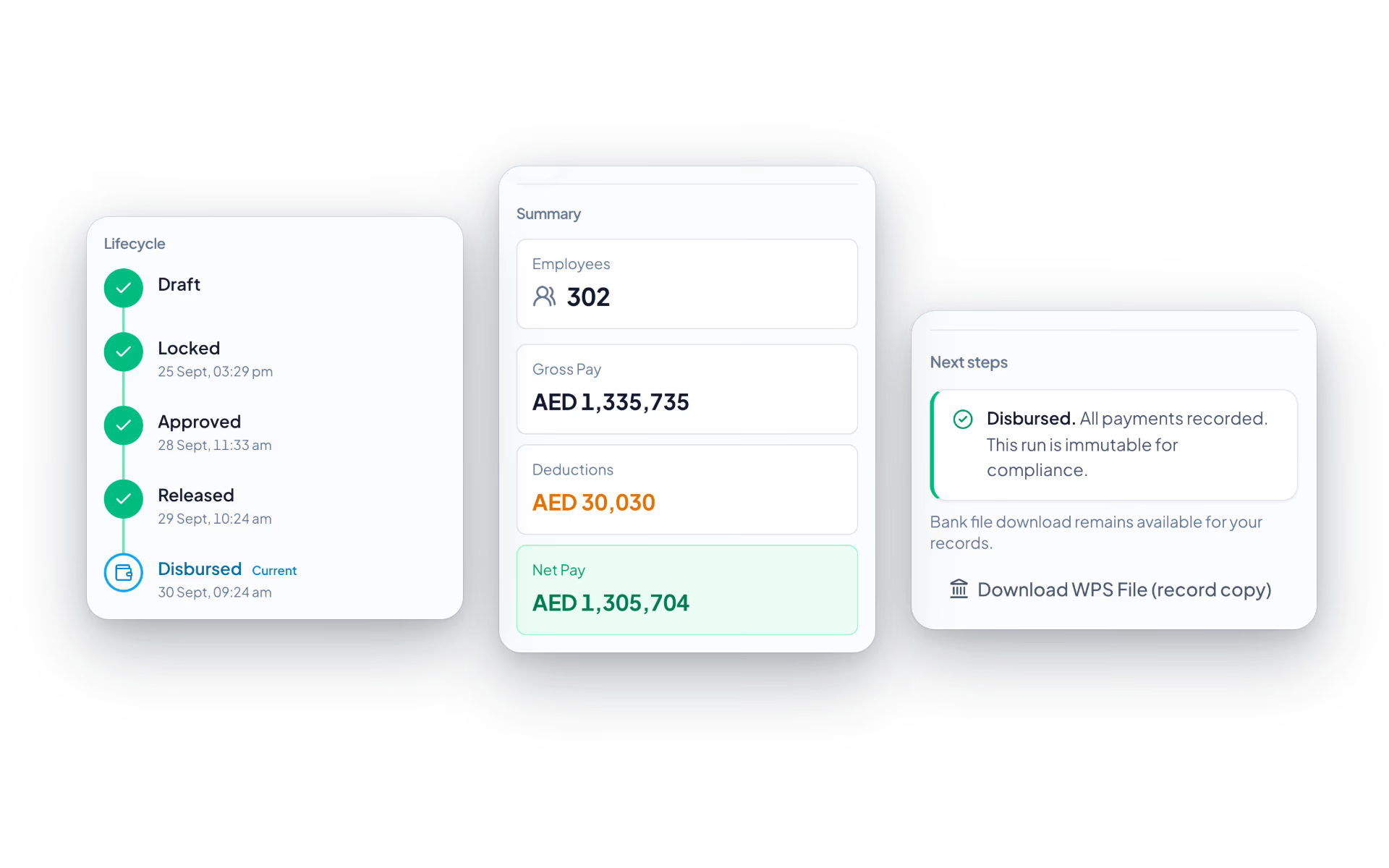
Five stages, each with a name against it: draft, locked, approved, released, disbursed.
On plans that include payroll.
- Six steps per employee
- Attendance and leave, salary structure, statutory, reimbursements, loans, then preview and process. Attendance is filled in from the month's records, and HR can override working days, days present, unpaid leave and overtime hours.
- Bulk matrix
- The same six steps tracked across a whole pay group, processed in one go with a count of what succeeded and what failed.
- Process and pay
- One confirmation processes everyone who has pay set up, locks, approves, releases and builds the bank file, then waits for you to confirm the upload.
- How pay is worked out
- Unpaid leave is monthly gross divided by the working days in a month (22 in the UAE) times the days. Overtime is the hourly rate times approved hours times your multiplier. Net pay never goes below zero.
- What gets added
- Approved overtime, approved expense claims, approved arrears and formula earnings all arrive in the run on their own.
- Leavers handled
- Anyone who left before the month, or whose final month was paid in a settlement, is left out automatically.
- Lock
- Freezes the numbers. A partial run can be locked, with the reason recorded.
- Approve by someone else
- The person who locked a run cannot approve it while anyone else holds payroll rights. With a sign-off chain configured, each approver signs in turn.
- Unlock with a reason
- A locked run can go back to draft with a written reason. Signatures collected so far are cancelled and the unlock is logged.
- Release
- Every employee in the run is told their payslip is ready, with a link to it.
- Disburse
- Record payment by bank transfer, cash or cheque. If any net pay changed after the bank file was generated, disbursing is refused until the file is rebuilt.
- Completeness card
- Expected against processed, the missing people by name, and one button to process the rest.
- Missing bank details, fixed in place
- Add an employee's IBAN and routing code from the run screen instead of leaving it to find their record.
- Activity trail
- Locked, unlocked, approved, bank file generated, disbursed: who and when.
- Password for the big steps
- Approving and disbursing can require the password again, however recently you signed in.
WPS salary file
The SIF file your bank's WPS portal asks for, built from the run you just approved.
For organizations registered in the UAE, on plans that include payroll.
- Employer identity
- MOHRE employer ID and bank routing code, set once for the company or separately for each establishment.
- Per establishment
- One file carries one employer. Payslips from two trade licences are never mixed into the same file.
- Standard layout
- An employee record for each person, then the employer trailer, named with the employer ID and a timestamp in the .SIF format.
- Missing data is named
- Anyone without a MOHRE person code, IBAN or routing code is listed. The file is refused unless you confirm a partial one, with a warning that it under-reports salaries.
- Checked before you start
- The pre-payroll checklist flags missing MOHRE codes and missing employer identity before the run is locked.
- A copy is kept
- Every generated file is stored with exactly which payslips and amounts it carried, and stays downloadable after disbursement.
End-of-service gratuity
What you owe each person if they left today, and what the whole company has accrued.
For organizations registered in the UAE, on plans that include payroll.
- The UAE formula
- 21 days of basic pay for each of the first five years and 30 days for each year after, on a daily wage of basic divided by 30. Nothing under one year, capped at two years' pay.
- Exact service
- Counted to the day and never rounded up, so nobody crosses the one-year or five-year line early.
- Liability page
- Accrued provision, payable today, people under a year and people with missing pay data, with a row per person.
- On the employee's own page
- "If you left today", years of service, and the dates the benefit becomes payable and the rate rises, each with the amount.
- On the payslip
- The monthly accrual prints as its own line.
- Nominee reminder
- The card shows whether a nominee is on file and links to add one.
Payslips and My Payroll
A PDF payslip with your logo on it, and a page where each employee finds every one they have ever had.
On plans that include payroll.
- Payslip PDF
- Logo, employee details, working days, days paid and unpaid days, then earnings and deductions with year-to-date columns. Only lines with an amount are printed.
- UAE identity lines
- Emirates ID, labour card number, MOHRE person code, IBAN, housing and transport allowance and end-of-service accrual.
- My Payroll
- Gross, deductions and net totals, months paid, and a table of payslips with a download for each. Filter by year.
- Own payslip only
- An employee opens their own. Anyone else needs payroll rights and has to be able to see that person's branch.
Bank detail changes
The request fraudsters love to fake, handled with proof, a side-by-side comparison and an approval.
On plans that include payroll.
- Employee asks
- New bank, account holder, IBAN, routing code and a proof file such as a bank letter. A request without proof is flagged.
- Old account stays live
- Payroll keeps paying the existing account until HR approves the change.
- Side by side
- HR sees what payroll holds against what was asked for, field by field, and opens the proof.
- HR only
- Managers are deliberately kept out of this queue. Declining needs a reason the employee reads.
- Withdraw
- The employee can pull back a pending request and sees the history of every one they have made.
Pre-payroll checklist
Run it before you lock, and find the missing IBAN now instead of when the bank rejects the file.
On plans that include payroll.
- What it checks
- Missing bank accounts, missing pay setup, missing attendance, and for the UAE missing MOHRE person codes and employer identity.
- Run sanity
- Employees in the run, net pay calculated, deductions valid, no negative salaries.
- Results
- Passed, failed, warnings and pending, with a banner that says whether you can proceed.
- Per-employee failures
- Each failed check with its message. Record a resolution note, or fix the cause and it clears on the next validation.
Payroll reports
The register your accountant asks for, by month and department.
On plans that include payroll.
- Payroll register
- Employee, department, designation, bank details, working, present and unpaid days, every earning and deduction, net pay, payment status and method, with totals.
- Payment status report
- Each payslip amount against whether it has been paid, how, and under which reference, with paid and pending totals.
- Filter and export
- By month and department, shown on screen and exported as CSV or JSON.
Salary revisions
An increment as a letter, an approval and a date, with the back pay worked out for you.
On plans that include payroll.
- Revision letter
- Pick the employee, the new annual pay, the type (annual increment, promotion, correction, other), the effective date and the reason. A PDF letter is produced with current against revised figures.
- Approval first
- With an approval rule for revisions, the letter is held until the approver signs off, and the employee hears nothing before that.
- Applies on the date
- A revision effective today applies at once. A future one waits, and a nightly job applies it on the day.
- Back-dated? Arrears are drafted
- For every month already paid at the old rate, a draft arrear is created, with the first month pro-rated by days.
- From a performance review
- Finalising a review with a new pay figure drafts the revision for payroll to complete.
- Stale letters are refused
- A letter cannot be accepted if the employee's pay has changed since it was written.
Arrears
Money owed for a month that has already been paid, corrected in a month that has not.
On plans that include payroll.
- Create an arrear
- The month being corrected, the month it will be paid in, the type and the original and revised figures.
- Detect pay changes
- For one employee, look back six months and list every month paid at a different rate from today's, with the difference.
- Approve into the run
- An approved arrear is added to its payment month automatically. Approval is refused if that month is already locked.
- One per month
- A person can have one active arrear for any given month, which stops the same correction being paid twice.
Full and final settlement
The last payment, calculated from the record and blocked until the laptop is back.
On plans that include payroll.
- What goes in
- Exit type, resignation date, last working day, notice period, days served and leave balance.
- What is calculated
- Final month salary to the last working day, leave encashment, gratuity by the country formula and any comp-off balance at the same day rate.
- What comes off
- Notice shortfall, outstanding loans and advances, and unreturned assets at replacement value.
- Service is verified
- The years of service you type must match the figure computed from the joining date.
- Clearance gate
- Approval is refused while the offboarding checklist has open items, an asset is unreturned or a started handover has not been accepted.
- No double pay
- Once a settlement is paid, the monthly run leaves that person's final month alone.
- Record the payment
- Bank transfer, cash or cheque with a reference. Nobody approves their own.
India payroll
For teams with an entity in India: the statutory deductions, declarations and filings that payroll there requires.
For organizations registered in India, on plans that include payroll. Filings are files you upload to the government portals.
- Statutory deductions
- Provident fund, ESI, professional tax by state and income tax under either regime, each switchable per pay group.
- Setup wizard
- Organization defaults, employees and pay, compliance toggles, statutory registration numbers, pay schedule and a test run.
- Salary templates
- Named structures with basic, HRA and allowance amounts, a preview against any annual figure, and department-level defaults.
- Tax declarations
- Employees declare under each section, upload proofs and submit. Form 12BB downloads as a PDF.
- Proof review
- HR approves or rejects each proof with a reason, or bulk-approves one employee's pending proofs.
- Tax simulator
- Old regime against new, monthly take-home, and what-if scenarios across several pay figures.
- Loans and advances
- Request, approve, and the instalment is deducted each month until the balance is nil.
- Statutory filings
- PF ECR, ESI challan, Form 24Q, Form 12BA, professional tax and labour welfare fund returns, and Form 16, generated per run.
- Registers
- PF, ESI, professional tax and TDS registers alongside the payroll register.
Questions
Payroll questions, answered.
Which countries does DenwaysHR payroll support?
Payroll is complete for the UAE: the monthly run produces the WPS salary file and end-of-service gratuity. There is also a payroll engine for organizations registered in India. Saudi Arabia and Qatar are not built yet; there DenwaysHR covers employee records, attendance, rosters and leave. Country rules sit in their own layer of the engine, so a further country is added without reworking the run.
How does WPS compliance work?
For the UAE, the WPS salary file (SIF) is generated directly from the approved payroll run, for each establishment, and names any employee whose IBAN or MOHRE code is missing. No exporting to spreadsheets, no re-keying salary data before submission. Wage files for Saudi Arabia and Qatar are not built yet.
How is end-of-service gratuity calculated?
For the UAE, automatically: 21 days of basic pay for each of the first five years of service and 30 days for each year after, counted to the day from the joining date. The amount flows straight into full & final settlement when an employee exits.
What does the monthly payroll run look like?
Five stages, every month: draft, locked, approved, released and disbursed, with a pre-payroll checklist before the lock. The run is locked before approval so nothing changes underneath the approver, and every action lands on the audit trail.
Does DenwaysHR send the salaries to the bank?
No. It builds the WPS salary file (SIF) from the approved run; you upload that file to your bank's WPS portal and the bank moves the money. Back in DenwaysHR you confirm the upload, and the run records each payment as bank transfer, cash or cheque. If a net pay changes after the file was built, the run refuses to be marked as paid until the file is rebuilt.
Can employees get their payslips themselves?
Yes. Every employee has a My Payroll page with each PDF payslip they have ever had, their totals for the year and their end-of-service figure, without emailing HR. Tax declarations, proof upload and the take-home simulator belong to the India payroll, for organizations registered there.
What about expenses, salary changes and loans?
Reimbursements go through receipt upload and two-stage approval, then are paid with the next salary. Salary revisions generate letters employees accept or reject, with arrears detected and paid in the next run. Loans and advances with automatic repayment are part of the India payroll today and are not yet available to UAE organizations.
Keep reading
Guides
Bring your whole workforce onto one platform.
See how DenwaysHR handles HR, attendance and leave across the GCC, and payroll with the WPS file in the UAE.

