

Enterprise HRMS for multi-entity groups: Every entity in the
group, on one system of record.
Multi-entity and multi-branch structure under a single account, with branch-scoped access, consolidated group reporting, database-level isolation and an audit trail behind every sensitive change.
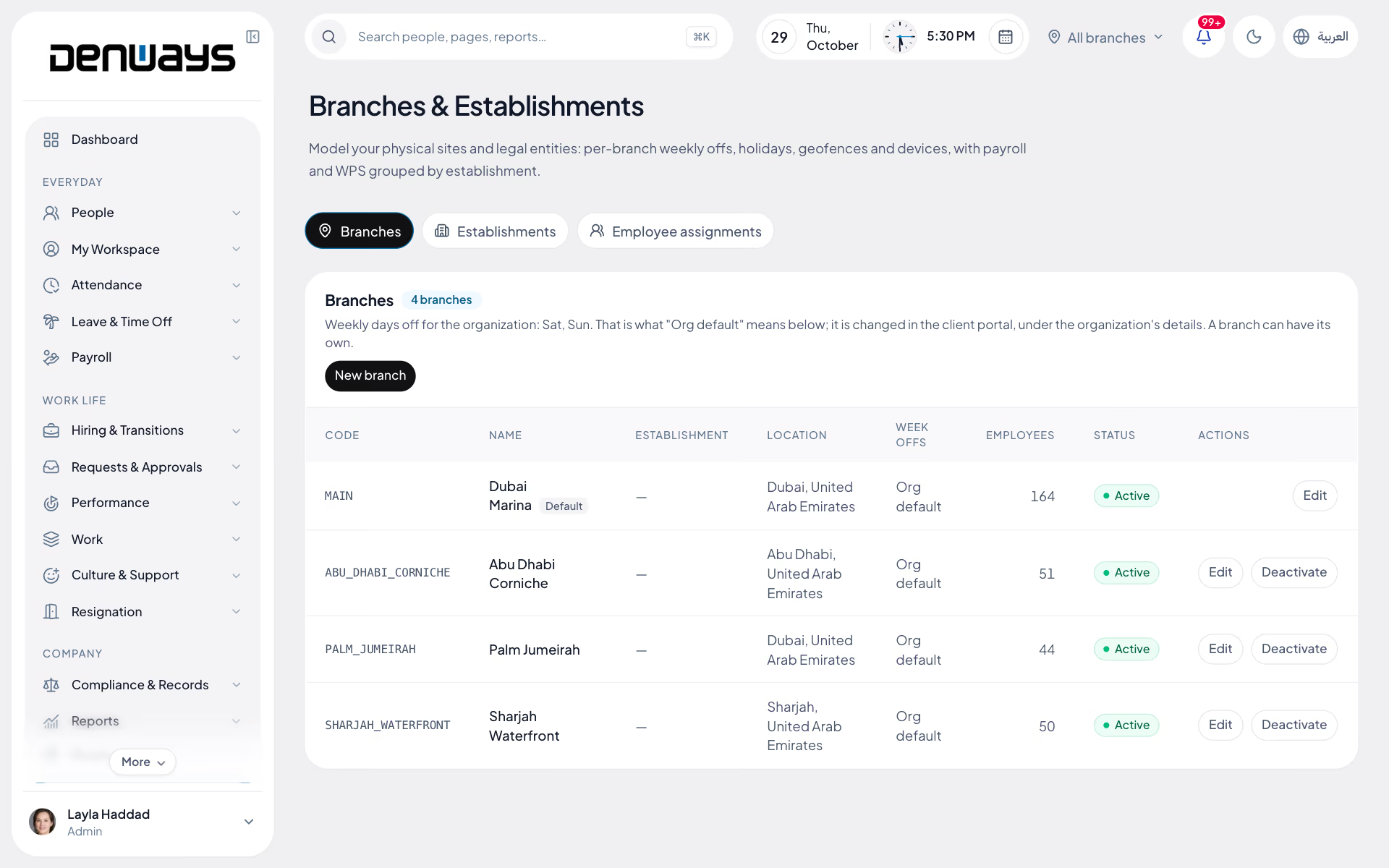
Multiple entities, many branches, one account
- Multi-Entity Structure
- Multi-Branch Access
- Custom Roles
- Consolidated Reporting
- Tenant Isolation
- Audit Logging
- White-Label Branding
- Named Contact
Enterprise
Enterprise, in 3 parts.
3 parts. Swipe across.Keep scrolling.
Several entities and branches, still one account
A group with a trading company, a contracting arm and a free-zone entity does not want three logins and three versions of headcount. Each entity keeps its own policies, calendars and payroll rules inside a single organization.
- Entities, branches and departments configured under one account
- Separate shift, leave and salary policies per entity
- Country payroll rules applied per entity, not per account
- One employee master behind every entity in the group

People see the part of the group they are responsible for
A branch manager in Sharjah has no reason to open a Riyadh payroll register. Access is role-based and group-scoped, so what somebody sees follows the position they hold rather than the module they opened.
- Super Admin, Admin, Manager and Employee roles as standard
- Custom roles and permission groups for larger structures
- Branch managers scoped to their own branch, managers to their line
- Checks enforced at the API route and again in the business logic

The group number, without a consolidation exercise
Headcount, attendance and payroll cost roll up across entities because they were never separate systems to begin with. Finance gets the consolidated figure and each entity still sees its own.
- Headcount and payroll cost consolidated across entities
- Entity, branch and department breakdowns from the same records
- CSV export for finance on the plans that include it
- Role changes, salary changes and disbursement on the audit trail

Enterprise, screen by screen.
The product itself, on a demo company's data. Nothing here is drawn for the website.
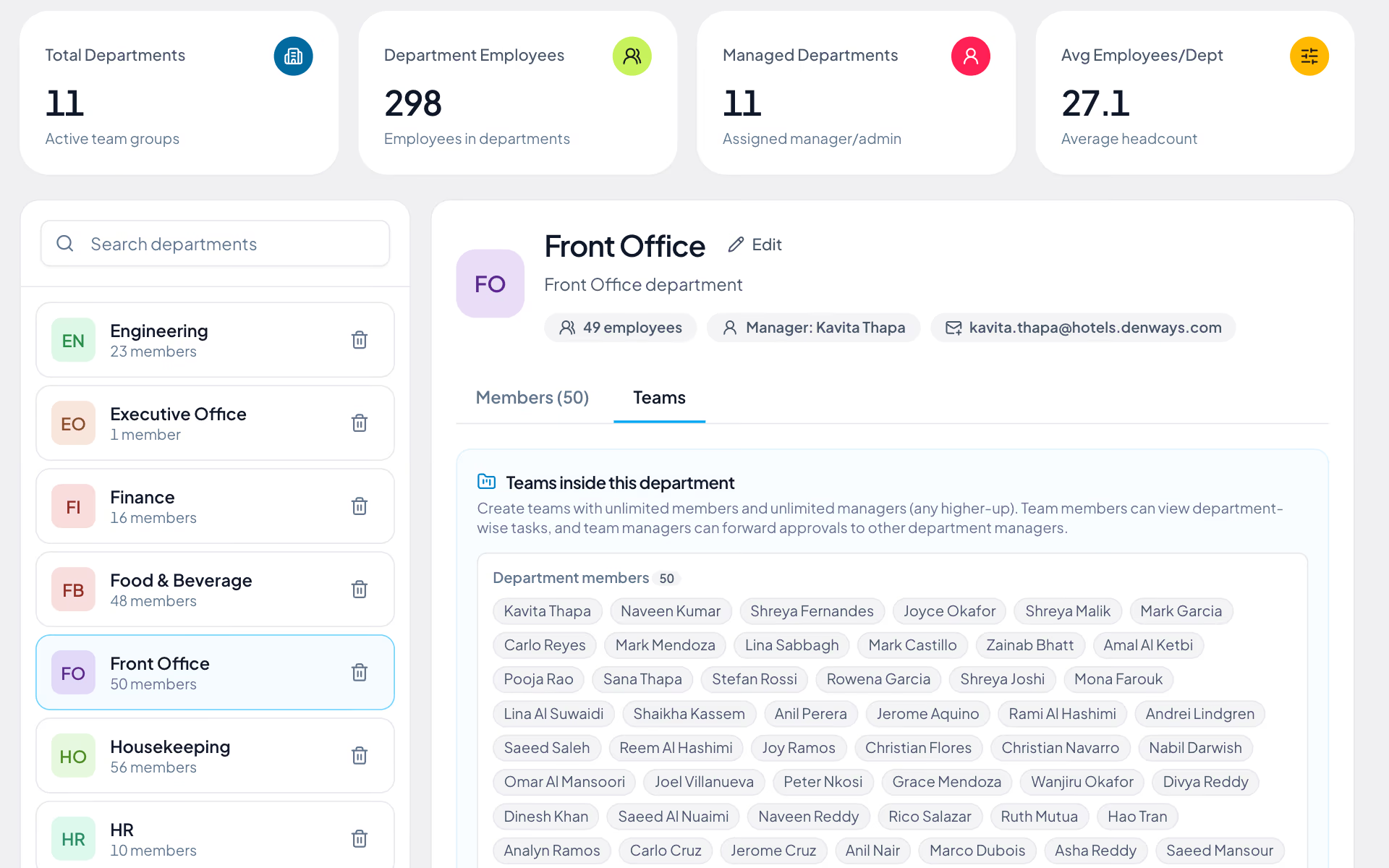
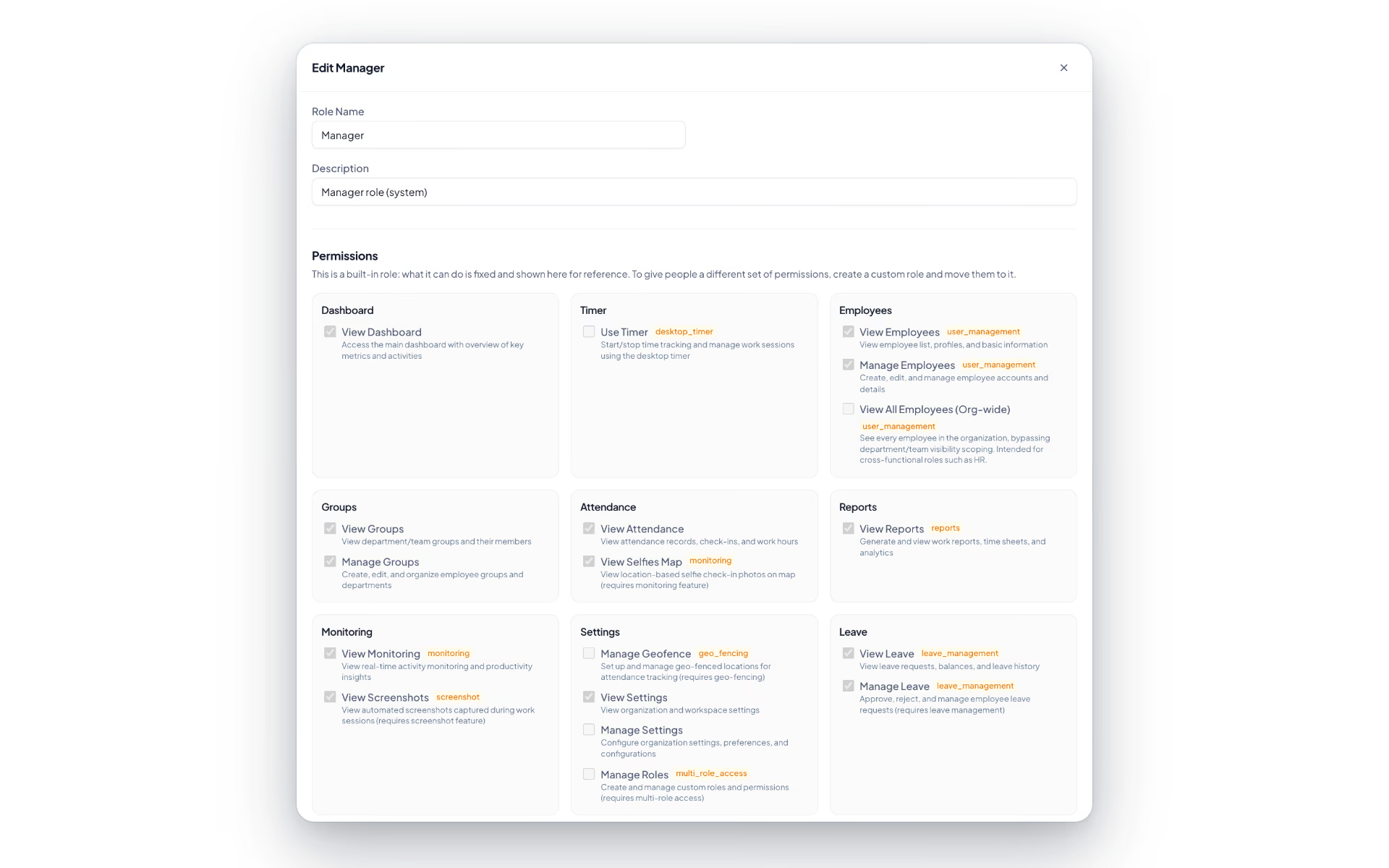
One group. Three things it has to survive.
Large organizations rarely choose a platform on features. They choose on whether structure, access and procurement can be answered without a workaround.
The group structure
- Entities and branches under one account
- One employee master across the group
- Consolidated headcount and payroll cost
- Transfers between branches without a new record
The IT function
- Custom roles and permission groups
- Tenant isolation enforced in the database
- Audit logging on every sensitive action
- Sign-on and directory requirements scoped before contract
The buying process
- A named point of contact on Enterprise
- Security questionnaires answered directly
- Documentation for legal and procurement review
The full list
What does the Enterprise module include?
14 features across 3 parts of the product, each one built into the application. Where one depends on a plan, a setting or a release, the note under its module says so.
Branches
Each site with its own weekend, holidays, shifts, geofence and devices, inside one account.
- Branch details
- Code, name, establishment, timezone, country, city, address and weekly off days.
- Inherit or override
- A branch takes the organization's settings unless it sets its own: off days, holidays, shifts, geofences, devices, timezone, office start and late-after time.
- Default branch
- Created for you. Anyone never assigned belongs to it.
- Transfers with a date
- Move a person to another branch from an effective date and keep the history. For payroll, the branch on the last day of the month owns the month.
- Three levels of visibility
- Organization-wide, assigned branch only, or a list of branches, which is what a regional manager needs.
- Branch switcher
- A control in the header narrows every page to one branch. It never widens what you may see.
Establishments
The legal employers behind the branches: one per trade licence, each with its own WPS identity.
- Legal details
- Name, legal name, registration and trade licence numbers, WPS employer ID, MOL establishment ID, bank routing code, country and currency.
- Payroll groups by it
- Payroll and wage files group by establishment. A branch with none falls back to the organization's identifiers.
- Its own documents
- Trade licence, establishment cards and tenancy contract, each with an expiry on the alert ladder.
Directory provisioning
Create and deactivate accounts from Microsoft Entra ID or Okta over SCIM 2.0.
- User provisioning
- List, find by username, read, create, replace, update and delete users.
- Deactivate means out
- Deactivating someone in your directory marks them as exited and ends every session they have, in the same request.
- Always an employee
- A provisioned account is never a manager or an admin, and the workspace owner cannot be changed through SCIM.
- Seat-aware
- Creating or reactivating takes a seat. With none free, the directory gets a clear refusal.
- Tokens
- Up to five named tokens, each shown once, with its last-used time and a revoke button.
We run several legal entities. Does each one need its own account?
No. Entities, branches and departments sit inside one organization. Each has its own shift, leave and salary policies and its own country payroll rules. Group reporting reads across them all, so headcount and payroll cost add up without anyone rebuilding a spreadsheet at month-end.
How do we stop a branch manager seeing the whole group?
Access depends on role and group. A branch manager sees their own branch and a line manager their own reporting line. The API route and the business logic each enforce this separately. Underneath the application, PostgreSQL Row-Level Security keeps one organization's data out of reach of another's.
Do you support single sign-on and directory sync?
Raise both in the scoping conversation before you sign anything. Access today is role-based, with a per-organization password policy, HTTP-only session cookies and rate-limited sign-in endpoints. We will tell you in writing what we can support against your directory, so nothing has to be discovered during implementation.
Our procurement team will send a security questionnaire. Who answers it?
We do, directly. Enterprise accounts have a named contact who owns that thread through to signature. Tenant isolation, encrypted bank details and government IDs, audit logging, antivirus scanning on uploads and encrypted, restore-tested backups are all in production today. We do not hold a formal ISO or SOC certification and will not claim one.
What does Enterprise add over Professional Payroll?
White-label branding on your own subdomain, and custom API work agreed in the contract. Professional Payroll already includes payroll, workforce monitoring, advanced analytics and a dedicated account manager. Pricing is quoted per organization, from your headcount, your branches and the modules you switch on.
Keep reading
Bring your whole workforce onto one platform.
See how DenwaysHR handles HR, attendance and leave across the GCC, and payroll with the WPS file in the UAE.

