

Onboarding, probation and offboarding software: Joining, moving up
and leaving, each with a paper trail.
Pre-boarding tasks, onboarding and offboarding checklists, probation decisions, promotions with an effective date, contracts sent for signature, and an exit that cannot be paid out until it is cleared.
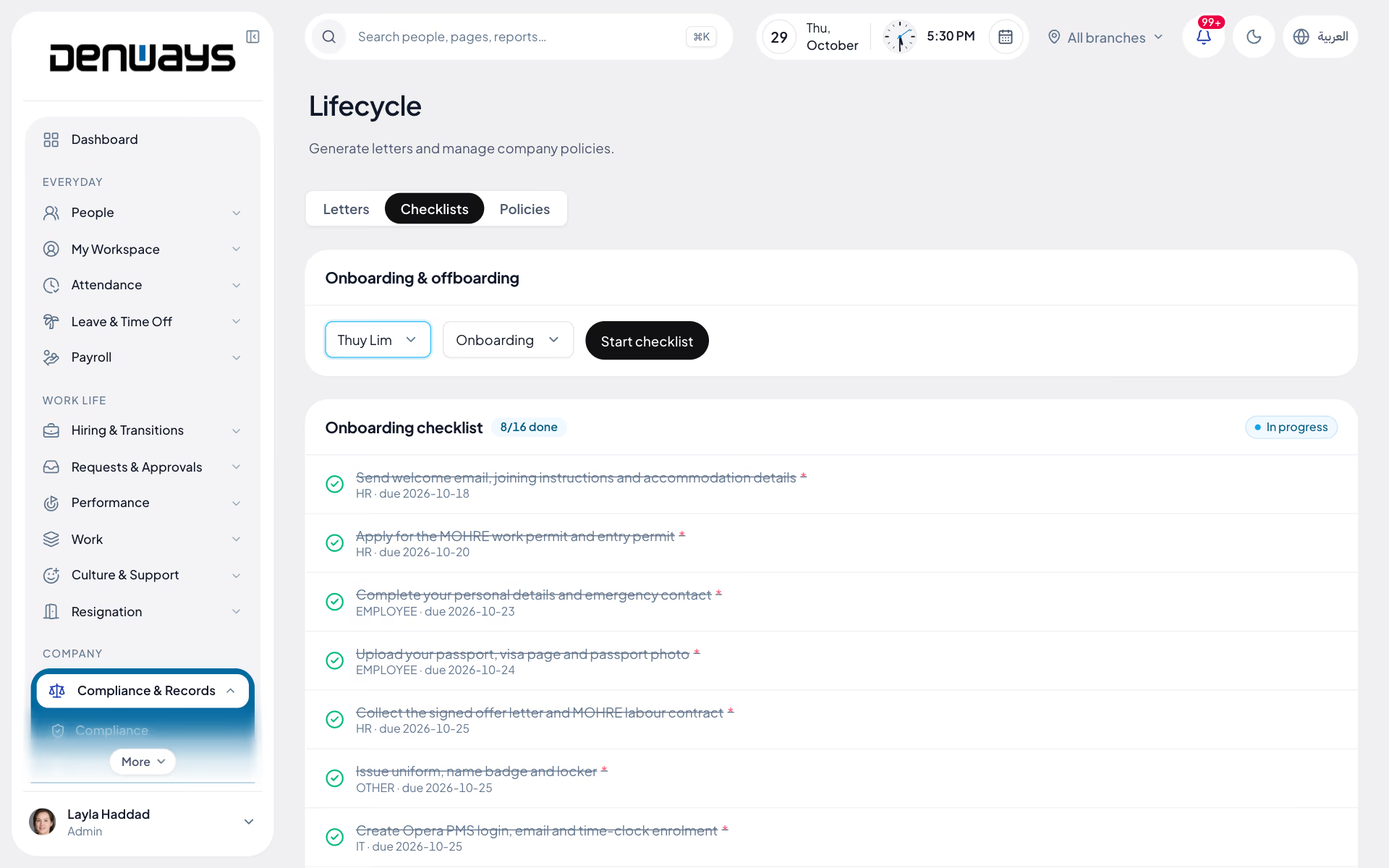
From offer accepted to final settlement
- Pre-boarding
- Onboarding Checklists
- Probation Reviews
- Position Changes
- Contract Amendments
- Signing Links
- Policy Acknowledgement
- Resignations
- Exit Handover
- Exit Clearance
Lifecycle
Lifecycle, in 4 parts.
4 parts. Swipe across.Keep scrolling.
The first week is settled before day one
A hire in recruitment starts an onboarding checklist dated from the joining date. The new joiner sees their own tasks; HR, IT, finance and the manager see theirs.
- Ten built-in steps, from three days before joining to two days after
- The joiner's own list: details, document copies, bank account, policies
- Every step owned by a function and due on a date
- Your own templates, with offsets up to a year either side

Probation ends on a date, not when someone remembers
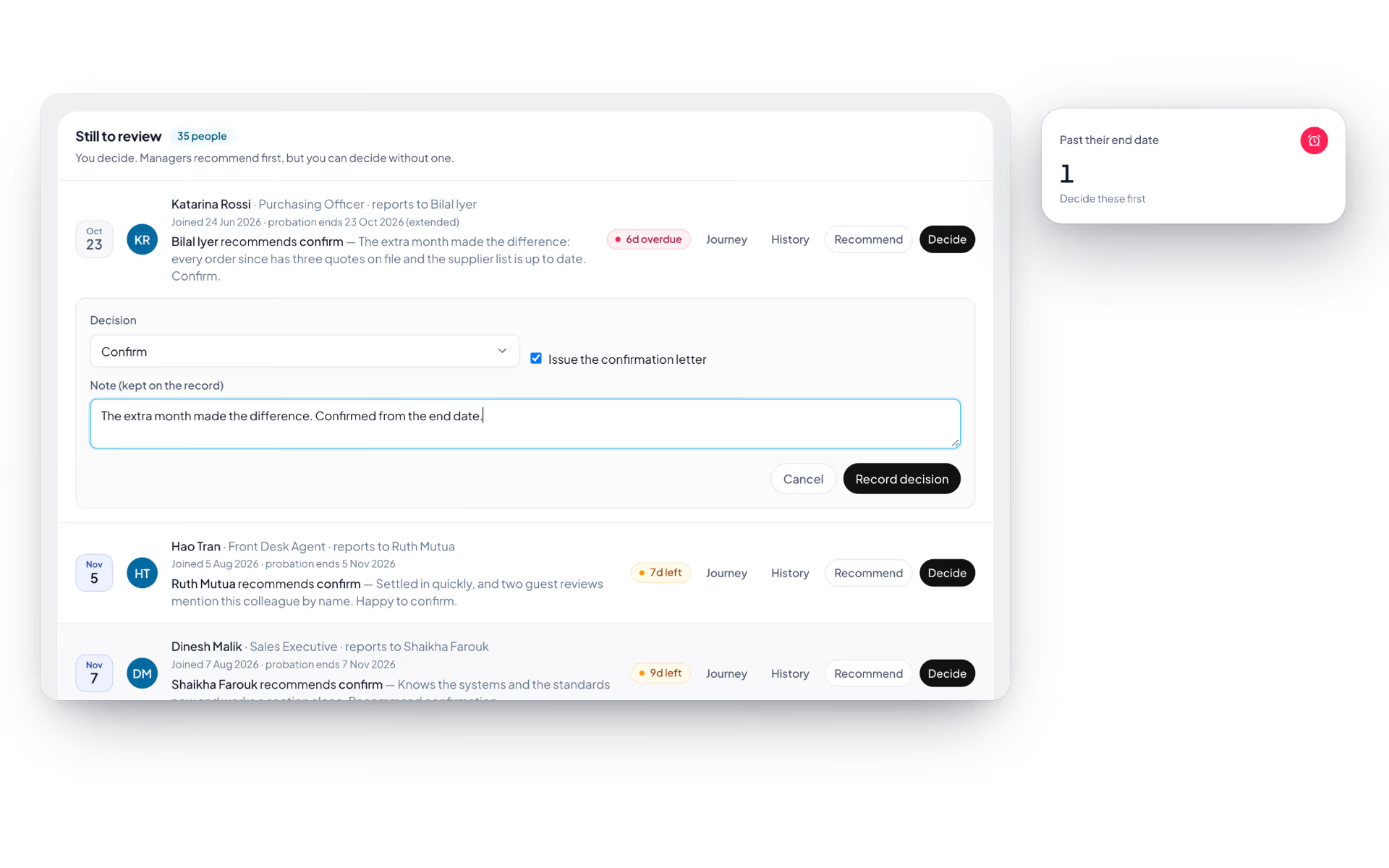
Every new record starts on probation, three months from joining. The manager recommends, HR decides, and the reminders start thirty days out.
- Confirm, extend or do not confirm, each with a note
- A confirmation letter issued for signature in the same step
- Reminders at 30, 14, 7 and 1 days, and again when overdue
- Earlier rounds kept as history for anyone extended

A promotion is a record with an effective date
Promotions, transfers and new reporting lines are recorded once, with the date they start. A future change is applied by the system on the morning it falls due.
- Six kinds of change, from promotion to manager change
- Old and new designation, department and manager kept side by side
- The org chart and reporting line update when it applies
- The employee is told, and it appears on their journey

Nobody is paid out while the laptop is missing
Approving a resignation starts the offboarding checklist. The final settlement stays blocked until the checklist is done, every asset is back and the handover is accepted.
- Six offboarding steps dated from the last working day
- A handover list each receiver has to acknowledge
- One banner that says what is still open
- Access ends the moment the last working day does

Lifecycle, screen by screen.
The product itself, on a demo company's data. Nothing here is drawn for the website.
Three moments. One record.
The same employee record carries a person in, through every change, and out. Each stage writes to it, so nothing is typed twice.
Joining
- Checklist started by the hire itself
- Appointment letter drafted in the same step
- Probation end date set from the joining date
Moving
- Position changes with effective dates
- Contract amendments sent for signature
- Policies published and acknowledged
Leaving
- Resignation approved through your chain
- Handover acknowledged item by item
- Clearance before the settlement is approved
The full list
What does the Lifecycle module include?
56 features across 9 parts of the product, each one built into the application. Where one depends on a plan, a setting or a release, the note under its module says so.
Pre-boarding
The new joiner's own to-do list, with the company's side of the preparation visible beside it.
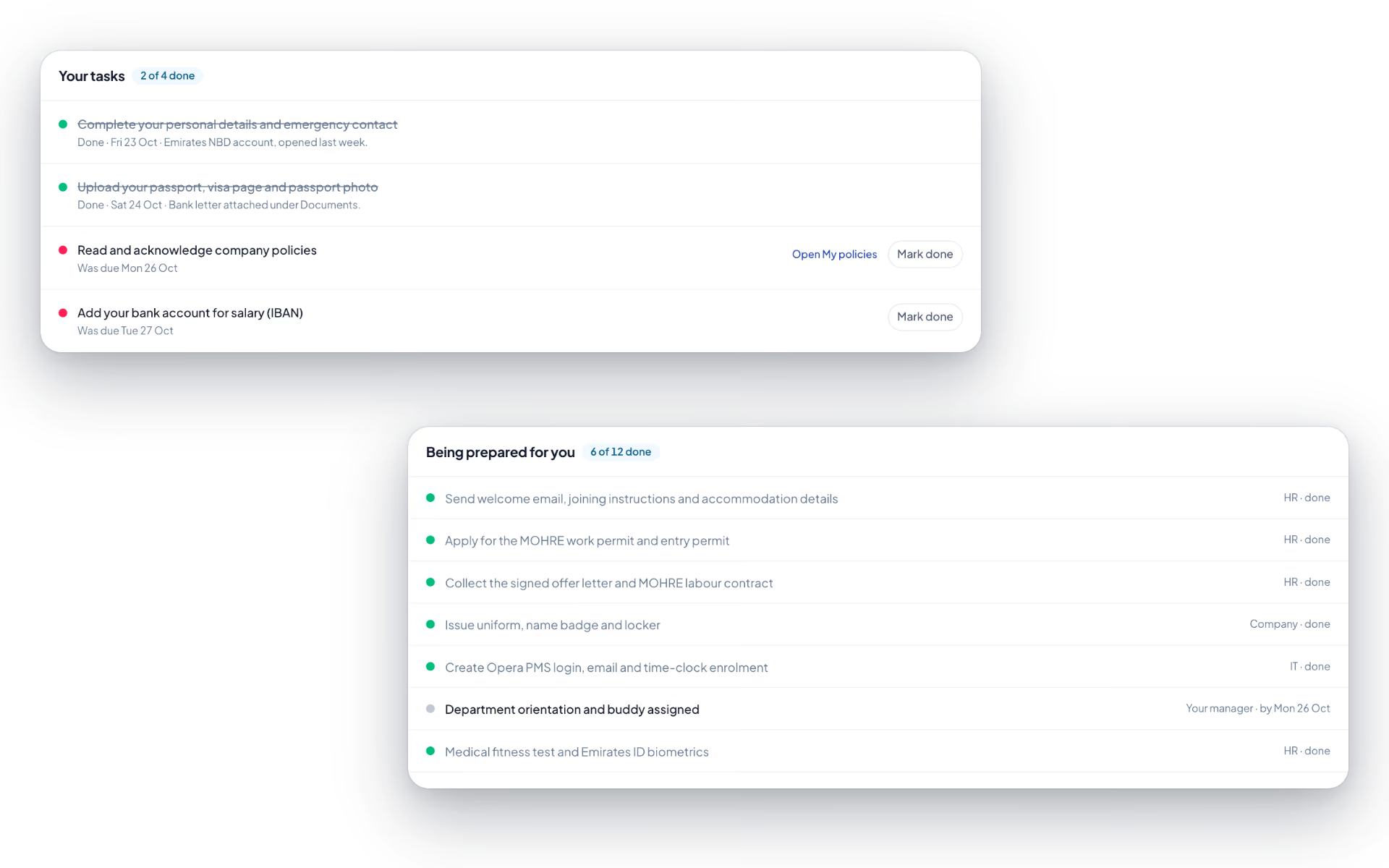
- Your tasks
- Each with a due date relative to the joining date, an optional marker and a place to leave HR a note when it is done.
- Starts before day one
- The built-in list asks for personal details two days before joining, passport, visa and Emirates ID copies the day before, bank details on the day and policies the day after.
- Being prepared for you
- A read-only list of what HR, IT, finance and the manager are doing, with who owns each step and whether it is done.
- Shortcuts
- Tasks about personal details or policies link straight to the screen where they are done.
- Welcome note
- The joiner is notified when HR starts their checklist.
Onboarding and offboarding checklists
The same steps for every joiner and every leaver, dated from the day that matters and owned by a function.
- Built-in onboarding
- Ten steps from the welcome email three days before joining through laptop and accounts on day one to payroll setup two days after.
- Built-in offboarding
- Six steps: exit interview, asset return, access revoked, dues recovered, handover and the experience and relieving letters.
- Your own templates
- Name a template, mark it the default, and list steps with an owner (HR, IT, finance, manager, the employee, other), a day offset from 365 before to 365 after, and whether each is required.
- Dates work themselves out
- Onboarding steps count from the joining date and offboarding steps from the last working day.
- Started for you
- Hiring a candidate starts onboarding. Approving a resignation starts offboarding.
- Progress
- Each checklist shows how many steps are done and completes when every required step is. Reopen a step and it goes back to in progress.
- Not your own
- Nobody ticks steps on their own checklist from the HR side.
Exit clearance
The gate between a leaver and their final settlement.
- One banner
- Either clearance is complete and the settlement can be approved, or it names how many items and assets are still open.
- Three conditions
- Every required offboarding step done, no asset still assigned to the person, and any handover they started accepted.
- Payroll is blocked
- The full and final settlement cannot be approved until all three are met, and says why.
- Exit interview
- HR records the reason for leaving and notes against the employee. Nobody records their own.
Probation reviews
The manager recommends, HR decides, and the end date does not slip past unnoticed.
- Who is on probation
- Everyone with a probation end date, sorted by it, with days left or days overdue. Fourteen days or fewer is highlighted.
- Manager recommends
- Confirm, extend or do not confirm, with a note HR reads.
- HR decides
- The same three outcomes, with a note kept on the record. HR can decide without waiting for the recommendation.
- Confirmation letter
- Confirming issues the letter for signature unless you untick it.
- Extend
- Set a new end date and the person stays on the list for another round.
- History
- Earlier rounds with who recommended what, who decided and any extension.
- Reminders
- Admins are reminded at 30, 14, 7 and 1 days before the end date and again when it is overdue.
- Everyone is told
- The employee hears the outcome, the manager hears a confirmation or extension, and it appears on the journey.
Position changes
Promotions, transfers and new reporting lines, recorded with the date they take effect.
- Six kinds of change
- Promotion, transfer, designation change, manager change, demotion and other.
- What can change
- Designation, department and reporting manager, with a reason kept on the record.
- Effective dating
- A date of today or earlier applies at once. A future date is scheduled and applied by a nightly job on the day.
- Old and new
- The previous values are captured when the change is recorded, so history reads as from and to.
- The org chart follows
- Applying a change updates the work record, department membership and reporting line.
- Loop protection
- The new manager cannot be the person themselves or anyone who reports up to them.
- Cancel before it applies
- A scheduled change can be cancelled. An applied one stays as history.
- The employee is told
- A notification worded for the kind of change, with the effective date and a link to their journey.
Contracts and signing
Amend a contract, send it for acceptance, renew it before it lapses, and keep the record of who agreed and when.
- Contract on file
- Type, job title, basic and total salary, hours a week, notice period, probation, MOHRE contract number, start and end dates and status (active, renewed, expired, terminated).
- Amend
- A new title, salary, hours or notice period from an effective date, with the reason. Each change is stored as old and new.
- Send for signature
- The employee is notified and gets a link valid for 30 days. A second send is refused while one is outstanding.
- Read and sign
- The signer reads the full text, types their full name and accepts or declines. The name, time and network address are recorded.
- One-time links
- A link works once and dies when it is used, reissued or voided. Only a hash of it is stored.
- Renew
- Give the new end date. The old contract is marked renewed and a new one starts the next day carrying the same terms.
- Renewal alerts
- Fixed-term contracts alert HR at 90, 60, 30 and 7 days, and are marked expired when the date passes.
- Salary stays restricted
- A manager without payroll rights sees the contract but not the figures, including in the amendment history.
Company policies
Publish a policy, require a read receipt, and see who has not got round to it.
- Publish with a version
- Each policy has a category and a version number.
- Acknowledge
- Employees expand a policy, read it and confirm. A banner counts how many still need their attention.
- Who has not
- HR sees who has acknowledged each policy and who has not.
Resignations and exits
A resignation submitted, approved and acted on, and the employer-side exits that need the same paper trail.
- Submit a resignation
- Last working date and reason, read back in a confirmation before it is sent. Withdraw it while it is pending.
- Status and history
- Where the request stands, who approved it and when, and every earlier request.
- Employer-initiated exits
- HR raises a termination, redundancy, failed probation or abandonment with a last working day, a reason the employee sees and a notice-waived flag.
- Approved by someone else
- Nobody approves or rejects their own exit, and an exit cannot be raised against the workspace owner.
- Approval chain
- Approve, reject or forward from the approval inbox. With a routing rule, a resignation follows as many stages as you set.
- Offboarding starts on approval
- The checklist is created from the last working day and the employee is told the resignation is approved.
- Access ends with the last day
- Checked every hour: once the last working day is over in your timezone, the person is marked as exited and every session they have is ended. The last day itself is a full working day.
- Exit numbers
- Left this month, left in total, exits per day over the last fortnight, and a searchable table of everyone leaving with tenure.
Exit handover
What the leaver knows, written down and acknowledged by the people who will need it.
- Handover items
- Each one a project, responsibility, account, document or contact, with a title, a named receiver and what they need to know.
- Submit
- Every item needs a receiver before the handover can be submitted. After that it is locked.
- Receivers acknowledge
- "I have this", with an optional note back that the leaver and the manager can read.
- Manager accepts
- Only once every item is acknowledged. Until then the page says how many are still waiting.
- Holds the settlement
- A handover that has been started has to be accepted before the final settlement can be approved.
Can we use our own onboarding steps?
Yes. A checklist template is a named list of steps, each with an owner (HR, IT, finance, the manager, the employee or other), a number of days before or after the joining date, and whether it is required. Mark one as the default and it is used when HR starts a checklist. There is a separate template type for offboarding, counted from the last working day.
What does the new joiner see?
A page called My onboarding with two lists. Their own tasks, each with a due date and a button to mark it done with a note to HR. And a read-only list of what the company is preparing for them, with who owns each step. HR's internal notes are not shown.
How does signing a contract work?
HR sends the contract or an amendment for signature. The employee gets a link that is valid for 30 days and works once. They read the full text, type their full name and accept or decline. The typed name, the time and the network address are recorded and written to the audit log. It is an acceptance record, not a certificate-based digital signature.
What stops a leaver being paid before they have handed everything back?
Exit clearance. The full and final settlement cannot be approved while a required offboarding step is open, while any asset is still assigned to the person, or while a handover they started has not been accepted. The reason is shown to whoever tries.
Can HR end someone's employment, or only accept a resignation?
HR can do both. Besides accepting a resignation, it can raise a termination, a redundancy, a failed probation or an abandonment of post, with a last working day and a reason the employee sees. It goes through the same approval as a resignation and has to be approved by someone other than the person it concerns.
When does a leaver lose access?
At the end of their last working day in your timezone. The check runs every hour: the person is marked as exited and every session they have is ended. The last day itself is an ordinary working day with full access.
Keep reading
Guides
Bring your whole workforce onto one platform.
See how DenwaysHR handles HR, attendance and leave across the GCC, and payroll with the WPS file in the UAE.

